


What a Zoho partner does day to day, in short
What a Zoho partner does day to day comes down to five kinds of work. The partner runs discovery workshops, configures Zoho apps, builds integrations and automations, migrates your data, and supports your team after go-live. Training runs alongside all five. You pay the partner for that labour and judgement, and you pay Zoho separately for licences.
A Zoho partner is an outside firm that guides you through choosing and setting up Zoho applications. It then configures, customises and extends them to fit your business. That is how Zoho's own partner blog describes the role.
The choice a partner helps you make is not small. Zoho says it offers over 60 applications, each built for a specific use case. They cover sales, marketing, finance, HR and customer support. Picking the right few, and connecting them, is most of the early work.
This guide walks through each stage in the order it usually happens. It then shows you what to put in a written scope before you sign. If you want the background on partner types first, read what a Zoho partner is.
Discovery workshops: mapping your process before anything is built
A discovery workshop is a working session where the partner maps how your business actually runs before building anything in Zoho. The partner asks how a lead arrives, who touches it, and where it ends. The same questions apply to support tickets, invoices or stock.
The workshop also settles what you buy. Zoho says partners know which features are worth paying for at your stage. They also know which ones you can hold off on until you need them. That advice shapes both your licence bill and the build.
At Svennis we run discovery with the people who do the work each day, not only the manager who signs off. The gaps in a process usually show up in their answers, and a field nobody mentions in the workshop is rarely filled in after go-live.
A good workshop ends with a written output you can check. Expect three things:
- A map of your current process, step by step.
- A list of what will be configured, integrated and migrated.
- A list of what is deliberately left out for now.
If the partner cannot give you that list, the build that follows has no agreed boundary. Scope then grows quietly, and so does the invoice.
Configuration: fields, layouts, workflows and dashboards
Configuration is setting up a Zoho app through its own settings, without writing new software. Zoho describes the partner's job as configuring, customising and extending apps. The examples it gives are custom workflows, dashboards, integrations and automations.
A workflow is a rule that runs when something happens in a record. For example, a workflow can assign a new lead to a salesperson or send a reminder when a deal stalls. Most of a partner's configuration days go on fields, page layouts and these rules.
Dashboards come with limits the partner has to plan around
Dashboards show a good example of why configuration needs judgement. The Zoho One listing on the UK Digital Marketplace defines two dashboard types:
- Dashboard for Everyone: only admins can create it, everyone in the organisation can see it, and each organisation can have up to three.
- Dashboard for Only Me: anyone can create it, only its creator can see it, and each user can have up to two.
With only three shared dashboards per organisation, someone has to decide which three matter most. A partner should agree that with you in discovery. Otherwise the first three built are simply the first three requested.
Worked example: redesigning a cluttered lead screen with Canvas
Canvas for Zoho CRM is a fully customisable way to design interfaces tailored to an industry and its users' needs. Partners often use it when a sales team finds the standard record screens hard to work with. Zoho itself notes that many businesses struggle with rigid layouts, cluttered interfaces and non-intuitive navigation.
The Zoho CRM webinar on Canvas walked through building a design for the Leads module. A partner following that approach would work through a sequence like this:
- In discovery, note which lead fields salespeople actually use and in what order.
- Build a Lead Module View, the screen a salesperson sees when opening a lead.
- Build an Edit Form, so updating a lead shows only the fields that matter.
- Build a Mobile Canvas for leads, for people working away from a desk.
- Test each design with two or three salespeople before switching it on for everyone.
Zoho's stated aim for Canvas is better functional usability and a more contextual navigation flow. In plain terms, people find what they need without scrolling past fields they never use.
The same pattern applies to most configuration work. The partner observes, builds a small piece, tests it with real users, then rolls it out. You should see that loop in the partner's weekly updates.
Custom integrations and automations: connecting Zoho to other systems
An integration is a connection that passes data between Zoho and another system, such as your website, an accounting package or a warehouse tool. An automation is a rule that does a task without anyone clicking a button. Zoho lists both among the things partners build.
Most integrations run through an API. An API is the published interface that lets one system read and write another system's data. The Zoho Marketing Automation listing says its API uses access and refresh tokens for authentication. Those tokens are what the partner stores and renews so the connection keeps working.
Testing without a sandbox
Not every Zoho app gives a partner a safe place to test. The G-Cloud listings for Zoho Campaigns and Zoho Marketing Automation both state that no API sandbox or test environment is provided. A partner therefore has to test against a small, clearly labelled set of test records. Ask how they will do that before any integration touches your live contacts.
Some firms also want an AI step inside these automations, such as drafting replies or sorting incoming requests. Treat AI automation as its own scoped piece of work, with its own testing, rather than an extra bolted onto an integration.
Data migration: moving records without stopping the business
Data migration is moving your existing records, such as contacts, deals, tickets or invoices, from old systems into Zoho. Zoho says partners handle data migration and system integrations with minimal disruption to your day-to-day operations. The work is less glamorous than configuration and often takes longer.
A careful migration usually follows the same order:
- Export everything from the old system.
- Clean it: remove duplicates, fix formats, agree what to leave behind.
- Map each old field to a new Zoho field.
- Run a trial import and check a sample of records by hand.
- Run the final import at a quiet time, then freeze the old system.
Plan the exit as well as the entry
A partner should also tell you how data leaves Zoho if you ever stop using an app. The Zoho Campaigns listing says its API can export data in XML or JSON format. It also says that at the end of the contract the account is deactivated and all data is removed. Zoho Marketing Automation sends warning emails first so you can export. A partner who explains this up front is thinking about your data, not just the project.
User training: teaching people, not just handing over logins
User training is where the partner shows each role how to do its own job in the new system. Zoho puts it plainly: partners provide hands-on training for your users, not just login credentials. A system nobody uses correctly is a cost, not an asset.
Training works best when it follows roles rather than menus. A salesperson needs to log a call and move a deal. A manager needs to read a dashboard and reassign work. An administrator needs to add a user and change a workflow safely.
Ask the partner three questions about training before you sign:
- Is training split by role, or delivered as one general session?
- Does it use your own configured system and data, or a demo account?
- Who on your side is trained as the internal administrator?
The last question matters most for the long run. Your own administrator handles small changes, which keeps support calls to the partner for work that needs their skill.
Ongoing support: partner support versus Zoho's own support plans
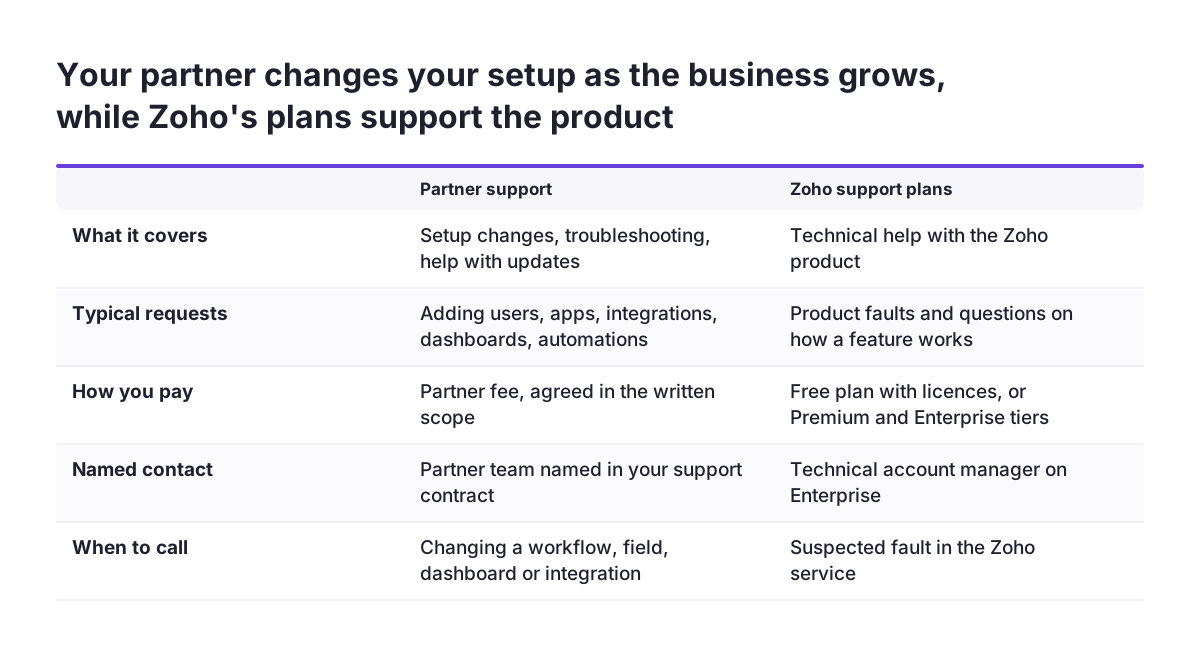
Ongoing support from a partner covers troubleshooting, help with updates and changes to your setup as the business moves. Zoho says a partner can update your setup by adding users, apps, integrations, dashboards or automations. That is different from Zoho's own product support, which you receive with your licences.
Zoho's support levels are published in its G-Cloud listings. For Zoho One, the listing states:
- Free technical support eight hours per workday.
- Premium support, available 24/5, with a 3 hour response time.
- Enterprise support, available 24/7, with a 1 hour response time and an assigned technical account manager.
The Zoho Campaigns listing says the Zoho Classic support plan is offered at no additional cost.
In practice, Zoho's support answers questions about how the product works. Your partner knows how your own configuration, integrations and data were built. You will usually need both. Before you buy a higher Zoho support tier, check what your partner already covers. The same question arises in finance systems, as covered in our post on Zoho Books partner services beyond the initial setup.
How engagements are priced: Zoho licences and partner fees are separate bills
A Zoho engagement produces two separate bills: licences you pay to Zoho, and services you pay to the partner. Keeping them apart in your budget makes quotes much easier to compare.
Licence prices for the UK public sector are published on the Digital Marketplace. The G-Cloud 14 listings show these ranges:
| Zoho product | Listed price | Free trial |
|---|---|---|
| Zoho One (45+ integrated apps) | £45 to £100 per user per month | 30 days |
| Zoho Marketing Automation | £15 to £47 per licence per month | 14 days |
| Zoho Campaigns | £3.20 to £12 per licence per month | 14 days |
These listed ranges do not show whether VAT is included, how you are billed or what conditions apply to the lowest rate. Treat them as a starting point only. Ask for the VAT position, the billing term and any conditions on each rate in writing before you budget.
Partner fees are not published in these listings, so you have to ask for them. Ask for a quote broken down by stage: discovery, configuration, integrations, migration, training and support. Ask too whether each stage is priced as a fixed amount or as time spent, and what happens when the scope changes mid-project.
The partner's advice can also lower the first bill. Zoho notes that partners know which features you can hold off on until you need them. That can mean a smaller plan or fewer apps in the first year.
Checklist: what each stage should include in a written scope
A written scope is the document that says what the partner will deliver, what you will provide and how you will know each stage is done. Use this table to check a proposal line by line before you sign.
| Stage | What the partner does | What you provide | What the scope should state |
|---|---|---|---|
| Discovery | Maps your process and recommends apps and features | Time from the people who do the work | Deliverables: process map, build list, out-of-scope list |
| Configuration | Sets up fields, layouts, workflows and dashboards | Decisions on priorities, such as the three shared dashboards | Which modules and screens, and who signs them off |
| Integrations | Connects Zoho to other systems through APIs | Access to the other systems | Each connection named, plus how it is tested |
| Data migration | Exports, cleans, maps and imports your records | Old data and decisions on what to leave behind | Trial import, checks and the final cut-over date |
| Training | Hands-on sessions by role | Staff time and a named internal administrator | Sessions per role, using your own configured system |
| Ongoing support | Troubleshooting, updates and changes to the setup | A clear route for raising requests | What is covered, how requests are charged, response times |
| Data protection | Handles your personal data only on your instructions | A signed data processing agreement | The processor terms UK data protection law requires, including security, sub-processors and what happens to your data at the end |
If a proposal leaves any row blank, ask about it directly. A blank row is where disagreements tend to start.
What this means for a UK company: data location, certifications and support hours
A UK company hiring a Zoho partner should check a few UK-specific facts, and Zoho's G-Cloud listings answer most of them. Zoho Corporation Limited lists Zoho One on the G-Cloud 14 framework under service ID 762622300230743.
The listings give these details a UK buyer usually asks about:
- Data location: the Zoho Campaigns and Zoho Marketing Automation listings state that data is stored and processed in the European Economic Area.
- Support hours: phone and web chat support run 9 to 5 UK time, Monday to Friday, for those two products.
- Security: the Zoho Campaigns listing names BSI for Zoho's ISO/IEC 27001 certification. The listed date is from 2022, so ask for the current certificate.
- Cyber Essentials: the Zoho Marketing Automation listing answers "No" to Cyber Essentials and Cyber Essentials Plus for that service. Ask Zoho for its current certificates, and which products they cover, before you rely on them in a tender.
- Accessibility: Zoho One and Zoho Campaigns are not yet compliant with WCAG 2.1 AA, according to their listings.
These points matter if your own customers or tenders ask for them. A partner should raise them in discovery, not after go-live. If email marketing is part of your plans, our page on Zoho Campaigns for UK businesses covers the product in more detail.
Next steps before you hire a Zoho partner
The next step is to write down your own process before you speak to any partner. A one-page description of how work moves through your business makes every discovery conversation shorter and every quote easier to compare.
Then work through this short list:
- List the Zoho apps you think you need, and mark which ones you could delay.
- Note which other systems must connect to Zoho.
- Estimate how many records you need to migrate, and from where.
- Name the person who will become your internal administrator.
- Ask each partner for a scope that fills every row of the checklist table above.
If you are comparing firms, our guide on choosing the right Zoho implementation team sets out what to check in a proposal. When you are ready to talk through your own scope, start with our Zoho partner services for UK businesses.