

Zoho One explained for UK firms: what the suite is
Zoho One explained for UK firms comes down to one decision. You can pay for one licence that opens most of Zoho's catalogue, or you can buy only the apps you use today, such as Zoho CRM, Zoho Desk or Zoho Books. This guide sets out what the suite contains, how its apps share users and data, what people have reported paying in pounds, and when the suite is the better buy.
Zoho One is a bundle of business apps under a single subscription. Appvizer describes it as "an all-inclusive business management suite designed for startups and small to medium-sized enterprises" and says it brings more than 45 apps into one platform. A member of UK Business Forums, writing in 2019, put the count at 40 apps. The catalogue has grown over time, so treat any count as a snapshot.
A single app is one product with its own subscription. Zoho CRM manages customers and sales opportunities. Zoho Desk manages support tickets. Zoho Books handles accounting. You can run any of them alone, and many firms start that way.
The choice matters for three reasons. The licensing rules differ, the way users are administered differs, and the cost changes differently as you add staff. The sections below take each in turn, then give you a decision table and a checklist.
What sits inside the suite
Appvizer groups what Zoho One offers by job rather than by app name. For collaboration it lists in-app chat, email and forums, document sharing and team workspaces, and an integrated calendar. For operations it lists custom workflows and automation, custom dashboards and reports, and connections to third-party applications through APIs.
Apps named in the sources
- Zoho Mail, Zoho Cliq, Zoho Connect, Zoho Forms and Zoho Vault. Zoho's help centre lists these alongside Zoho One as services that sit at organisation level (more on that below).
- Zoho Directory. Zoho calls it "a secure platform for workforce identity and access management". In plain terms, it controls who can sign in to what.
- Zoho Flow. Zoho's integration platform for connecting cloud applications and automating workflows between them.
- Zoho Apptics. Zoho has announced that it is now available in Zoho One, bringing app analytics.
- Zoho Campaigns, Zoho Social and Zoho WorkDrive. Forum members report using these as part of their Zoho One subscription for email marketing, social posting and file storage.
The list is broad, and most firms use a handful of these apps every day. The value of the suite comes from the apps you would otherwise pay for separately, not from the length of the catalogue. Before you compare prices, write down which of these jobs your business already pays another supplier to do.
How the apps connect: one organisation, many instances
The part of Zoho One that most guides skip is how Zoho structures accounts. Zoho's partner support documentation says its services fall into two types, and the difference shapes how you manage staff.
Organisation Bounded Apps
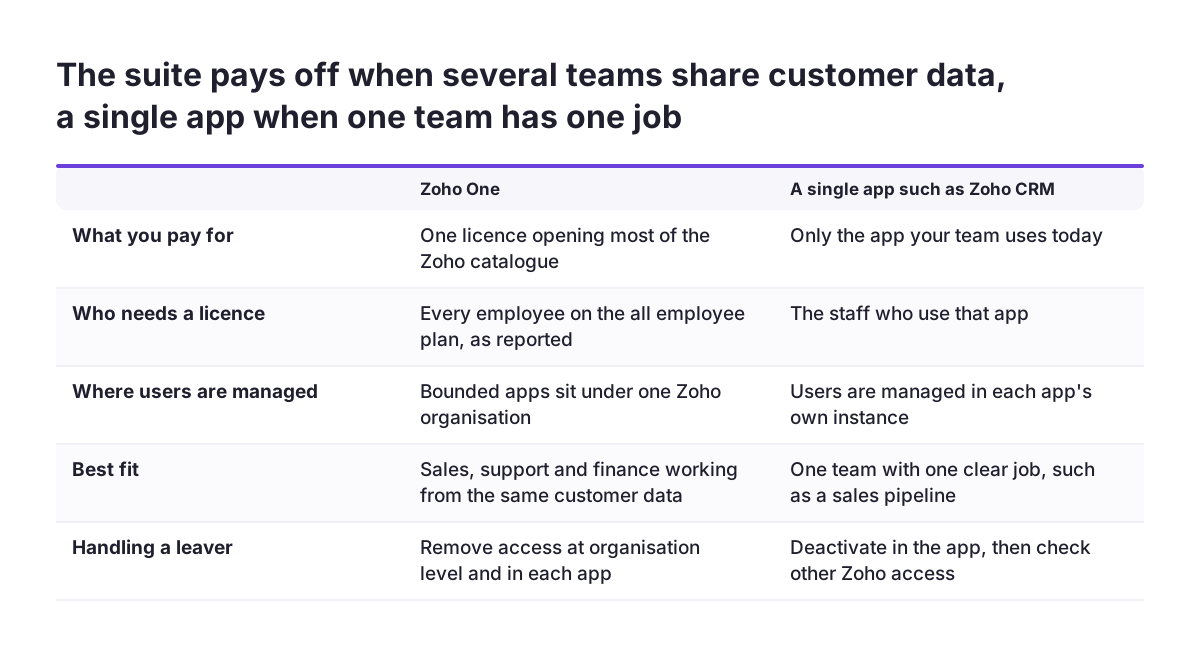
These are apps whose accounts all sit under a single Parent Organisation, which Zoho also calls the Zoho Organisation. It is a separate data space created on Zoho's servers when the first user of a company sets up any bounded app, and that person becomes its admin and owner. Zoho lists Zoho One, Directory, Cliq, Mail, Connect, Forms and Vault as bounded.
Non Organisation Bounded Apps
Everything else, including Zoho CRM and Zoho Desk, is non-bounded. Each app's organisation is an individual Child Organisation. In practice, your CRM and your help desk are separate instances that hang off the parent.
Why it matters
Zoho states that a user can be part of only one Zoho Organisation. Someone from another company can join yours as an external user, with limited roles and restricted access, but cannot be a full member of two. At Svennis, we check which Parent Organisation a client's existing apps sit under before any suite work begins, because an app trial started under a personal account is a common source of tangled users and data. Sorting that out first is far easier than after the whole team has signed in.
A worked example: handling a leaver
Take a firm running Zoho CRM and Zoho Mail. An account manager hands in notice. Here is how the account structure plays out, using the settings Zoho documents.
- Confirm your organisation. Sign in at accounts.zoho.com, click Settings in the left menu and scroll to the bottom. You will see your organisation's name and the contact email of your org administrator. If that address belongs to someone who has left, fix it now.
- Do not rely on the CRM alone. In a non-bounded app such as Zoho CRM, you can deactivate or delete the user from the app's own controls. Zoho notes that a user removed from an instance can still reach other instances of that app, create new ones and keep access to other Zoho apps. Removing them from the CRM is not an offboarding.
- Act centrally. Zoho says the same deactivation and deletion can be done from Zoho One or Zoho Directory. This is where the suite earns its keep: one place to close access across apps.
- Choose deactivate or delete. In a bounded app, a deactivated user's data stays intact and they can be reactivated later, but they cannot sign up for the same app again with the same account. Deleting a user individually is currently supported only in Zoho Mail's standalone edition. In other bounded apps, deletion means removing them from the organisation entirely and closing their Zoho account.
For most leavers, deactivation is the practical default. It keeps records and email history for whoever takes over the accounts, for as long as your retention policy allows, and then you can delete them.
What it costs in pounds, and the licensing catch
The source pack for this guide contains no Zoho pricing page, so the figures below are reported by users and a review site. Use them to understand the structure, then confirm current prices with Zoho before you budget.
| Option | Reported price | Source and date |
|---|---|---|
| All-employee licence, annual billing | £30 per user per month equivalent | UK Business Forums member, 2019 |
| All-employee licence, monthly billing | £35 per user per month | UK Business Forums member, 2019 |
| Per-user option for named staff | About $50 per user per month | UK Business Forums member, 2019 |
| "Pour tous les employés" plan | €30 per user per month | Appvizer listing |
| "Flexible" plan | €75 per user per month | Appvizer listing |
The all-employee rule
The lower price comes with a condition. One forum member reported that the £30 deal applies only if all your employees are on that licence, and that each additional "employee" needs a licence, including a virtual assistant or freelancer. For a short-term hire, Zoho told them to add a licence and claim a pro-rata refund when the person stops working for you.
So a firm with eight staff and one regular freelancer would count nine licences under that rule. Another member noted that suspending a user gives a pro-rata discount on the next bill. A 30-day free trial was also reported, which lets you test before committing.
Suite or single apps: a decision table
The suite is not automatically the better deal. It wins when you would otherwise buy several separate tools, and when moving data between them costs staff time. A single app wins when one team has one clear job. Use the table to place your firm.
| Your situation | Lean towards | Reason |
|---|---|---|
| Only the sales team needs software, and only for a pipeline | A single app, or Bigin | Zoho describes Bigin as a pipeline-centric CRM "built and priced for small businesses" |
| Sales, support and finance each re-key the same customer data | Zoho One | Shared organisation, one place to manage users, apps built to connect |
| You already pay other suppliers for email marketing, social scheduling and file storage | Zoho One | Forum members report replacing Campaign Monitor, Buffer and Dropbox with Zoho apps |
| Many staff will never log in, such as warehouse or site crews | Single apps, or the per-user option | The all-employee rule means paying for people who do not use it |
| Frequent freelancers and short contracts | Compare both carefully | Each one may need a licence under the all-employee plan |
| Offboarding across several apps is a worry | Zoho One or Zoho Directory | Central deactivation instead of app-by-app clean-up |
If you land in two or more Zoho One rows, price the suite properly. If you land mainly in the single-app rows, start small and revisit in a year.
Who the suite suits: the cost of disconnected tools
The strongest case for a suite is not the app count. It is what happens between separate tools. Rohan Bhargava, writing on LinkedIn about scaling CashKaro to a few hundred people, describes bringing in different tools for different teams, each "genuinely good at its job". The problem was the gaps: "Data moves by hand, updates don't carry across, and two teams end up looking at slightly different versions of the same situation without realising it."
Replies to that post give concrete examples. One commenter found that finance and operations had been forecasting from datasets that diverged six weeks earlier. Another described a client whose team lost hours each week copying numbers between spreadsheets, and whose month-end close got noticeably shorter once the apps were connected.
These are individual accounts, not studies, so do not expect the same figures. They do show you what to measure in your own business before deciding:
- Hours per week spent copying data from one system to another.
- Days taken to close the month.
- How often two teams disagree about a customer's status or balance.
If those numbers are small, the suite's main benefit is modest for you. If they are large, connected apps are likely to pay back faster than any saving on licences.
Where the suite falls short
A fair comparison needs the drawbacks. The same forum thread that praised the price also recorded friction.
- It can feel clunky. One member said Zoho One felt "a little bit clunky compared to Microsoft and Google offerings". Another said it "can be clunky at times" and that Zoho needs to improve cross-application integrations, which it seemed to be working on.
- Some apps have gaps. One member who moved their files to WorkDrive reported that their plan did not let them set who sees folders nested inside folders.
- Connectors are not always complete. A Zoho community user reported that the native Shopify connector in Zoho Analytics did not appear to sync product cost, so cost of goods sold could not be calculated.
On review sites, Appvizer gives Zoho One an overall 4.3 out of 5, based on more than 200 reviews gathered from other industry websites. It lists Google Workspace at 4.6 as an alternative. Bear in mind that Google Workspace is mainly email and documents, so the scores compare different scopes.
None of this rules the suite out. It means you should test the two or three workflows that matter most during the trial, rather than judging the catalogue as a whole. A clunky screen you use once a month is a minor cost. A missing field in a daily report is not.
What this means for a UK company
Several points in the sources apply directly to a business based in the UK.
Pricing in pounds
UK users have reported sterling prices, with a lower equivalent rate on annual billing than on monthly. Appvizer quotes euros. Make sure the quote you work from is in pounds, and check whether it assumes the all-employee plan.
Working alongside Microsoft 365
If your firm runs Microsoft 365, note what the link with Zoho CRM covers. Zoho says the Zoho CRM app for Microsoft Office 365 currently supports user import, calendar synchronisation and contacts synchronisation. Zoho has also acknowledged a duplicate invitation issue when syncing events, because Microsoft Graph APIs offer no option to ignore an invitation. Test calendar sync with a few users before you roll it out to everyone.
Security and data
Appvizer lists ISO 27001 among Zoho One's benefits. Your CRM, help desk and mailboxes will hold personal data, so check Zoho's current certifications, its data processing terms and where your data is hosted as part of your own UK GDPR due diligence.
Support routes
Zoho asks Europe and UK partners to contact its EU partner support desk. If you work with a partner, issues they escalate go through that route. Our guide to what a Zoho partner does explains where that help fits.
For accounting, look at Zoho Books in detail during the trial, since it is the app most tied to your UK tax obligations.
Practical next steps
You can make this decision in a few weeks with a short, ordered piece of work. Do these steps in sequence.
- List your current tools and costs. Include email marketing, social scheduling, file storage, help desk and accounting. Note which ones a Zoho app could replace.
- Count your people honestly. Staff, regular freelancers and virtual assistants. Under the all-employee plan as reported, each needs a licence.
- Measure the gaps. Record weekly hours spent re-keying data and the days taken to close the month. These tell you what connected apps are worth.
- Check your Zoho organisation. Sign in at accounts.zoho.com, open Settings and confirm the organisation name and administrator email. Find any trials sitting under personal accounts.
- Get a current quote in pounds. Compare the all-employee plan, the per-user option and the single apps you actually need.
- Trial the workflows that matter. Use the free trial to test calendar sync, your key reports and one leaver scenario end to end.
If the numbers point to one app, our Zoho CRM setup checklist for a UK firm walks through the build. If they point to the suite, the Zoho One page sets out how we plan and deliver a full rollout, and is the right place to start a conversation about your list.