


Why two weeks is enough for a new Zoho CRM user
Training a new starter on Zoho CRM in two weeks is realistic if you plan around their job rather than the software. A sales rep or coordinator does not need every module, setting and automation. They need to do their own daily tasks correctly, in the right records, without asking for help.
Zoho's own courses show how wide the full system is. Its administrator programme covers organisation settings, data security, user management, territory management, automation, Zia and portals. The original classroom format ran for three full days. The current virtual classroom for administrators runs four days at six hours per day. That is the scope for the person who runs the system. A new starter needs a much narrower slice.
This guide gives you a plan for ten working days. It covers what the starter reads and watches each day, which practice records they work on, which settings they see and which they do not. It also covers the check at the end of each week and what you sign off before they touch live data. The plan works in two stages. First you trim the account so the starter sees only what their role needs. Then you teach through their real daily tasks, one at a time, rather than through a tour of every screen.
The terms you need before you start
A few words come up throughout this post. Each is defined here once, in plain terms.
- CRM. Customer relationship management: the system where your team records customers, prospects and every contact with them. Our glossary entry on CRM covers the idea in more depth.
- Module. Zoho describes a module as a division of Zoho CRM data that groups similar data together. Leads sit in one module, for example, and other kinds of records sit in others.
- Profile. A profile restricts what a user can and cannot do in Zoho CRM, such as which actions and settings are open to them.
- Role. A role restricts what data a user can view. Two people with the same profile can see different records because they hold different roles.
- Audit log. A chronological list of entries, each created by an action a user performed in Zoho CRM. According to the G-Cloud listing for Zoho CRM, it lets you identify records linked to events over a rolling 60 days.
- Practice record set. Our term for a small group of clearly marked test records that the starter can create, edit and break without harming real data.
- Sign-off. The manager's written confirmation that the starter has passed both weekly checks and can work on live records.
Step one: trim the account to the starter's role
Most confusion in the first week comes from seeing too much. If a new rep opens Zoho CRM and finds every module, every field and every setting, they spend their energy working out what to ignore. Trimming the account removes that problem before day one.
Start with the two controls Zoho gives you. The profile decides what the starter can do. Give them a profile that matches their job, with no access to settings they will not use and no permission to delete or mass-change records. The role decides what data they see. Place them in the role for their team, so their lists show their own and their team's records, not the whole company's.
Then tidy what remains. Remove access to modules outside their job, and cut down the fields and saved lists they see to the ones their daily tasks need. Our post on how to customise your CRM covers the layout side of this in more detail.
At Svennis we set the starter's profile and role before their first login, and the training we see go wrong is usually where a new user was left on an administrator profile "for now". Once a starter can reach every setting, they will change one by accident, and the rest of the team feels it.
Step two: build a practice record set
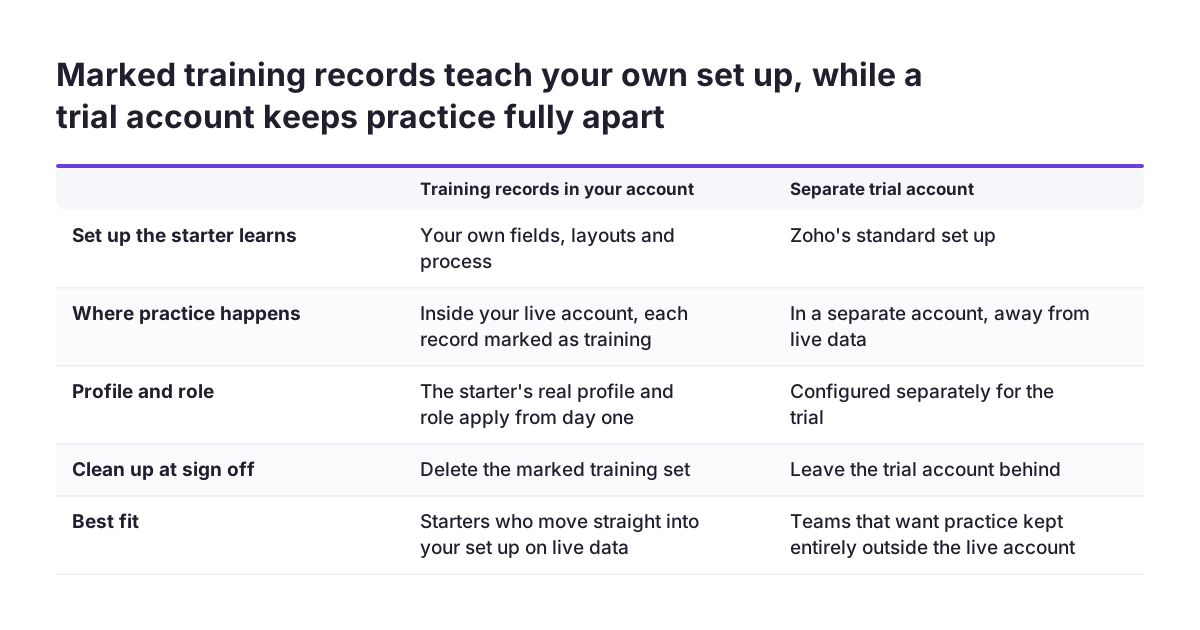
The starter needs somewhere safe to make mistakes. You have two options.
Option A: marked training records in your own account
Create a small set of records inside your real account, each clearly marked as training in its name. Use invented people and companies, not copies of real customers. The starter learns on your actual set-up, with your fields and your process, which is the whole point. Delete the set at sign-off.
Option B: a separate trial account
Zoho's own G-Cloud listing offers a free 15-day trial for three users, which just covers ten working days. The drawback is that a trial starts without your customisation, so the starter learns a generic set-up. Another listing notes that some features, such as Deduplication, are not available in the Enterprise trial. For most firms, Option A is the better choice.
A worked example
Take a fictional firm, Harbour Supplies, hiring a new sales rep called Amira. Her manager gives her a profile that can create and edit leads but not delete them, and a role inside the sales team. The practice set holds invented leads, each named with the word "Training" at the start. Some are fresh, some already have a logged call, and one has an overdue follow-up task. Every task in the two-week plan below uses these records.
What Zoho gives you to teach with
You do not need to write training material from scratch. Zoho publishes most of what a new user needs on its CRM resources hub. The hub includes a getting-started checklist, free ebooks, documentation on customisation, automation and security, webinars, a user community and an SDR course. That course covers organising your day, talking to leads, using Zoho CRM and meeting sales targets. If the starter cannot find an answer, they can submit a support ticket.
The video page is thinner at the moment. Zoho says it is refreshing the library to reflect the latest interface and adding videos progressively. Until then it points users to webinars covering key concepts and recent changes. Two short videos, "Introduction to Zoho CRM" and "Navigating CRM for Everyone", run to 51 seconds each.
Zoho also runs a paid training programme. Its training FAQs set out the options:
| Option | What it is | Fit for a new starter |
|---|---|---|
| Classroom | Instructor-led, set course outline, not personalised | Poor: the programme for sales reps and managers is still in the works |
| Virtual classroom | Pre-scheduled online sessions with trainees from several organisations | Aimed at administrators, not daily users |
| Online | Scheduled on request, one organisation at a time, customised course plan | Good if you want outside help with your own set-up |
| Onsite | Zoho experts come to your company with a tailored programme | Suits a larger team starting together |
Week one: one daily task at a time
Week one teaches the tasks the starter will repeat every day. Each day adds one task and repeats the ones before it. Keep the demonstration short and give the rest of the day to practice on the training records.
| Day | Read or watch | Practise on the training records |
|---|---|---|
| 1 | The getting-started checklist, the two short videos, and our post on the basics of Zoho CRM | Log in, find their own lists, open each training record and read it |
| 2 | The documentation pages on finding and editing records | Search for a named record, update a field, save, and find the change again |
| 3 | The first part of the SDR course, on organising the day | Add a new lead with all required fields and log a call against it |
| 4 | The SDR course section on talking to leads | Set a follow-up task, then clear the overdue task on the training record |
| 5 | No new material | The week one check |
The week one check
The manager sits with the starter for a short session and gives them a list of tasks, with no prompting. Find a named training record and update it. Add a new lead. Log a call. Set a follow-up task. The starter passes if every task is done correctly and in the right record. Any task that fails goes back into Monday of week two before new material starts.
Week two: a full working day, then the exceptions
Week two moves from single tasks to a whole working day. The starter now combines what they learned, and meets the situations that do not follow the usual pattern.
| Day | Read or watch | Practise on the training records |
|---|---|---|
| 6 | Repeat any task that failed the week one check | If they work away from a desk, repeat days 2 to 4 on the mobile app |
| 7 | A Zoho webinar on key concepts and recent changes | Handle a record that belongs to a colleague: what they can see, and whom to ask |
| 8 | The SDR course section on using Zoho CRM | Work through a list of training leads in order of priority |
| 9 | The SDR course section on sales targets | A full simulated day: plan, calls, updates and follow-ups, unaided |
| 10 | No new material | The week two check and sign-off |
A note on the mobile app. The G-Cloud listing says the Zoho CRM mobile apps have a limited set of features. They leave out more complex functions such as system administration. That makes the app a sensible tool for a new user, but check on day 6 that the fields they need are there.
The week two check
The starter runs the simulated day while the manager watches the result, not every click. Were all calls logged, every lead updated, every follow-up set? Anything the starter will need later, such as the features covered in our intermediate Zoho CRM guide, waits until after the first month.
Settings the starter sees, and the ones they do not
The easiest way to decide what stays hidden is to use Zoho's own administrator syllabus. Everything on it belongs to the person who runs the system. Changes there affect every user, so a new starter should not be exploring them in their first fortnight.
| Area | In the two weeks | Why |
|---|---|---|
| Their own records, lists and search | Shown | Used every day |
| Calls, tasks and follow-ups | Shown | Used every day |
| Mobile app, if they work away from a desk | Shown | No administration functions in the app |
| Raising a support ticket or asking the community | Shown | They need a route to help |
| Organisation settings, data security, user management | Not shown | Day 1 of the administrator course |
| Customisation, communication channels, territory management | Not shown | Administrator topics |
| Automation, workflows and Blueprints | Not shown | A change here runs for every user |
| Data administration, Marketplace, Zia, portals | Not shown | Day 2 and day 3 of the administrator course |
"Not shown" should mean "not reachable", not just "not mentioned". Set it through the profile, as described in step one. If the starter later moves towards administration, Zoho's administrator course covers these areas in order.
What the manager signs off before live data
Sign-off is a short, written decision on day 10. It protects your records and gives the starter a clear line between practice and real work. Do not sign off on a feeling. Use a list.
- Profile and role confirmed. The starter is on the profile for their job, with no administrator access, and in the correct role.
- Week one check passed. Every basic task was done correctly, including any repeated on day 6.
- Week two check passed. The simulated day was complete: calls logged, leads updated, follow-ups set.
- Training records handled. The practice set is deleted or clearly separated, so it cannot mix with live reporting.
- Route to help agreed. The starter knows who to ask internally, where the Zoho community is, and how to raise a ticket.
- First live review booked. Put a date in the diary about a week after sign-off to review the starter's first live actions.
The audit log makes that review practical. It records the actions users perform and lets you trace records linked to events over a rolling 60 days. Hold the review well inside that window, while the entries are still there to read. If something looks wrong, fix the record and go back over the task with the starter, rather than restarting the whole plan.
What this means for a UK company
A few points from Zoho's G-Cloud listings matter when you bring a new person into the system in the UK.
Where the data sits. Zoho's EU data centres have a primary site in Utrecht, replicated by a backup data centre in Dublin. Check that your account sits in the EU data centre, and read Zoho's data processing terms on access from outside the EEA. Invented names in the practice set keep real customers' personal details out of your training material entirely.
Security credentials. Zoho holds ISO/IEC 27001 certification, issued by BSI. A reseller's G-Cloud listing for Zoho CRM answers no to Cyber Essentials and Cyber Essentials Plus, so check Zoho's own compliance page for the current position before a customer contract relies on either. If a customer contract asks about either, also check with whoever manages your compliance before the starter handles that customer's records.
Support hours. Zoho provides free technical support eight hours per workday. Premium support runs 24 hours a day, five days a week, with a three-hour response, and Enterprise support runs around the clock with a one-hour response. Tell the starter which level you pay for, so they know what to expect when they raise a ticket.
Accessibility. Zoho states that it is still working towards WCAG 2.1 AA compliance. If your new starter uses assistive technology, test the screens they need during week one, not after sign-off.
Training in the UK. Zoho's instructor-led programme is not new to the UK. Its first classroom sessions ran in London and Sydney in the first week of June 2018.
Next steps
You can start preparing this week, before the new starter arrives. Work through these steps in order.
- List the starter's daily tasks. Write down what they will do in Zoho CRM on a normal day. That list becomes the week one table.
- Set the profile and role. Choose or create both before the first login, with no administrator access.
- Build the practice record set. Invented names, clearly marked as training, covering fresh leads, logged calls and an overdue task.
- Pick the Zoho material. Bookmark the getting-started checklist, the two short videos, the SDR course and one current webinar.
- Book the checks. Put the day 5 check, the day 10 sign-off and the first live review in the manager's diary now.
- Decide whether you need outside help. If you want Zoho's online training on your own set-up, its FAQs say it replies within 12 hours with a price quote. Rescheduling requests made up to two weeks before a course starts carry no extra charge.
If trimming the account shows that your set-up no longer matches how your team works, sort that out before training anyone on it. Our Zoho CRM implementation page explains how we review and rebuild an account. A clean, role-based set-up makes every future onboarding shorter.
Sources
- Zoho CRM: CRM Resources
- Zoho CRM: Videos
- Zoho CRM Training Programs: FAQs
- Zoho Blog: Stepping into the second year of the Zoho CRM Training Program
- Zoho Community: Zoho CRM Training for Administrators
- Digital Marketplace: Zoho CRM (G-Cloud listing)
- Digital Marketplace: Zoho CRM by Zoho Corporation Limited