


Your Zoho data centre is set when the first account is created
With Zoho data centres and UK data residency, timing is the key fact. Your data centre is decided when the account is created. A user on Zoho's community forum reports that Zoho Cliq routes each new user to a data centre based on their location at sign-up. So you settle residency before anyone signs up, not after.
That detail changes how you plan a Zoho project. The person who opens the first trial account makes a choice for the whole organisation, often without knowing it. If that choice does not match what your clients, contracts or internal policies expect, you find out late.
This guide covers five things:
- what the terms mean
- how to check where an account sits
- a worked example from the forum report
- a checklist to agree before an implementation starts
- what all of this means for a UK company
One limit comes first. The sources behind this guide do not say which data centre a UK sign-up is assigned to. Confirm that with Zoho or your partner in writing rather than assuming it.
Data residency and Zoho data centres, defined
Data residency is the physical location where your organisation's data is stored and processed. It matters when a client contract, an internal policy or a regulator expects data to stay in a particular region.
A Zoho data centre (often shortened to DC) is the regional set of servers that hosts a Zoho account. The forum report names three Zoho data centres by their web addresses. These are zoho.com for the US, cliq.zoho.eu for the EU and cliq.zoho.in for India. According to the same report, users on different data centres cannot interact with each other in a shared external channel.
Two more terms appear in this guide. An organisation is your company's Zoho account, the container that holds your users and records. An external channel in Zoho Cliq is a channel shared beyond your own organisation. In the forum report it is the channel the poster used to work with outside developers.
Data residency is a different question from access. A data centre tells you where your data sits. On its own, it says nothing about who can open that data. Your users, roles and permissions decide access, and you set those separately during the build.
How to check which Zoho data centre your account uses
The quickest check is the web address you see when you are signed in to Zoho. The forum report identifies data centres by domain: zoho.com for the US, and zoho.eu and zoho.in in the Cliq addresses it quotes for the EU and India. Look at the domain in your browser's address bar for each Zoho product you use.
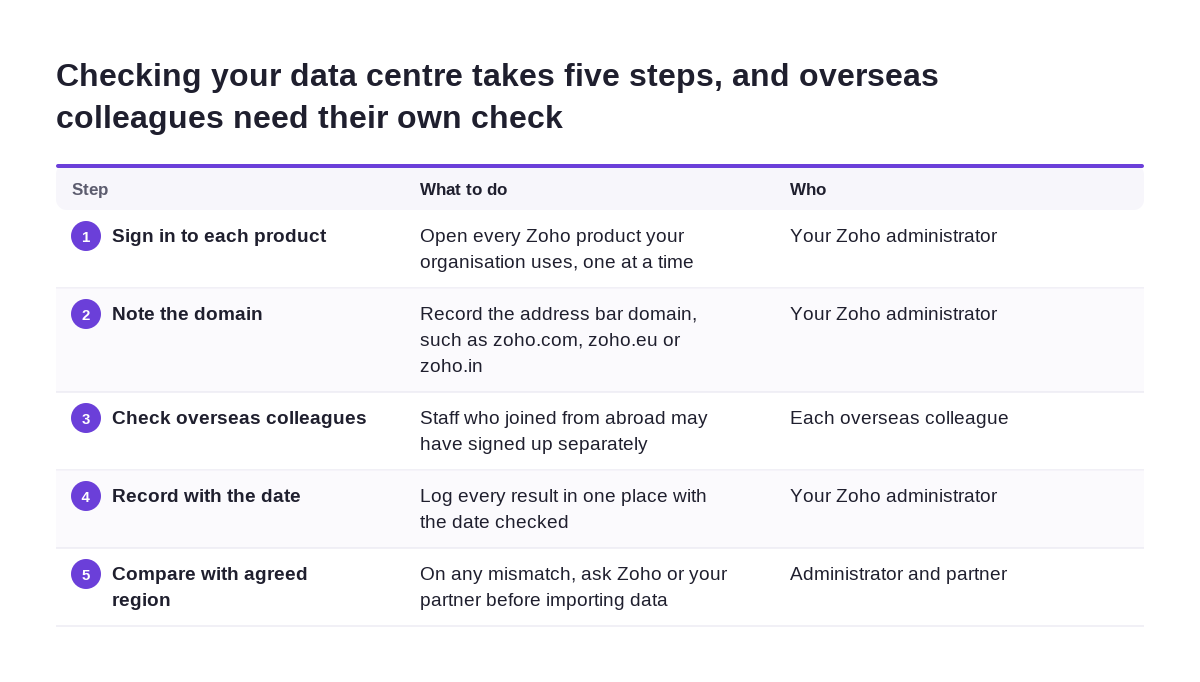
To check an existing setup, work through these steps:
- Sign in to each Zoho product your organisation uses, one at a time.
- Note the domain shown in the address bar for each product.
- Ask colleagues who joined from another country to do the same, because they may have signed up separately.
- Record every result in one place, with the date you checked.
If every address matches, you have a consistent starting point. If the addresses differ, treat that as a finding to resolve before you add more users or data.
The domain is a practical first check, not a formal answer. A client or auditor may rely on your answer. In that case, ask Zoho or your partner to confirm the data centre in writing.
Worked example: one Zoho Cliq organisation split across three data centres
A post on the Zoho community forum about cross-data centre collaboration shows what happens when sign-up decides the region. The poster's organisation sits on the US data centre, zoho.com. Their developers in the EU were assigned to cliq.zoho.eu. Their developers in India were assigned to cliq.zoho.in.
Nobody chose that split. According to the poster, Zoho Cliq "automatically routes users to specific data centers (DCs) based on their location during account creation". Each developer simply signed up from where they worked.
The cost showed up in daily work. The poster reports that users from different data centres cannot interact with each other in their external channel. The people they had brought together to collaborate could not talk in one place.
Now apply that pattern to a hypothetical UK firm. Suppose your Leeds office opens the main account. Then a contractor in Dublin signs up separately, and a developer in Pune does the same. On the pattern in the forum report, you could end up with three regions and people who cannot share a channel.
The lesson is about order. Agree the region and how people join first, then let them in.

Changing data centre after sign-up: what the forum report shows
The forum report suggests that users cannot simply move their own data centre after sign-up. The poster asked Zoho for two changes. One was an option to choose the preferred data centre during account creation. The other was a way to change it manually. Asking for both implies neither was available to them at the time.
The poster also tried a workaround. They used a VPN, a service that makes your connection appear to come from another country, to get around the data centre restrictions. They call it "cumbersome and impractical for ongoing collaboration" and say it was not working for them.
Two planning points follow from this report:
- Plan as if the sign-up choice will stick, rather than counting on fixing the region later.
- Do not build a process around a VPN, because the one documented attempt failed.
Keep one caution about the source in mind. This is a single user's feature request, not Zoho's official documentation, and products change. Before you rely on it, ask Zoho or your partner two questions. Can you change data centre today for the products you use? And if so, what does the change involve?
Residency checklist to agree before a Zoho implementation starts
A residency checklist is a short list of questions you answer and record before anyone creates a production account. The table sets out each question, why it matters and who should answer it.
| Question | Why it matters | Who answers |
|---|---|---|
| Which data centre will host our organisation? | The forum report shows sign-up decides it | Zoho or your partner, in writing |
| Which Zoho products will we use? | Each product needs checking, not just the first | You, with your partner |
| Where are our users based? | Location at sign-up drove routing in the forum report | Your operations lead |
| How will overseas staff and contractors join? | Separate sign-ups split the organisation in the forum example | Your Zoho administrator |
| Do clients or contracts name a storage region? | That sets the region you need | Your legal or compliance adviser |
| Who creates the first production account? | That person's sign-up sets the region | Agreed in the project plan |
List every product by name. Say you plan Zoho Books for accounts and Zoho Analytics for reporting. Confirm the data centre for each one. The forum example concerns Zoho Cliq, so do not assume every product behaves the same way.
Keep the signed-off answers with your project documents. The next administrator can then find them without asking around.
Who creates the first Zoho account decides the region
The first account holder sets the region for the whole organisation, so choose that person deliberately. Without a plan, the choice falls to whoever starts a trial first, from wherever they happen to be.
At Svennis we agree the data centre with the client and record it before anyone creates a production account. We also check the domain of every existing trial against that decision before we import any data.
The same care applies when you work with an implementation partner. Ask three questions: who will create the accounts, from which region, and under whose details? If you are unsure what a partner normally handles, our guide on what a Zoho partner is and does explains the role.
Write the agreed region and the account owner into the project plan. Do the same for the route overseas users will take to join. Ask whether inviting them into your existing organisation keeps them on your data centre before they sign up on their own. A few lines in the plan now save a difficult conversation later.
What Zoho data residency means for a UK company
For a UK company, Zoho data residency means one thing. The account's region must match what your clients, contracts and policies expect. The sources behind this guide do not state which data centre a UK sign-up is routed to. They also do not state what any rule requires of you. That makes written confirmation the one step in the checklist you cannot skip.
Three situations call for extra care in a UK firm:
- You have staff or contractors outside the UK who will use Zoho. The forum report shows their location at sign-up can place them on a different data centre.
- A client contract or tender asks where you store their data. You need a confirmed answer, not a guess from the address bar.
- You already run Zoho products that different people set up at different times. Each product may sit somewhere different.
Bring your data protection adviser into the conversation early. They can tell you which region your obligations point to. Your Zoho partner can then show you how to place the account there and keep it there as people join.
Existing Zoho accounts: check residency before a data migration
If you already use Zoho, check residency before you move more data in. A data migration is the move of records from one system into another. A migration puts more of your data in whatever region the target account sits in.
Run the domain check on every live Zoho product. Then compare the results with the region you agreed in the checklist. If they match, migrate as planned. If they do not, stop and ask Zoho or your partner about the options before importing anything. The forum report suggests users could not change the region themselves once it was set.
Also look for stray accounts. A team member may have signed up on their own, perhaps from abroad. That account could hold records outside the main organisation. The forum example shows how easily people in one company end up on different data centres without anyone deciding it. Bring those records into the agreed organisation as part of the migration plan, rather than leaving them where they fell.
Next steps: confirm the region, then plan the Zoho build
Start with the checks you can do today, then get written confirmation. Work through these steps in order:
- Check the domain of every Zoho product you use and record it with the date.
- Fill in the residency checklist, with a named person answering each question.
- Ask Zoho or your partner to confirm your organisation's data centre in writing.
- Decide who creates the production account and how overseas users will join.
- Start the build and any data import only after the first four steps are done.
You may want a partner to handle the region decision as part of the setup. If so, see how we work as a Zoho partner for UK companies. Bring your completed checklist to the first conversation. It turns a vague worry about where your data lives into a short list of answered questions.