


Zoho Inventory pricing: five plans from free to $249 a month
Zoho Inventory pricing runs from a free plan up to $249 per organisation per month for Enterprise, billed annually. Standard costs $29, Premium $79 and Plus $129. All of these prices exclude VAT. Once you connect Zoho Books and Zoho CRM, their subscriptions sit on top, so the Inventory plan price is only one line of your total.
Zoho Inventory is an online application for managing orders and stock. Zoho sells it per organisation, and each plan comes with a fixed allowance of orders, users and warehouse locations. You can see the current figures on Zoho's UK Inventory pricing page.
Your real cost depends on four things:
- the plan your order volume, headcount and locations push you into;
- any add-ons you buy instead of moving up a plan;
- whether you pay monthly or yearly;
- the other Zoho apps you connect, such as accounting and CRM.
If you are still deciding whether the product fits your stock processes at all, our overview of Zoho Inventory for UK businesses covers multi-channel stock and order management before you get to price.
Plan limits that decide your Zoho Inventory tier: orders, users and locations
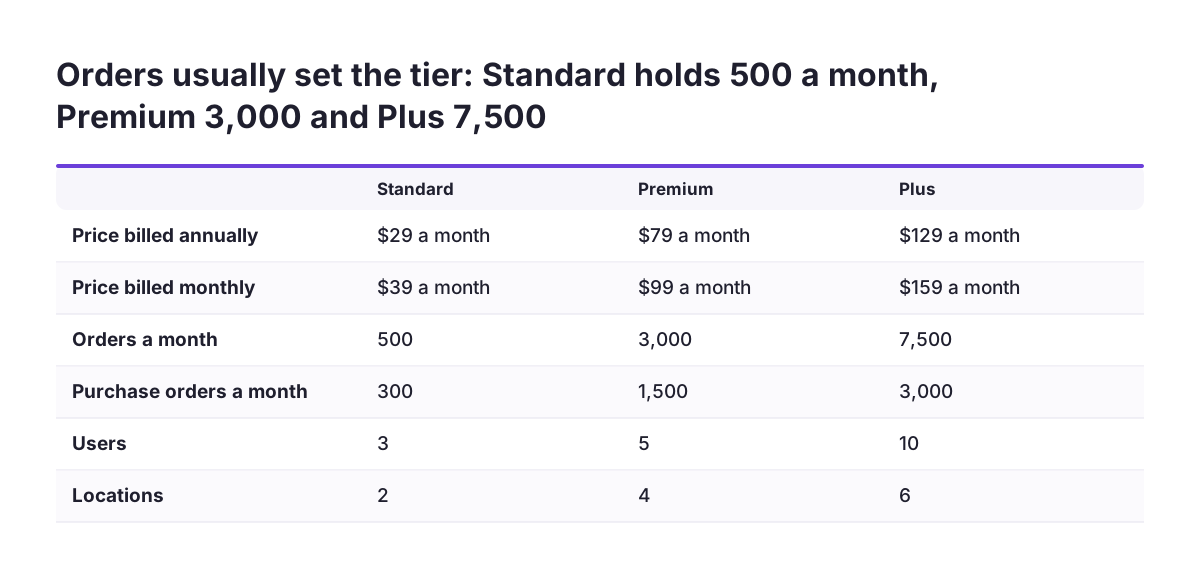
The monthly order limit is usually what decides your Zoho Inventory plan. Users and locations come next. The table below sets out the five plans from Zoho's plan comparison page, per organisation per month.
| Plan | Billed annually | Billed monthly | Orders a month | Users | Locations |
|---|---|---|---|---|---|
| Free | $0 | $0 | 50 | 1 | 1 |
| Standard | $29 | $39 | 500 | 3 | 2 |
| Premium | $79 | $99 | 3,000 | 5 | 4 |
| Plus | $129 | $159 | 7,500 | 10 | 6 |
| Enterprise | $249 | $299 | 15,000 | 10 | 10 |
Orders are not the only monthly cap. Invoice limits match the order limits: 50, 500, 3,000, 7,500 and 15,000. Purchase orders have lower caps of 20, 300, 1,500, 3,000 and 7,500 across the same five plans.
At Svennis we size the Inventory plan from the busiest month of the last year, not the average. We count sales orders, invoices and purchase orders separately, because each has its own monthly cap and the peak month is the one that forces an upgrade.
Features that only start on higher Zoho Inventory plans
Serial number tracking and batch tracking start on the Premium plan, so a business that must trace either cannot stay on Standard. Premium also adds barcode generation, stock counting, profit margin reporting, customisation and automation, and UoM conversion, which means converting between units of measure such as single items and cases.
Bin storage grows with the plan. Premium includes 500 bins per location. Enterprise includes 5,000 bins per location, alongside its 10 locations.
Enterprise is the only plan that adds Zoho Analytics. Zoho lists this as Advanced Analytics with 3 million records, letting you build reports and dashboards and analyse Inventory data along with other data sources. If you already pay for Analytics separately, that overlap matters when you compare Plus with Enterprise.
API limits also rise by plan, from 1,000 calls a day to 10,000 calls a day at the top. Check the daily allowance before you plan any custom connection to a system outside Zoho, because a busy sync can need more calls than a lower plan allows.
Zoho Inventory can also trigger actions in third-party apps through webhooks. That is one way to pass stock events to another system without building a full integration.
Zoho Inventory add-ons can cost less than the next plan up
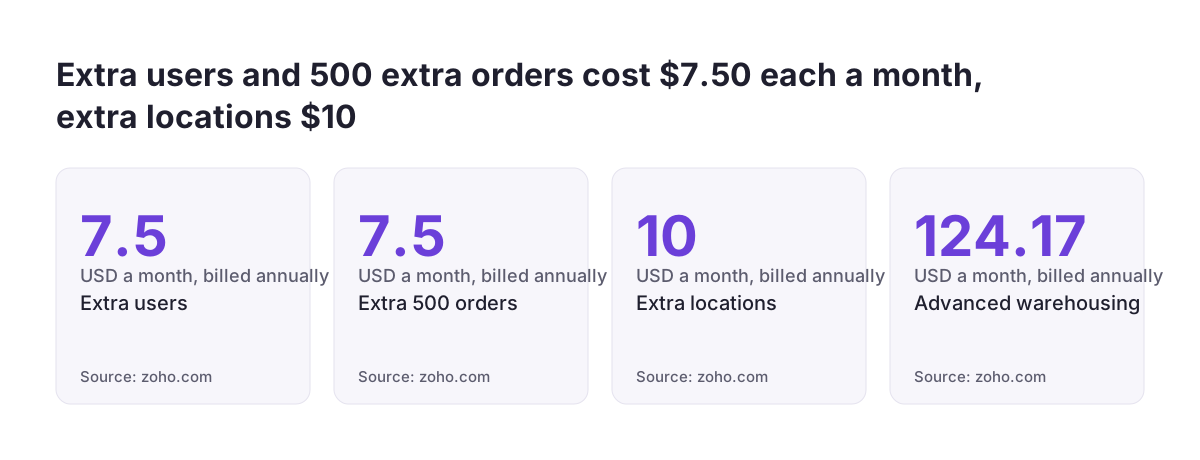
Zoho Inventory sells extra capacity as add-ons, so a business that outgrows one limit does not always need the next plan. The add-on prices below are per organisation per month, billed annually:
- extra users: $7.50;
- an extra 500 orders: $7.50;
- extra locations: $10;
- advanced autoscans: $8 for 50 scans;
- advanced warehousing: $124.17.
A worked example: Premium with add-ons against Plus
Say you need 7 users and 6 locations, with about 2,500 orders a month. Premium covers 5 users and 4 locations at $79. Two extra users add $15 and two extra locations add $20, giving $114 a month. Plus costs $129 and already includes 10 users and 6 locations.
In that case Premium with add-ons saves $15 a month, or $180 a year. The gap closes quickly, though. One more user or one extra block of orders, and Plus becomes the simpler choice with more headroom. Plus also raises the order limit to 7,500, so growth costs nothing extra for a while.
Advanced warehousing is the add-on to watch. At $124.17 a month it costs almost as much as the Plus plan on its own, so price it as a separate decision.
Monthly or annual billing for Zoho Inventory: the 20% difference
Paying yearly for Zoho Inventory saves 20% against monthly billing. Standard drops from $39 to $29 a month, Premium from $99 to $79, Plus from $159 to $129 and Enterprise from $299 to $249. On Enterprise, that is $600 a year.
The UK pricing page quotes Zoho Inventory in US dollars. Zoho's subscription help page explains that you can choose your preferred currency from a dropdown on the pricing page. Do that before you budget, because Zoho Books is priced in pounds and you will want both in one currency.
A few billing terms also affect the total:
- prices exclude local taxes, so add VAT;
- Zoho gives nonprofits a 15% discount on Zoho Inventory;
- you can pay by Visa, MasterCard, American Express or PayPal;
- yearly subscriptions can also be paid by cheque or bank transfer.
Comparison sites can show a different headline figure. Capterra lists a starting price of US$39 a month, which matches Standard on monthly billing rather than the $29 annual rate.
Zoho Books alongside Zoho Inventory: the accounting cost to add
Zoho Books is a separate subscription, so connecting it to Zoho Inventory adds a second line to your bill. Zoho's UK Books pricing page lists these plans per organisation per month, billed annually, with the monthly price in brackets:
- Standard: £10 (£12);
- Professional: £20 (£24);
- Premium: £25 (£30);
- Elite: £85 (£99);
- Ultimate: £165 (£199).
Zoho Books also has a free plan for all business types, capped at 1,000 invoices a year. Add-ons are not supported on the free plan, except CT600 and Final Accounts at £5 a year. The Elite and Ultimate plans allow up to 100,000 invoices a year.
User numbers matter here too. The Books Premium plan takes up to 10 users, and extra users cost £2.50 per user per month. Books prices also exclude VAT, like Inventory.
As a simple example, Inventory Premium at $79 a month plus Books Professional at £20 a month gives an annual spend of $948 and £240, before VAT. Our guide to Zoho Books for UK businesses covers what each tier does for HMRC-recognised accounting.
Zoho CRM alongside Zoho Inventory: what the connection adds to the bill
Zoho CRM is priced separately from Zoho Inventory, so adding it brings a third subscription with its own user count. Zoho's Inventory plan comparison lists CRM among its integration categories, next to accounting, ecommerce, shipping and payment gateways. A Capterra reviewer from a very large company also notes that Inventory integrates with Zoho CRM and Zoho Books.
Each app has its own user allowance, so list who needs a login in each one. A sales team may live in CRM and never open Inventory. A warehouse team may need Inventory and nothing else. Paying for the same person in every app is the most common way a connected setup costs more than planned.
Take your CRM figure from Zoho's own CRM pricing page on the day you budget, and add it to the Inventory and Books totals. If you are new to the product, our Zoho CRM implementation page explains what a UK setup involves.
The connection itself takes work as well as licences. Deciding which records sync, and in which direction, is where most of the effort goes. Our article on what a Zoho Inventory partner should connect for you sets out the links between Inventory, Books and CRM in more detail.
Zoho One or separate apps: how to compare the two totals
Zoho One works out cheaper than separate apps only when its quote for your headcount comes in below the sum of every standalone subscription you would otherwise buy. No headline figure settles that, so run the comparison with your own numbers.
Use these steps to compare the two totals:
- List every Zoho app you need now and within the next year, not only Inventory, Books and CRM.
- Price each app from its vendor page at the plan your limits require, including add-ons.
- Count users per app, since each standalone plan has its own allowance.
- Convert everything to one currency and use the same billing period throughout.
- Add the totals, then request a current Zoho One quote for the same people.
The more separate subscriptions on your list, the more a suite quote is worth requesting. A business that needs only Inventory and Books on small plans will often find the standalone route easy to justify. A business adding CRM, Analytics and more besides should price the bundle before signing up to each app one by one.
Check plan features as well as price. Serial tracking, bin capacity and Analytics all sit on specific Inventory plans. Make sure whichever route you choose gives you the level you actually need.
Zoho Inventory trial, free plan and cancelling: the commitments you take on
Zoho Inventory asks for very little commitment up front. The 14-day free trial needs no credit card. If you do not upgrade by the end of the trial, Zoho automatically moves your organisation to the free plan.
The free plan has no validity period, but it limits features as well as volumes. It allows 50 orders a month, one user and one location. That suits testing, not a live operation of any size.
Paid plans carry no contract. You can upgrade or downgrade, and you can schedule a downgrade to the free plan for the end of the current billing cycle. Cancelling does not delete your account. Your data stays and you can view it, but you cannot perform any functions in the organisation.
A few practical details are worth knowing before you buy:
- only admins of the organisation can see the manage subscriptions option;
- the Manage Subscription screen shows your plan, subscription date, usage cycle and usage stats;
- if you bought offline, upgrades and renewals go through renewals@zohocorp.com;
- support queries are answered 24/5 for free, with a paid premium support plan for a dedicated manager.
What Zoho Inventory reviewers say about value and limits
Zoho Inventory holds a 4.5 out of 5 rating from 422 reviews on Capterra UK, with 93% positive sentiment and 3% negative. Capterra lists its typical users as ecommerce businesses, online sellers, retailers, wholesalers and small and medium-sized businesses.
Value comes up often. One US small-business reviewer moved from QuickBooks Online because it "became too expensive" and said Zoho "gives great value for the price".
The critical reviews point to setup rather than price, and setup has a cost too. A UK retail reviewer stopped using the product after failing to automate stock management, which meant hours of admin updating stock levels by hand. A self-employed apparel seller found reports and workflows hard to customise and the mobile app more limited than desktop. A reviewer from a company with over 10,000 employees said that for very large companies "this is not a complete tool".
Read those reviews as a budgeting point. The plan price buys the software, but someone still has to configure automation, reports and integrations. Allow for that time, whether your own team does it or you bring in help.
Next steps for pricing Zoho Inventory for your business
Start your Zoho Inventory budget with your own volumes, not the plan list. A one-page calculation done this week will tell you more than any comparison table.
- Pull last year's busiest month for sales orders, invoices and purchase orders.
- Count the users and warehouse locations you need in Inventory.
- Pick the lowest plan that fits, then test whether add-ons beat the next plan up.
- Check that the plan includes serial tracking, batch tracking or Analytics if you need them.
- Add Zoho Books and Zoho CRM at the plans and user counts each team needs.
- Convert to one currency, choose annual or monthly billing, and add VAT.
- Request a Zoho One quote for the same people and compare the totals.
- Run the 14-day trial on the plan you picked, with real orders, before paying.
Keep the calculation and repeat it once a year. Order volumes, team size and locations change, and the cheapest plan last year may not be the cheapest next year.