


Zoho Payroll in the UK: the short answer and the realistic route
Zoho Payroll UK is not something you can plan around today. Zoho's recent payroll announcements name editions for the US, India, the UAE and KSA. None of them names a UK edition. The realistic route is to run payroll in a dedicated UK payroll provider. You then post each pay run into Zoho Books, so journals, employee costs and reporting stay in one ledger.
Zoho Payroll is Zoho's payroll application. Zoho sells it as separate country editions, such as the US edition and the India edition. Each edition follows the tax rules of its own country. A UK business cannot use one of these editions to run PAYE and National Insurance.
This applies whether you run Zoho Books for your UK accounts on its own or as part of Zoho One. In both cases the accounting side works well with payroll from another provider. You do not need a Zoho payroll product for Books to hold payroll correctly.
Three things do the job. You need a journal for each pay run and a clear set of wage and liability accounts. You also need a monthly check that the tax liability clears when you pay it. The sections below cover each of these. They also cover what to ask a payroll provider before you connect it to Books.
Zoho Payroll editions are country specific, and the UK is not among them
Zoho Payroll is built country by country, and the published editions do not include the UK. Zoho Corporation announced the US edition of Zoho Payroll, reported by Silicon UK. That edition covers federal, state and local tax compliance across all 50 US states. It includes automated calculation, payment and filing of taxes.
Zoho's August 2025 product update shows the other regions. Its changes apply to users in India, the UAE, KSA and the US. In the Zoho Payroll community forum, one user also writes about Zoho Payroll in Canada. The UK appears in none of these.
The sign-up process makes the country link explicit. Zoho's help page states that selecting United States as your country lets you use the US edition. The country you choose decides which tax rules the product applies.
The India edition shows how closely each edition follows local law. A Zoho Payroll forum announcement states that India's Income Tax Act 2025 came into effect on 1 April 2026. It replaces the Income Tax Act of 1961, and the government has also released the Income Tax Rules 2026. An edition has to be rebuilt for changes like these.
A UK edition would need the same depth of work on PAYE and NIC. Until Zoho announces one, plan as if it does not exist. Check the current regional list with Zoho before you make a final decision.
What the US edition connects to Zoho Books, and what UK firms must rebuild
The US edition of Zoho Payroll posts payroll journal entries straight into Zoho Books. UK firms have to recreate that link with another provider. Silicon UK's report on the launch lists integration with Zoho People, Zoho Expense and Zoho Books. That integration syncs employee data, starts expense reimbursements and posts payroll journal entries.
The US edition also includes a mobile employee self-service portal on iOS and Android. Those details matter to UK readers mainly as a benchmark. They show what a joined-up payroll and accounting setup should give you.
A UK firm on Zoho Books or Zoho One needs three things that the US edition handles inside the Zoho suite:
- Payroll journals in Books: gross wages, employer's National Insurance, net pay and tax liabilities posted after every pay run.
- Employee data: one place where starters, leavers and pay details are kept and updated.
- Self-service: payslips and personal details that staff can reach without asking the finance team.
A UK payroll provider normally covers the second and third points itself. The first point is the gap. The journal link into Books decides whether your accounts show payroll costs correctly each month. Most of the work in a UK setup goes into that link.
A dedicated UK payroll provider is the realistic option for PAYE and NIC
Running UK payroll in a specialist provider, then posting the results to Zoho Books, is the standard pattern. It is also common well beyond Zoho users. The Zoho launch release quotes a global payroll benchmarking survey of organisations that outsource payroll.
Outsourcing does not solve everything, according to the same survey. Organisations that outsource payroll still name compliance, self-service and technology integration as areas to improve. For a Zoho Books user, technology integration is the one to watch. A provider can calculate PAYE and NIC correctly and still leave you retyping figures into your ledger every month.
Accounting vendors in other markets have reached a similar split. A user on the Zoho Payroll forum says that Xero, a Zoho Books competitor, stopped offering its own payroll in the US. The same user says Xero recommended that its customers use Gusto instead. That is a US example, but the point carries over. The accounting system holds the ledger, and a payroll specialist runs the pay.
When you compare UK providers, judge them on how they hand data to Zoho Books, not only on payroll features. Ask for a sample output from a real pay run. Check that it separates gross wages, employer's NI, net pay and the PAYE and NIC liability. Those four figures are what Books needs.
Posting UK wages to Zoho Books with one journal per pay run
A manual journal for each pay run is the simplest reliable way to get UK payroll into Zoho Books. A Zoho community user who had moved from Sage described this method for UK wages, including NIC and PAYE. The journal debits payroll costs to the profit and loss account. It credits what you owe to the balance sheet.
The user's example used £10,000 of gross wages and £1,000 of employer's NI. The table shows the four lines of that journal. The credit amounts come from your payroll provider's report for the pay run.
| Account | Debit or credit | Statement | Example amount |
|---|---|---|---|
| Gross Wages | Debit | Profit and loss | £10,000 |
| Employers NI | Debit | Profit and loss | £1,000 |
| Net Wages | Credit | Balance sheet | From the payroll report |
| PAYE and NIC (employee and employer) | Credit | Balance sheet | From the payroll report |
The two credits together must equal the £11,000 of debits, because a journal always balances. Net Wages clears when you pay staff. The PAYE and NIC line clears when you pay the tax.
Agree the account names and structure with your accountant before the first pay run. If you pay pension contributions or other deductions, give each one its own liability account. Keep the layout the same every month. Then anyone can check a pay run by comparing the journal with the provider's report.
Holding PAYE and NIC on the balance sheet until you pay them
PAYE and NIC belong on the balance sheet as a liability from payday until the tax is paid. The community user who described the journal method explained why. Their company pays its UK taxes, NIC and PAYE, in the month after it pays wages. They wanted to hold the tax on the balance sheet until payment.
The journal in the previous section does this. Its credit to PAYE and NIC creates the liability on payday. When you pay the tax the following month, you record that payment against the same liability account. After the payment, the balance for that pay run should be zero.
That zero balance is your control check. A balance left over usually means a figure was keyed wrongly or a payment went to the wrong account. A balance that keeps growing usually means a journal was posted but the tax payment was never recorded against it.
At Svennis, we set up a separate liability account for PAYE and NIC and use the same journal layout for every pay run. We then reconcile that account to the tax payment each month before closing the period, because a balance that does not clear is usually the first sign of a duplicated or missing journal.
The check takes a few minutes once the accounts are set up. It also gives your accountant a clean trail at year end.
Connecting a payroll provider to Zoho Books: what to ask before you choose
How a UK payroll provider connects to Zoho Books depends on the provider, so ask before you sign. The question comes up often. On the Zoho community forum, one user asked how closely Zoho Books works with a third-party payroll service such as Gusto. The answer is never a blanket yes. It depends on what the provider exports and how it maps to your accounts.
These questions settle most of the detail:
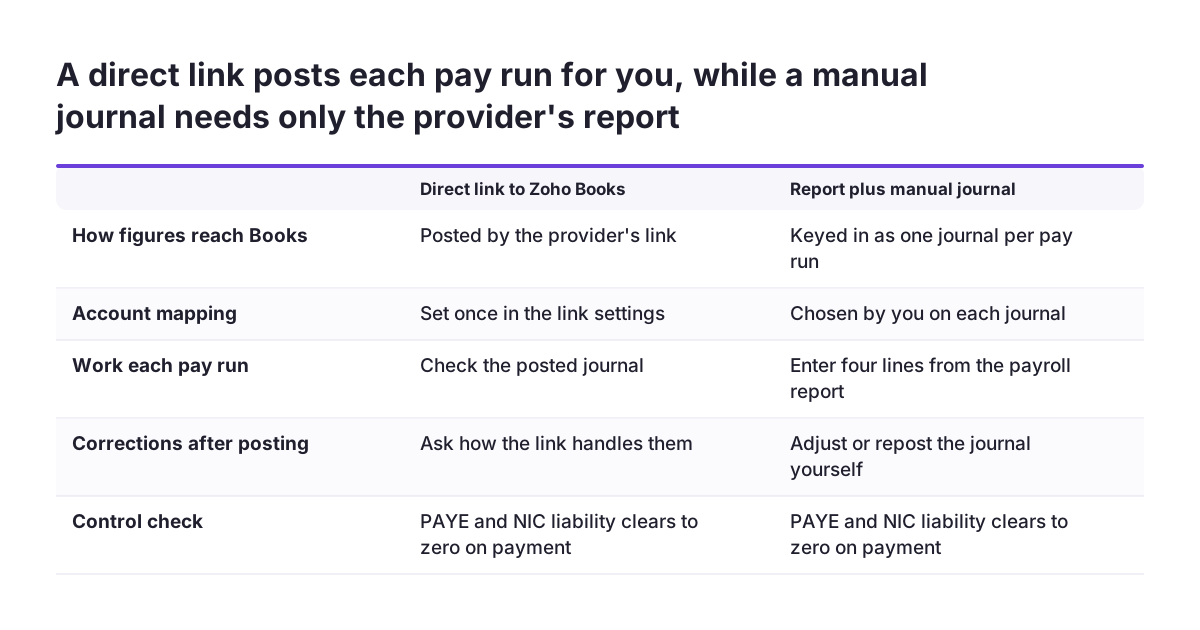
- Does the provider connect to Zoho Books directly, or only produce a report?
- Can it map each payroll figure to an account you choose in Books?
- Does it post one summary journal per pay run, or a line for every employee?
- What happens in Books when you correct a pay run after posting it?
- Who is alerted when a posting into Books fails?
A summary journal per pay run is usually enough for the ledger. Employee-level detail can stay in the payroll system, where access is already restricted. That also keeps individual salaries out of reports that many people in Books can see.
If the provider only produces a report, the manual journal still works well for a small headcount. Write down who posts it and by what day. The work around these routines is part of what Zoho Books partner services beyond the initial setup often cover.
Keeping employee costs and reporting in one place in Zoho Books
Once every pay run lands in Zoho Books as a journal, your payroll costs sit in the same reports as everything else. The profit and loss account shows gross wages and employer's NI next to other costs. The balance sheet shows what you still owe to staff and in tax. Your month-end figures then come from one ledger rather than two systems.
That single ledger matters for decisions. Margin, cost per head and budget against actual all depend on payroll being posted on time. If payroll lands late, every report for that month understates costs.
Agree a posting deadline with whoever runs payroll. A journal posted within a day or two of payday keeps management reports current. A journal posted at quarter end does not.
Some firms want to look further, for example at staff costs by team or by project over several years. For that kind of analysis, Zoho Analytics for UK business reporting can draw on Zoho Books data and combine it with other sources. Keep the summary figures in Books and the employee-level detail in the payroll system. Then decide which totals the analysis really needs.
Use the same account structure from the first pay run onwards. Changing account names halfway through a year makes trend reports harder to read. It also makes year-end harder for your accountant.
Payroll software problems reported on Zoho's forums, and how to test for them
Payroll mistakes reach employees directly, so test any payroll product with real pay runs before you rely on it. Zoho's own payroll forums show the kinds of problems that come up. These reports concern non-UK editions, but the lessons apply to whichever UK provider you choose.
Users on the Zoho community forums have reported these problems:
- Direct deposit taking 3 business days, against the next business day in the user's previous payroll product.
- No setup for contractors, which mattered to a firm that used mostly contractors.
- In Canada, one user posted that their payroll payment left the company account before staff were paid. We have not seen how Zoho resolved it.
- An error saying tax calculation was not supported for 2025, shown while running the last payroll of the year.
- In India, a bank integration that became harder when some apps started requiring a token from the bank's website.
Each report points to a test. Check how many days payments take to reach staff. Confirm the provider handles every type of worker you pay. Run a year-end pay run in a test period before the real one.
Use any free trial to run a full pay run alongside your current payroll. Zoho Payroll's US edition, for example, offers a 14-day free trial. Compare net pay, tax and the journal posted to Books line by line before you switch over.
Next steps for a UK firm on Zoho Books or Zoho One
Start with your accounts in Zoho Books, then choose a payroll provider that fits them. Use these steps in order:
- Set up the payroll accounts in Books. Create Gross Wages and Employers NI on the profit and loss side. Create Net Wages and a PAYE and NIC liability on the balance sheet. Agree the names with your accountant.
- Ask providers for a sample pay run output. Check that it separates gross pay, employer's NI, net pay and the tax liability.
- Ask how each provider connects to Zoho Books. Use the questions on mapping, corrections and failed postings from the section on connecting a provider.
- Run a parallel pay run. Compare net pay, tax and the journal against your current payroll before you switch.
- Set a posting deadline and a monthly check. Post each journal within a day or two of payday. Confirm the PAYE and NIC balance clears after each tax payment.
- Recheck Zoho's regional list once a year. If Zoho announces a UK edition of Zoho Payroll, compare it with your provider on the same tests.
If you want help with the account structure or the connection, see what a Zoho partner does before you decide whether to bring one in. Many firms set up the journal themselves and ask for help only with the provider connection.
Sources
- Silicon UK: Zoho launches Zoho Payroll for businesses in the United States
- Zoho Payroll: Product Updates, August 2025
- Zoho Community: Zoho Payroll general forum
- Zoho Community: Payroll integration options for Zoho Books other than Zoho Payroll
- Zoho Community: Wages and Salaries
- Zoho Payroll help: Access Zoho Payroll