


Setting up Zoho Billing for a UK subscription business: the five decisions
Setting up Zoho Billing for a UK subscription business comes down to five decisions, made in order. First, choose the Premium edition. Second, set GBP and your VAT details. Third, build products and plans.
Fourth, choose a pricing model. Fifth, decide on proration before the first subscription exists. Make those decisions in the free trial and the recurring invoices then run on schedule.
Zoho Billing is Zoho's cloud billing and invoicing application. It creates invoices, manages subscriptions, takes online payments and applies VAT. It replaced Zoho Subscriptions, which Zoho created in 2014. In September 2023 Zoho announced Zoho Billing as the successor to Zoho Subscriptions. Existing users kept their history, transactions, records and workflows.
This guide is part 1 of a three-part series for UK subscription and recurring-revenue businesses. That covers software, memberships, retainers and maintenance contracts. Part 1 covers the set-up. Part 2 will cover collecting payments. Part 3 will cover Zoho Billing with Zoho CRM and Zoho Books.
If you want an overview of the product and how we deliver it, see our Zoho Billing product page. This post stays hands-on and follows one worked example: a support retainer sold in three tiers, each with an annual option.
Zoho Billing Premium is the edition a subscription business needs
A subscription business needs Zoho Billing Premium, not Standard. Zoho's UK pricing page describes Standard as suited to one-time billing. It describes Premium as suited to one-time and subscription billing.
The page lists subscription billing, hosted payment pages, proration and dunning under Premium. Dunning is the automated chasing of failed or overdue payments. The help page for creating plans manually also lists Premium and Enterprise only.
The three editions compare as follows, taken from Zoho's UK plan comparison page and pricing page.
| Edition | Users | Locations | Billing type | Volume limits |
|---|---|---|---|---|
| Standard | 3 | 1 | One-time | 100,000 invoices a year, £800K billed a year |
| Premium | 10 | 3 | One-time and subscription | 100,000 invoices a year, £800K billed a year |
| Enterprise | Custom | Custom | Complex, large-scale billing | No annual billed limit; 0.2% fee on billed amounts above £400K a month |
Watch the £800K ceiling. Zoho upgrades Standard and Premium accounts to Enterprise when they reach the billed amount threshold. Enterprise adds flexible revenue recognition, forecasting and a dedicated account manager.
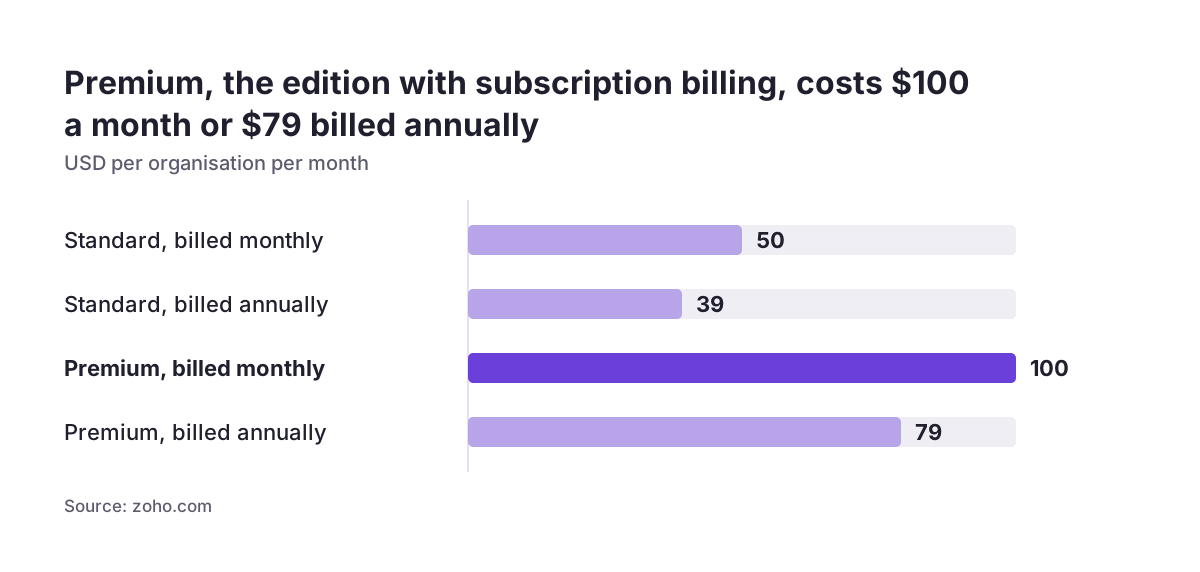
Zoho prices every edition per organisation per month, with a lower rate when you pay annually. Prices exclude VAT. Check the Zoho Billing UK pricing page on the day you buy. Zoho does not tie you to a long-term contract, and Standard and Premium both start with a 14-day free trial.
Organisation settings: GBP, time zone and creation date
Set the Zoho Billing organisation's default currency to GBP before you create any customers or invoices. Zoho confirms that UK businesses can set GBP as the default. You can still handle international transactions in other currencies. Deciding the currency first means every report, plan price and VAT figure starts from the same base.
Check the organisation's time zone at the same time. Zoho Billing creates subscription invoices automatically at 6 AM in the organisation's time zone, based on the schedule you configure. A wrong time zone does not break anything. It does mean invoices land at an hour your customers and finance team do not expect.
The organisation's creation date matters too. Subscriptions have a tax inclusive or tax exclusive option. That option only exists for organisations created after December 2023. If you inherited an older organisation from Zoho Subscriptions, you will not see it. Plan your prices on that basis rather than hunting for a missing setting.
Premium supports three locations. A location is a branch whose transactions you manage separately. Most retainer or membership businesses need one. If you trade from several sites, decide now whether each needs its own location. Adding the structure after invoices exist is harder to reconcile.
VAT settings in Zoho Billing: registration number, basis and cross-border trade
Zoho Billing's VAT settings capture how HMRC knows your business, and the rest of the system follows them. The settings described on Zoho's VAT settings help page apply to the UK Edition only.
Work through these fields in order:
- VAT Registration Number: the 9-digit number HMRC gave you.
- Accounting basis: accrual basis calculates VAT on the invoice date; cash basis calculates it on the date the customer pays.
- Trade outside the UK: enabling this handles the reverse charge mechanism and acquisition tax.
- NI Protocol: tick this if your business is in Northern Ireland and trades goods with EU businesses.
- Flat Rate Scheme: tick this only if you are on the scheme, because you generally cannot reclaim VAT on purchases once it is enabled.
Choose the basis your accountant actually files on. A mismatch between Zoho Billing and your VAT return is the kind of error that surfaces months later.
Two behaviours deserve care. If you edit a VAT rate already used in transactions, you can push the new rate into draft transactions. If you deregister and then create transactions, you cannot undo the deregistration without deleting them. HMRC usually confirms a cancellation within 40 working days, and you should keep charging VAT until it does.
The same help page still quotes older VAT thresholds. Use the gov.uk figures covered later in this guide instead.
Products, plans, add-ons and coupons: how Zoho Billing structures what you sell
Zoho Billing organises what you sell as products, and each product holds plans, add-ons and coupons. A plan is an option for subscribing to a product, with its own billing frequency, pricing model and features. A subscription is the record that charges one customer for the plan they chose.
The Zoho help page on creating plans sets these rules:
- The plan name must be under 100 characters.
- The plan code must be under 100 characters, with no spaces, though hyphens and underscores are allowed.
- The description can run to 2000 characters.
- Billing cycles either auto-renew until cancelled or expire after a set number of cycles.
- A subscription must last at least 5 days.
The plan code is the identifier the API uses to create or update subscriptions, so treat it as permanent. A setup fee is a one-time charge on the first billing cycle. You can also use it for a security deposit.
Each plan takes an individual tax or a tax group. Each plan can also post revenue to an income account in Zoho Books, but that account must exist in Zoho Books first. You can import many plans at once from a file.
Add-ons are extras charged on top of a plan, and they can be one-time. Coupons carry promotional discounts, and a subscription can hold only one coupon at a time. A subscription with a discount cannot take a coupon at all. Discounts are in early access, and you enable them by contacting Zoho Billing support.
Pricing models: flat, per unit, volume, tiered and package
A pricing model defines how a plan charges the customer, and Zoho Billing offers five. You set the model on the plan under Product Catalog, using the Pricing Model dropdown. Zoho's pricing models help page defines them:
- Flat: every customer on the plan pays the same amount.
- Per unit: the total rises in line with the number of units.
- Volume: once the quantity reaches a tier, one rate applies to all units, shown as a single invoice line.
- Tiered: each tier has its own unit price, and the customer pays for the usage falling in each tier.
- Package: the price applies to the whole package, with no unit price.
Zoho's own pages disagree on which edition includes these models. The pricing models help page labels the feature Enterprise Edition. The UK pricing page lists automated billing for usage-based pricing under Premium. Take the cautious reading.
Flat pricing on Premium is safe. If you need per unit, volume, tiered or package pricing, test it in the trial before you commit. Treat fully automated usage billing as an Enterprise feature until Zoho confirms otherwise in writing.
Zoho's examples show the typical fit. A SaaS company might prefer flat or tiered pricing. A telecom provider may rely on volume or per unit pricing. A service retainer usually sits comfortably on flat pricing, which keeps it inside Premium.
Worked example: a support retainer in three tiers with an annual option
The worked example is a firm selling a monthly IT support retainer in three tiers, Essential, Plus and Priority, each with an annual option. Create one product, "IT Support Retainer". Then create six plans under it, one monthly and one annual plan per tier.
| Tier | Monthly plan code | Annual plan code | Pricing model | Billing cycles |
|---|---|---|---|---|
| Essential | support-essential-monthly | support-essential-annual | Flat | Auto-renews until cancelled |
| Plus | support-plus-monthly | support-plus-annual | Flat | Auto-renews until cancelled |
| Priority | support-priority-monthly | support-priority-annual | Flat | Auto-renews until cancelled |
Each code uses hyphens and no spaces, as Zoho requires. Set the monthly plans to bill every 1 month and the annual plans every 1 year. Enter your own prices. Attach your standard-rate VAT tax to every plan.
Point all six plans at one income account, such as "Support retainer income", created in Zoho Books beforehand. If you charge for onboarding, put it in the setup fee so it bills once on the first cycle. Sell out-of-hours call-outs as a one-time add-on rather than a seventh plan.
At Svennis we agree the plan codes and create the Zoho Books income accounts before anyone opens the plan form. The codes are what integrations and the API use afterwards, and changing them later is where we see syncs break.
Proration settings: decide before the first subscription is created
Prorated billing charges the customer only for the part of the period they used. You switch it on under Settings, then General under Subscriptions, with the Prorated Billing toggle. It is available on Premium and Enterprise. Decide this early, because you can only change proration for an individual subscription when you create it.
Proration works in both directions. On an upgrade, Zoho Billing raises an invoice for the prorated amount. On a downgrade, it issues a credit note, which you can refund or apply to the customer's invoices. The Zoho proration help page works its examples on a 30-day month. In one, a customer moves from a $300 plan to a $500 plan after 10 days and is billed $133.33.
The same page offers extra options worth setting now:
- Prorate flat discount coupons, so a coupon cannot wipe out a prorated charge.
- Prorate one-time add-ons added or removed mid-cycle.
- Apply proration to monthly and yearly subscriptions, or to weekly ones.
- Generate invoices when proration occurs, on by default when proration is enabled.
In the retainer example, a customer moving from Essential to Priority mid-month gets an invoice for the remaining days. The unused Essential days come back as credit. Note one related rule from the subscriptions help page. An immediate change cancels any change already scheduled for the end of the term.
What UK VAT rules mean for your Zoho Billing set-up
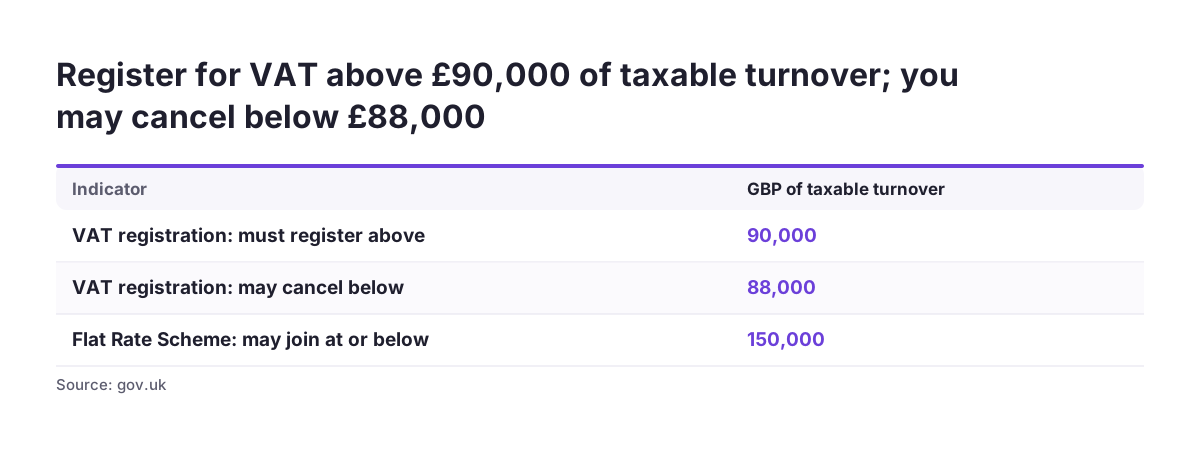
UK VAT thresholds decide whether Zoho Billing should charge VAT at all, and which scheme boxes you tick. Use the figures on GOV.UK's VAT thresholds page, not the older ones on Zoho's help page. Thresholds use taxable turnover, which is the total value of everything you sell or supply that is not exempt.
| Rule | Join or register at | Leave or act at |
|---|---|---|
| VAT registration | Must register above £90,000 | May cancel below £88,000 |
| Flat Rate Scheme | £150,000 or less | Must leave above £230,000 |
| Cash Accounting Scheme | £1.35 million or less | Must leave above £1.6 million |
You must register if you go over the registration threshold or expect to. A growing subscription business can cross it mid-year, because recurring revenue compounds. Watch your rolling taxable turnover. Enter the VAT number in Zoho Billing as soon as HMRC issues it.
The schemes map onto Zoho Billing settings, with one caution. If you join the Cash Accounting Scheme, choose cash basis, but check with your accountant first. Invoices raised in advance, such as annual plans billed up front, are excluded from the scheme and must use standard VAT accounting. If you join the Flat Rate Scheme, enable it and accept that you generally cannot reclaim VAT on purchases.
Northern Ireland businesses face extra rules. Bringing goods in from the EU above £90,000 requires registration. Distance selling from Northern Ireland to EU consumers above £8,818 in total means registering in EU countries. Most service retainers never meet these goods rules.
Testing the Zoho Billing set-up in the 14-day trial
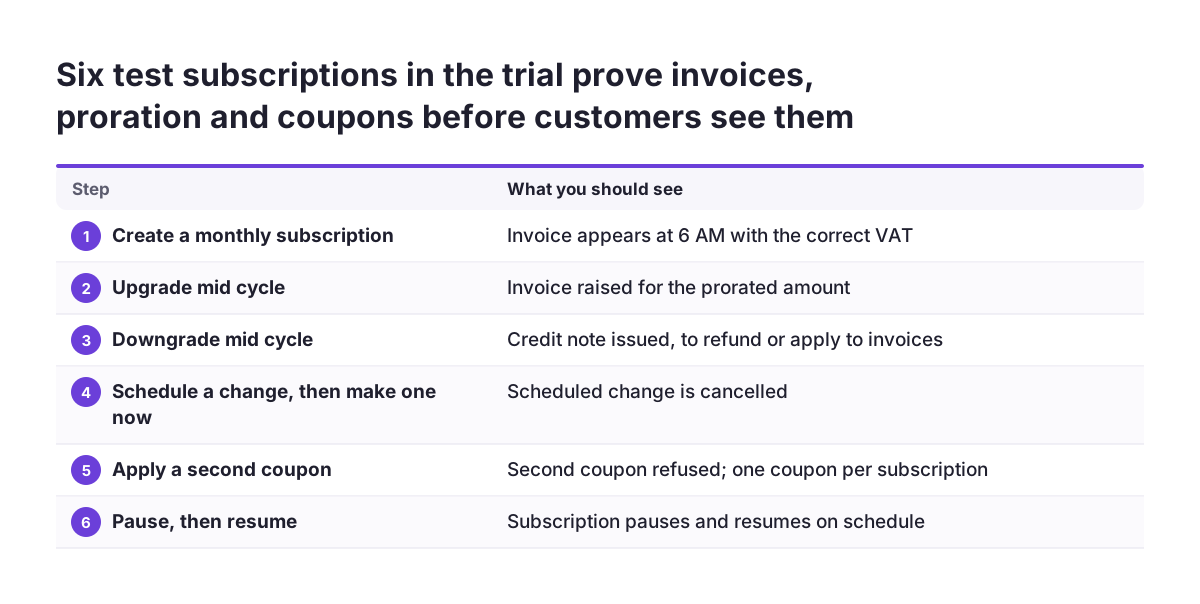
The 14-day free trial is where you prove the set-up works before a real customer sees an invoice. In the UK the trial needs no credit card. Build the full configuration in it, then run test subscriptions through every path your customers will take.
Use this checklist with a test customer on each tier:
- Create a monthly subscription and confirm the invoice appears at 6 AM, with the right VAT.
- Upgrade it and check the prorated invoice. Downgrade it and check the credit note.
- Schedule an end-of-term change, make an immediate change, and confirm the scheduled one is cancelled.
- Apply a coupon and confirm a second coupon is refused.
- Pause the subscription, then resume it.
- Check that revenue posts to the right income account in Zoho Books.
Pausing has rules worth knowing before customers ask. Only a subscription in Live status can be paused. A paused subscription cannot be edited or take one-time add-ons. Pausing does not affect churn reports.
If other systems need to know, Zoho provides Subscription Paused and Subscription Resumed webhook events. The Zoho subscriptions help page covers each of these behaviours.
Record what you test and what you expected. That record becomes your acceptance sign-off.
Next steps: payments, integrations and getting help
Your next step is to open a Zoho Billing trial and build the organisation, VAT settings and plans in the order this guide sets out. Once the test subscriptions behave as expected, you are ready to connect a way to collect money.
Three things remain outside this part 1 guide:
- Collecting payments: part 2 will cover payment collection, including Direct Debit for UK customers.
- Integrations: part 3 will cover Zoho Billing with Zoho CRM and Zoho Books. Zoho provides prebuilt integrations with both.
- Reporting: Zoho Billing reports on subscription metrics such as MRR, churn rate and customer lifetime value.
Before you go live, write down three things. Record your plan codes, your VAT basis and your proration choice. All three are hard to change once real subscriptions exist, so treat them as signed-off decisions.
If you would rather have the configuration built and tested for you, read what a Zoho partner does and when you need one. When you are ready to talk it through, you can contact our team about working with a Zoho partner in the UK.
Sources
- Introducing Zoho Billing (Zoho Blog)
- Zoho Billing UK home page
- Zoho Billing pricing plans
- Zoho Billing pricing plans comparison
- Zoho Billing help: VAT settings
- Zoho Billing help: Creating plans
- Zoho Billing help: Pricing models
- Zoho Billing help: Proration
- Zoho Billing help: Create and manage subscriptions
- GOV.UK: VAT thresholds