


Zoho Analytics plans and prices for UK firms, in brief
Zoho Analytics plans and prices for UK firms range from free to £369 a month, billed annually, with VAT on top. We read these prices on Zoho's pricing page on 28 September 2026. Most small firms fit Standard at £39 a month for 5 users and 1M rows. Firms with around 15 people building reports, or firms that want the Ask Zia AI features, fit Premium at £92 a month.
A Zoho Analytics plan is a subscription tier. It fixes how many users you get, how many rows of data you can store and how often data refreshes from your business apps. Zoho runs the service month to month on a pay-as-you-go basis. You can upgrade, downgrade or cancel at any time.
This guide is one of a set of three posts on Zoho Analytics. The other two cover choosing between Zoho CRM reports and Zoho Analytics, and setting up scheduled email reports and sharing. This post deals with plans and prices in pounds, and with which plan a small or mid-sized firm needs. If you are new to the wider subject, our glossary entry on what data analytics means sets out the basics.
Prices change. Check Zoho Analytics' own pricing page on the day you buy. The licence also leaves out the setup and integration work, which the later sections cover.
How Zoho Analytics counts users, viewers and rows
Zoho Analytics prices each plan on three measures: users, viewers and rows. Getting these definitions right matters more than the headline price.
Users
A user is a co-collaborator who can connect to data, create reports and dashboards and share them, within the roles and permissions you grant. Zoho identifies each user by a unique email address. A report is Zoho's collective term for a chart, pivot table, tabular view or summary view.
Viewers
A viewer can only view, interact with and explore the reports and dashboards shared with them, through a secure login. A viewer cannot create or share reports or dashboards. Zoho sells viewers in packs of 25.
Zoho's two pricing pages word this differently. The comparison page says anyone you privately share workspaces, data, reports or dashboards with counts as a user. The cautious reading is that everyone who receives a private share is a user unless you have bought viewer packs for them.
Rows
The row count is the sum of all rows across all tables in all workspaces of your account. Zoho gives a rough size guide: 1 million simple rows equals about 1GB or more, depending on the number of columns and the type of data. Rows usually decide your plan before users do, because every synced CRM and accounts table counts in full.
At Svennis we count rows before we recommend a plan. We take the record count of every module the firm wants to sync, add the history it wants to keep, and size the plan on that total rather than on headcount.
Zoho Analytics plan comparison in pounds
The table below sets out the five Zoho Analytics plans. It uses GBP prices per month, excluding VAT, as read on Zoho's pricing page on 28 September 2026. Users and rows are the starting allowances. Refresh rates are Zoho's figures for data from business apps.
| Plan | Users | Rows | Billed annually | Billed monthly | Refreshes per day |
|---|---|---|---|---|---|
| Free | 2 | 10,000 | £0 | £0 | 1 |
| Basic | 2 | 0.5M | £19 | £24 | 1 |
| Standard | 5 | 1M | £39 | £48 | 8 |
| Premium | 15 | 5M | £92 | £116 | 8 |
| Enterprise | 50 | 50M | £369 | £460 | 24 |
Annual billing saves about 20% against monthly billing, which is the saving Zoho quotes. Reports and dashboards are unlimited on every plan. Every plan includes an MCP server, which lets AI models, AI agents and MCP clients interact with Zoho Analytics.
The Free plan gives 2 users, 10,000 rows and 5 workspaces. It has no business-app connector once the trial ends. It suits a test with spreadsheet data, not a live reporting setup.
Beyond Enterprise, Zoho offers dedicated compute. Dedicated compute is a cluster of servers, memory and storage reserved for your account alone. It starts at 50 users and 500 million rows, which is far beyond what a small or mid-sized firm needs.
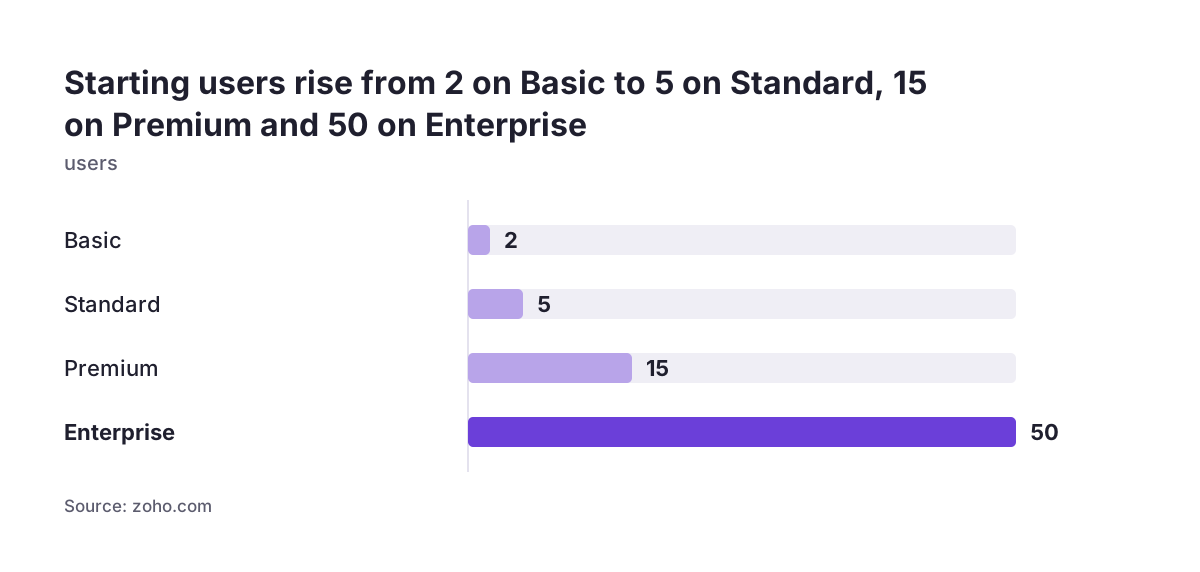
What each Zoho Analytics plan adds over the one below
Each step up the Zoho Analytics price list buys more connectors, faster refreshes and higher technical limits. The jump that matters most depends on how your data arrives and who reads it.
Basic to Standard
Standard adds 50 or more connectors to business apps. Refreshes rise from once to eight times a day. Standard also brings data alerts, with 10 active alerts, and data snapshots. A data snapshot is a record of a report's data at a set point in time, so you can track trends. SQL query tables rise from 25 to 50, and daily API units from 4,000 to 10,000.
Standard to Premium
Premium adds private links that open without a login, live connect to databases and the generative Ask Zia features. It also adds premium ERP connectors for Oracle NetSuite, Odoo, Exact Online and Microsoft Dynamics 365 Business Central. Data alerts rise to 30, query tables to 100 and API units to 30,000 a day. Advanced data preparation pipelines handle 5M rows a month.
Premium to Enterprise
Enterprise refreshes 24 times a day and carries the largest limits. These are 100 data alerts, 500 query tables, 100,000 API units a day and 10M pipeline rows a month. Code Studio and AutoML are available only on Enterprise.
Sales connectors on the comparison page include Zoho CRM, Bigin, Salesforce, Microsoft Dynamics CRM, HubSpot and Pipedrive. Zoho also connects Zoho Analytics to more than 500 business apps through Zoho Flow.
Zoho Analytics add-ons: extra users, viewer packs and rows
Zoho Analytics add-ons let you top up a plan without moving to the next tier. The GBP prices below come from Zoho's pricing page, read on 28 September 2026. They are per month and exclude VAT.
- Extra user: £5.12 billed annually, or £6.40 billed monthly.
- Viewer pack of 25: £64 billed annually, or £80 billed monthly.
- Extra rows: from £30.74 a month for 1M rows, billed annually.
Add-ons change the maths. Five extra users cost £25.60 a month on annual billing. A viewer pack costs £64. For fewer than about a dozen read-only people, extra users can therefore cost less than a viewer pack. They also avoid any doubt about how Zoho counts private shares.
Extra rows compare against the next plan up. Standard with an extra 1M rows costs £39 plus £30.74, which is £69.74 a month. Premium costs £92 and brings 5M rows, 15 users and the AI features. Once you would buy two or more row add-ons, price the next plan as well.
Zoho states that it gives free technical support to all customers. The level of support varies by plan, so check what your tier includes before you rely on it.
Ask Zia and the AI features on Premium and Enterprise
The generative AI features in Zoho Analytics are available only on the Premium and Enterprise plans. Zoho calls the main one Ask Zia. Ask Zia is a semi-autonomous assistant, human led and AI assisted, that reads your analytical intent and suggests recommendations and actions through a chat interface.
Ask Zia and related features can do the following, according to Zoho's help pages:
- Generate a valid SQL query from logic you describe in plain terms.
- Build a complete data pipeline from data preparation goals written in plain language.
- Produce Zia Insights, which are descriptive, predictive, diagnostic and prescriptive narratives about an outcome.
- Turn reports and dashboards into narrative slideshows, which Zoho calls Data Stories.
- Run Key Driver Analysis, which identifies the factors driving a metric.
Access is limited to users with administrator privileges. The account admin can grant access to other organisation and workspace admins. Budget for that in your user plan, because not every user will get the AI tools by default.
Zoho Analytics mainly uses two large language models. The Zoho LLM handles report creation. An OpenAI LLM handles data pipelines, report and dashboard creation, and insight generation. Administrators choose which model to use.
In most cases only prompts and metadata, such as column names, data types and the data model, go to the model. Zoho says columns marked as personally identifiable information are never shared. Zoho's help page says insight recommendations send aggregated data to the model. Check the GenAI Configuration settings page for what your account shares, because you can change these preferences there. If you plan wider AI for reporting beyond Zoho's built-in tools, weigh it against what Premium already includes.
Worked example: a 10-person firm on Zoho CRM and Zoho Books
A 10-person firm running Zoho CRM and Zoho Books usually needs Standard with five extra users. The reasoning follows, step by step, using the prices read on 28 September 2026.
The firm
The owner, the sales manager and the finance lead build reports. The other seven people check dashboards on sales and cash. The firm wants CRM and Books data to refresh during the working day, and an alert when overdue invoices pass a threshold.
Ruling out the cheaper plans
Free has no business-app connector after the trial, so it cannot pull from CRM or Books. Basic has 2 users, 0.5M rows and one refresh a day, and it has no data alerts. Both fail the brief.
Pricing Standard
Standard includes 5 users, 1M rows, eight refreshes a day and 10 data alerts. The firm needs 10 people with access. Two ways to cover them:
- Standard plus 5 extra users: £39 + £25.60 = £64.60 a month billed annually.
- Standard plus one viewer pack of 25: £39 + £64 = £103 a month billed annually.
Extra users win. The cost is £775.20 a year before VAT. On monthly billing the same setup costs £48 + £32 = £80 a month.
The check that decides it
The CRM and Books tables together must fit in 1M rows. If the row count comes out higher, compare one row add-on at £30.74 with a move to Premium.
Worked example: a 40-person firm with regional managers and a board pack
A 40-person firm with regional managers and a monthly board pack usually fits Premium with one viewer pack. Here is the working, again on prices read on 28 September 2026.
The firm
Fifteen people build reports: the finance team, an analyst and the regional managers. Each manager should see only their own region, which you set through roles and permissions. The other 25 staff, including the directors, only view dashboards. The board wants a monthly pack it can read as a presentation.
Why Premium
Premium includes exactly 15 users and 5M rows. It adds Data Stories through Ask Zia, which turns dashboards into a narrative slideshow suited to a board pack. It also adds private links that open without a login, and 30 data alerts for the regions.
Pricing the options
| Option | Annual billing, per month | Monthly billing, per month |
|---|---|---|
| Premium plus one viewer pack | £92 + £64 = £156 | £116 + £80 = £196 |
| Premium plus 25 extra users | £92 + £128 = £220 | £116 + £160 = £276 |
| Enterprise, 50 users | £369 | £460 |
Premium with a viewer pack costs £1,872 a year before VAT. Confirm with Zoho how it counts private shares before you commit, given the difference between its two pages. Move to Enterprise if rows pass 5M, if you need 24 refreshes a day, or if you want Code Studio or AutoML.
What UK firms should know: GBP pricing, VAT and the EU data centre
UK firms see Zoho Analytics prices in pounds, pay VAT on top, and have their data stored in Zoho's European data centre. Each point affects your budget or your compliance paperwork.
Pricing in pounds
The UK pricing address for Zoho Analytics redirects to the main pricing page. That page shows GBP based on your location. Zoho states that local taxes such as VAT are charged on top of the listed prices, so add VAT to every figure in this guide.
Where your data sits
Zoho has no UK data centre. UK accounts use the European region. Zoho's data centre page lists Amsterdam in the Netherlands as the primary site and Dublin in Ireland as the secondary. Zoho assigns the data centre from the country you choose at sign-up. That field is pre-selected from your IP address, so check it before you confirm.
AI and personal data
If you switch on Ask Zia, record which features use which language model. Zoho says the OpenAI model handles data pipelines, report and dashboard creation, and insight generation, while the Zoho LLM handles report creation. Mark personal data columns as personally identifiable information, which Zoho says keeps them out of what is shared. Check the transfer terms for the OpenAI model before you note it in your UK GDPR records. Zoho lets you manage data-sharing preferences on the GenAI Configuration settings page.
If you already run several Zoho apps, compare a standalone licence with the full suite. Our guide Zoho One explained for UK firms sets out what the suite contains.
The Zoho Analytics setup work the licence price does not cover
The Zoho Analytics licence buys the software, not a working reporting setup. The first few weeks of work decide whether the reports get used. Zoho says professional services for building analytical solutions are available from its partners, alongside its own technical support.
The work usually falls into these tasks:
- Connecting each source, such as Zoho CRM and Zoho Books, and choosing which modules to sync so rows stay within the plan.
- Joining tables with query tables so a sale and its invoice line up.
- Agreeing one definition for each metric, such as revenue or margin.
- Setting roles and permissions so each manager sees the right data.
- Deciding who is a user and who is a viewer, then buying accordingly.
- Configuring the AI features, marking personal data columns and choosing the language model.
- Training the people who build reports.
Use the checklist below to pick the plan first, then scope the setup around it.
| Question | If the answer is yes | Plan it points to |
|---|---|---|
| Do you need data from CRM or accounts software? | Free is out after the trial | Basic or above |
| Do you need more than one refresh a day, or data alerts? | Basic is out | Standard or above |
| Do you need Ask Zia, Data Stories or an ERP connector such as NetSuite? | Standard is out | Premium or above |
| Do you hold more than 5M rows, or need 24 refreshes a day? | Premium is out | Enterprise |
| Do you need Code Studio or AutoML? | Only one plan has them | Enterprise |
If you plan to bring in outside help, our guide on choosing a Zoho consultant who has actually delivered explains what to ask.
Next steps for choosing your Zoho Analytics plan
The quickest way to choose a Zoho Analytics plan is to measure your data and your people before you look at prices. Work through these steps in order.
- Start the 15-day free trial. Zoho requires no credit card.
- Connect your main sources and read the total row count across all workspaces.
- List everyone who needs access. Mark each person as a builder, who needs a user licence, or a reader, who may be a viewer.
- Run the checklist in the previous section to find the lowest plan that fits.
- Price the plan with extra users, viewer packs and row add-ons, then compare it with the next tier up.
- Check the prices on Zoho's pricing page on the day, add VAT and confirm your data centre at sign-up.
Choose annual billing only once the trial has confirmed the plan. Zoho lets you upgrade or downgrade at any time, but annual billing is where the 20% saving comes from.
If you want help sizing the plan or planning the setup, our Zoho Analytics services page explains how we connect sources, build the reports and train your team.