


Zoho Creator pricing is per user, but the licence is only part of the cost
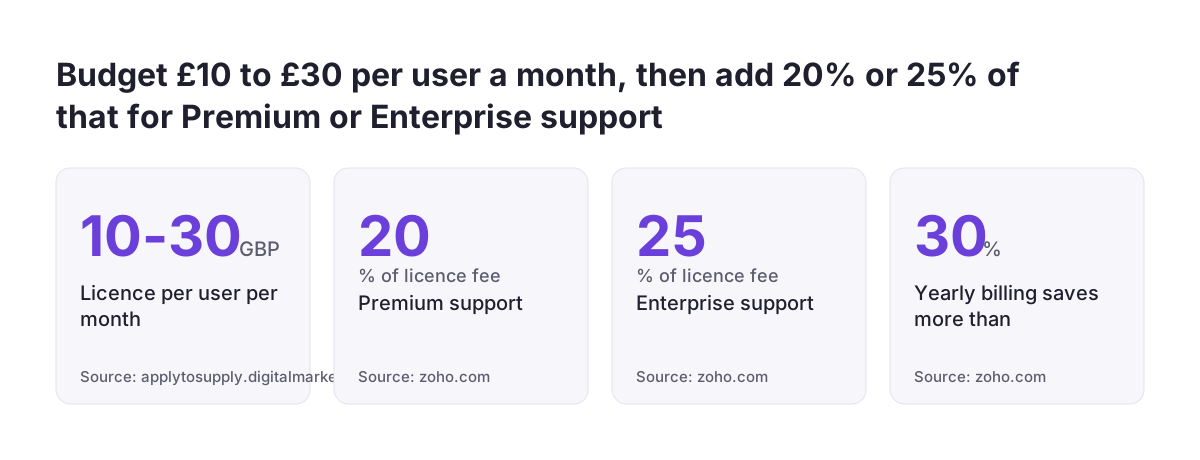
Zoho Creator pricing is a per-user licence, billed monthly or yearly, on one of four plans. Zoho's own G-Cloud 14 listing gives a range of £10 to £30 a user a month, excluding VAT. Capterra UK shows a starting price of US$8.00 per user a month. That licence is only one part of your budget.
Three things decide what a Creator app really costs. The first is how many people need access, and whether each needs a full licence or a portal login. The second is which plan your integrations, schedules and AI features push you onto. The third is the custom build work on top, which no price page shows.
Zoho Creator itself is a low-code platform for building business apps. Every app built on it runs on the web, iOS and Android. If you are still deciding whether the platform fits, our Zoho Creator overview covers what it does. The rest of this post shows you how to estimate each of the three costs before you commit.
Zoho Creator plans compared: Free, Standard, Professional, Enterprise and Flex
Zoho Creator has four plans: Free, Standard, Professional and Enterprise. Zoho describes Standard as the plan for your first application. It positions Professional for team and department apps, and Enterprise for software that serves a whole organisation. The Flex plan lets you pick features and limits, and Zoho prices it to match.
The Free plan is for trying the platform, not for running a business app. It includes one user, one application, 250 MB of storage and 1,000 records.
The paid plans differ mainly in their limits. The figures below come from Zoho's Zoho Creator pricing page.
| Limit | Standard | Professional | Enterprise |
|---|---|---|---|
| Custom schedules, per user per month | 90 | 300 | 600 |
| Data sources | 5 | 15 | 30 |
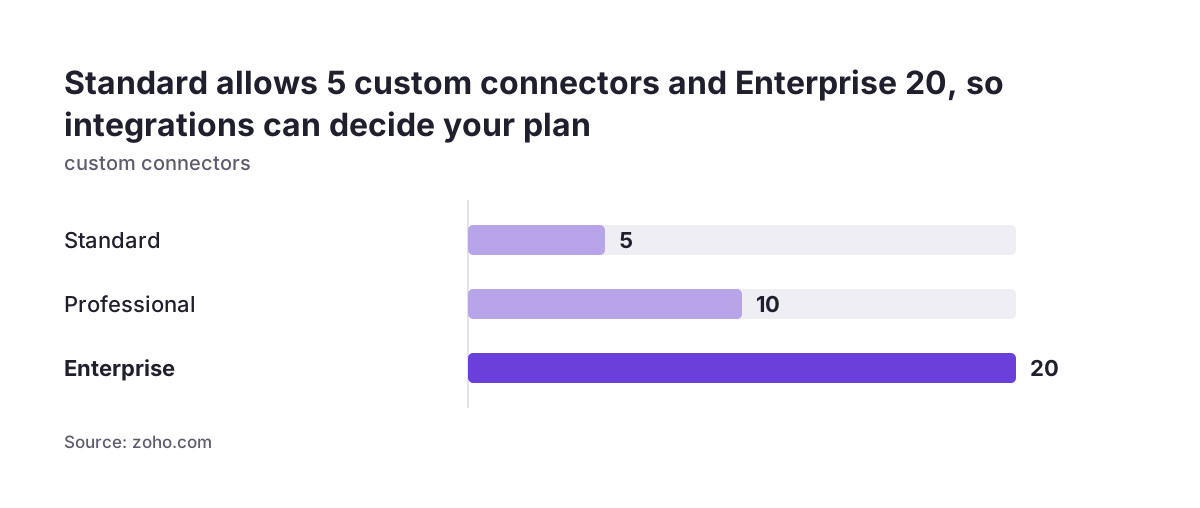
| Custom connectors | 5 | 10 | 20 |
| Cloud function calls, per user per day | 50 (max 5,000 a day) | 100 (max 10,000 a day) | 200 |
| Ready-to-use AI models | 50 | 250 | 250 |
| Custom AI models | 20 | 100 | 100 |
File upload storage runs from 250 MB to 5 GB per user, depending on the plan. Enterprise allows 250,000 records per user. Four capabilities come only with Enterprise: Integration Flow, business intelligence and analytics, UI and process automation, and application testing. The Zoho Creator plan comparison lists every limit side by side.
User numbers: full licences, portal users and who needs which
User count is the biggest single driver of Zoho Creator pricing. Zoho charges per user, and you add users by buying licences. Getting this number right matters more than any other part of the licence decision.
People outside your organisation do not always need a full licence. Zoho defines a customer portal user as anyone outside the organisation who signs up through the portal instead of taking a regular licence. Up to three portal users are free, and you buy additional portal users as add-ons.
How to count users before you buy
Sort everyone who will touch the app into three groups:
- Staff who build or change the app.
- Staff who enter, review or approve data in it.
- Customers, suppliers or contractors who only see or submit their own records.
The first two groups need licences. The third group may fit the portal. Ask Zoho for the add-on price for your expected number of portal users before you set a budget. A portal for hundreds of clients is a separate line on the bill, not a rounding error.
Check occasional users closely too. A manager who opens one report a month still needs a licence if they log in to the app. Decide early whether each of those people needs to log in, or only needs the output.
Integrations and automation often decide the plan, not headcount
The Zoho Creator plan your app needs depends on what it connects to and how much it runs on its own. Each plan caps data sources, custom connectors, scheduled jobs and cloud function calls. An app with many links to other systems can outgrow Standard long before it outgrows its user count.
Zoho Creator offers more than 1,000 prebuilt connectors, including to systems such as SAP and Oracle. Custom connectors are capped separately: 5 on Standard, 10 on Professional and 20 on Enterprise. Custom schedules, which are jobs that run on a timer, are limited per user per month on every plan.
API limits to check
Zoho's G-Cloud listing says Creator throttles API requests at 50 per minute per endpoint per public IP address. The total number of API requests allowed per day depends on your subscription. If another system pushes data into Creator all day, test both limits against your expected volume.
When Enterprise becomes necessary
Integration Flow, powered by Zoho Flow, comes only with Enterprise and includes 600 tasks plus 200 per user each month. Business intelligence on Enterprise is powered by Zoho Analytics. If you already run Flow or Analytics accounts, Zoho lets you merge them into Creator, and Creator's limits then apply.
At Svennis we list every scheduled job, connector and external system an app will touch before we recommend a plan. That list, more than the headcount, is what normally settles the choice between Professional and Enterprise.
AI features in Zoho Creator: call limits and model costs
AI usage in Zoho Creator is metered by plan. Professional and Enterprise each include 1,000 AI calls a month, which are the API calls Creator makes to AI services. Zoho sells an add-on for higher limits. Ready-to-use AI models are pre-built and need no training, while custom AI models must be trained on your own data for a specific task.
You can power Creator's AI features with Zoho's native generative AI or bring your own key from OpenAI, Google or Anthropic. Zoho says you can connect different models to different parts of the same app. With your own key, the model provider bills you directly, outside the Creator licence.
Token prices vary widely between models, so check them before you connect a key. Anthropic's models overview lists Claude Haiku 4.5 at US$1 per million input tokens and US$5 per million output tokens. It lists Claude Opus 5.5 at US$4 and US$20. Estimate how many records the app will send to a model each month, then pick the smallest model that does the job.
If AI is central to the app rather than a feature on the side, plan it as a workstream of its own. The guide to AI automation covers how to scope that work.
Add-ons and support plans that sit on top of the licence
Several Zoho Creator costs only appear after you choose a plan. Custom domains are an add-on. Rebranded mobile apps are an add-on. Portal users beyond the free three, and AI calls beyond the plan limit, are add-ons too.
Support is priced separately from the licence. Zoho Creator has four support tiers: Basic, Classic, Premium and Enterprise. Premium support costs 20% of the licence fee and Enterprise support costs 25%. Enterprise support needs at least 50 users and an annual subscription, and promises a first response within 1 hour.
Every pricing plan includes mail support, live chat, toll-free numbers and a dedicated account manager. Zoho's G-Cloud listing says paid editions get email support within 8 hours. Decide whether that is enough for an app your team relies on every day. If it is not, a paid tier adds a fifth or a quarter to the licence cost.
Zoho commits to 99.9% monthly uptime. Read its terms to see what service credits it offers if it misses that figure, and plan for the business impact of downtime yourself.
Custom build work: the cost the price page does not show
Custom build work is the part of a Zoho Creator budget that no Zoho page prices for you. Its size depends on how much your app must do beyond what the builder offers out of the box.
Creator gives you a head start. It has more than 50 pre-built app templates, 32 field types and a drag-and-drop builder. Zoho also offers Plan Agent, which turns an idea into a requirements document, Build Agent for tailoring the app, and Test Agent for generating and running test cases.
Logic beyond the builder is written in Deluge, Zoho's own scripting language. Cloud functions written in Java or NodeJS can be called from workflows and Deluge functions. Each plan caps Deluge execution statements, and Enterprise allows 50,000. Reviewers on Capterra UK describe the initial learning curve as steep. One says the platform is not great for highly customised apps.
How to size the build
Count these items before you ask anyone for an estimate:
- Forms, one per type of record.
- Reports and dashboards.
- Workflows and approval steps.
- Integrations, one per external system.
- Portal screens for outside users.
- Data to migrate from spreadsheets or older systems.
Zoho's G-Cloud listing states that Creator has no API sandbox or test environment, so integration testing needs its own plan. Our guide to building a Zoho Creator app and going live covers testing and launch in detail.
Monthly or yearly billing, the free trial and changing plan later
Yearly billing is the cheaper way to pay for Zoho Creator. Zoho's pricing page says yearly billing saves more than 30% compared with monthly. Card and PayPal payments work for both. Yearly subscriptions can also be paid by bank transfer or cheque, and GBP is one of 18 billing currencies.
The free trial lasts 15 days and needs no credit card. By default it gives you the Professional plan. When it ends, the account moves to the Free plan, with its limit of one user and one app. Use the trial to test your heaviest workflow and your most demanding integration, not just the forms.
Changing plan later is possible, with one catch. If you move down from Enterprise, Zoho says you keep your data, but features from the higher edition stop being available. An app built on Enterprise-only features, such as Integration Flow, will lose those functions on a lower plan.
Choose the plan for what the app must do in its first year. Stay on monthly billing while the build settles, then switch to yearly once the plan is clearly right.
Estimating total Zoho Creator cost in five steps
A realistic Zoho Creator budget adds five figures together. Work through them in this order:
- Licences. Multiply licensed users by the per-user price for your plan, then by 12 for a year. Apply the yearly discount if you will pay annually.
- Plan fit. Check your connectors, data sources, schedules, cloud function calls and API volume against the plan limits. Move up a plan if any limit is tight.
- Add-ons. Price extra portal users, a custom domain, rebranded mobile apps and extra AI calls.
- Support. Add 20% of the licence fee for Premium support or 25% for Enterprise support, if you need either.
- Build and running work. Estimate the build from your list of forms, workflows, integrations and data migration. Add any AI provider costs if you bring your own key.
The total is your first-year cost. The second year keeps the licence, add-ons, support and AI costs. The initial build falls away, but you should budget for changes, because apps grow once people use them.
Public sector buyers can compare this estimate with Zoho's G-Cloud 14 range of £10 to £30 a user a month, excluding VAT. Anyone who needs limits between two plans can ask Zoho to price a Flex plan instead.
Next steps before you commit to a Zoho Creator plan
Before you sign up for a paid Zoho Creator plan, gather the facts that drive the cost. These steps take a few days and save you from choosing the wrong plan:
- Write down every person who will use the app and put each into a licence group or the portal group.
- List every external system, scheduled job and automated process the app needs.
- Start the 15-day trial and build your hardest workflow and one real integration.
- Compare your list with the limits on the plan comparison page, and ask Zoho for a Flex quote if you fall between plans.
- Decide which support tier you need and add its percentage to the licence.
- Get the build estimated from your written list of forms, workflows, integrations and data.
If you plan to bring in outside help for the build, it helps to understand what a Zoho partner does and how that work is usually scoped. Either way, the written list from these steps becomes the basis of every quote you receive.