


Zoho Projects pricing in short: four editions from free to £8 a user plus VAT
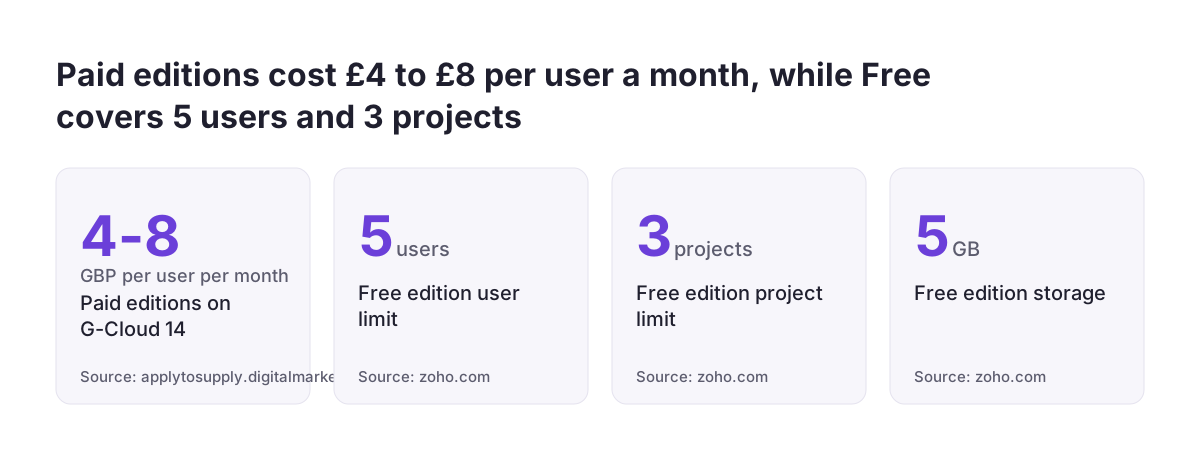
Zoho Projects pricing is the per-user, per-month charge Zoho sets for each edition of its project management app. On the UK government's G-Cloud 14 listing, Zoho Projects costs £4 to £8 a user a month for business buyers, plus VAT at 20%, with a free trial. You can choose from four editions: Free, Premium, Enterprise and Ultimate.
The Free edition covers up to 5 users, 3 projects and 5 GB of storage, according to Zoho's own pricing page. Paid editions come with a 15-day trial and no credit card is needed. Paying yearly saves over 15% compared with paying monthly.
The per-user price is only half the decision. If your firm already runs Zoho CRM, Zoho Desk or Zoho Books, or plans to, you can also take Projects as part of a Zoho One licence instead of buying it alone. Whether that saves money depends on how many apps each person uses. The sections below cover the editions, the limits that push teams up a tier, the extra costs, and how to compare a standalone licence with the suite.
What each Zoho Projects edition includes
Each Zoho Projects edition adds capacity and control rather than a different product. The Free edition already lets you break down project activities, allocate resources and schedule work on a Gantt chart. The paid editions remove the project cap and add planning, security and AI features.
The table below sets out the differences that most often decide the choice. It draws on Zoho's Zoho Projects plan comparison and pricing page.
| Feature | Free | Premium | Enterprise | Ultimate |
|---|---|---|---|---|
| Users | Up to 5 | Paid per user | Paid per user | Paid per user |
| Projects | 3 | Unlimited | Unlimited | Unlimited |
| Storage | 5 GB | 100 GB | 120 GB | 15 GB per user or 150 GB per organisation, whichever is higher |
| Read-only users | None | None | 10 | 100 |
| Sandbox | None | None | 1 | 10 |
| Critical path | No | No | Yes | Yes |
Premium is where Zia, Zoho's AI assistant, arrives, with Zia Summary, Zia Translate, Zia Task and Subtask Creation and Zia Insights. Enterprise adds single sign-on, two-factor authentication, a portfolio dashboard, critical path and baselines, a sandbox and a Power BI integration. Zia Search and task dependencies across projects are limited to Enterprise and Ultimate.
Automation and storage limits that push teams up a tier
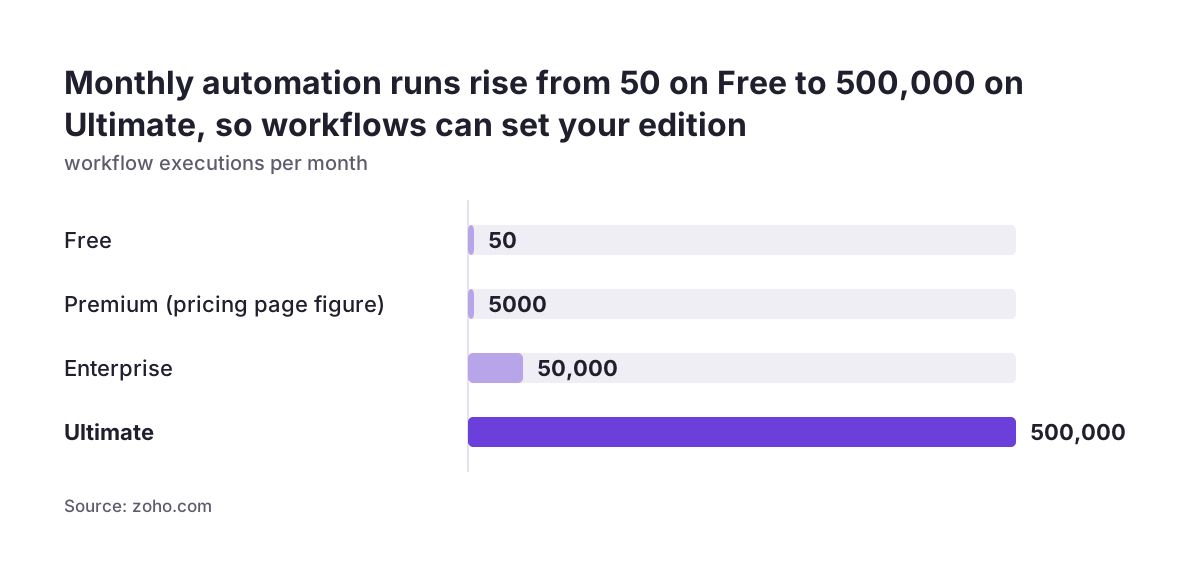
Automation limits are the most common reason a team outgrows a cheaper Zoho Projects edition. Zoho counts workflows, macros, blueprints, webhooks and custom functions as automation actions. The Free edition allows 50 executions a month, Enterprise 50,000 and Ultimate 500,000.
The Premium figure needs checking before you buy. Zoho's pricing page lists 5,000 executions a month for Premium, while the comparison page lists 500. Ask Zoho to confirm the current number for your account, because a tenfold difference changes whether Premium can carry your workflows.
Other daily limits also rise by edition. Ultimate allows 10,000 webhook invokes and 10,000 custom function executions a day. Every edition includes 100 Zoho Flow actions a month, and you buy more as Flow Credits. Zoho Flow actions sit outside the automation count above.
Storage is the second pressure point. A team that attaches drawings, contracts or site photos will fill 100 GB on Premium faster than one that only tracks tasks. Ultimate scales storage with headcount, so a larger team gets more than the 150 GB floor.
A short audit helps. Before you pick an edition, count your current automations, estimate how often each one fires, and add up the files you store per project each month.
Monthly or yearly billing, cancellation and what happens to your data
Zoho Projects has no minimum term, so you can cancel at any time. You can also switch between monthly and yearly billing. Yearly billing saves over 15%, which suits a team whose headcount is stable.
Third-party price lists show the gap in dollars. A November 2025 guide from Lark on Zoho Projects pricing lists Premium at $5 a user a month paid monthly or $4 paid yearly. It lists Enterprise at $10 monthly or $9 yearly. Treat these as a guide and check the live sterling price before you budget.
Downgrading is low risk. If you move to a lower paid edition, you keep your data but lose access to the higher-edition features until you upgrade again.
Ending a subscription carries more risk. When a paid subscription is not renewed, the account moves to the free edition. If an account then shows no activity for more than 120 days, Zoho deletes it with all its data, and you cannot export anything after that. Export your projects before you let a licence lapse.
Payment is by Visa, Mastercard or American Express. Yearly subscriptions can also be paid by PayPal or wire transfer.
Support, hosting and security terms for UK buyers
Zoho's G-Cloud listing sets out the support and hosting terms a UK buyer usually asks about. Paid users get an 8-hour response commitment, against an average of 24 hours for free users. Phone and web chat support run 9 to 5 UK time, Monday to Friday. The Premium support plan is only available to buyers with at least 25 user licences.
Hosting is cloud only. Zoho Projects has no on-premise option. Data is stored and processed in the European Economic Area, and Zoho states a monthly service uptime of 99.9%.
The security record is worth reading in full if you sell to the public sector:
- ISO/IEC 27001 certification, accredited by BSI on 22 August 2022.
- CSA STAR at Level 1, which is a self-assessment.
- No Cyber Essentials or Cyber Essentials Plus certification.
- Not yet compliant with WCAG 2.1 AA, with testing by assistive technology users still to come.
- User audit data kept for at least 12 months.
None of these terms change with the edition you buy, apart from the Premium support threshold. Cyber Essentials certifies your own organisation. The cloud services you use are in scope, so you must set up Zoho Projects securely, for example by turning on two-factor sign-in where it is offered, but Zoho does not need its own certificate for you to pass. A client contract may also ask your subcontractors or software suppliers to hold Cyber Essentials. If so, check the clause, because Zoho's G-Cloud listing does not show that certification for Zoho Projects.
Add-ons and Projects Plus: the costs outside the per-user price
The per-user price does not cover every cost in Zoho Projects. Two add-ons are common. Lite Users can view tasks, bugs and phases and add timelogs and timesheets, which suits staff who only record time. Resources let you add and track equipment used on projects.
Zoho Projects Plus is a separate, larger product. It combines Projects with Zoho Sprints, Zoho Analytics and other apps for waterfall, agile and hybrid project management. Lark's guide lists it at custom pricing. The Zoho Projects Plus pricing page lists some of its extra charges:
- Zoho Projects client users at US$10 a user a month, or US$9 paid yearly.
- Zoho Sprints client and vendor users at US$6 a user a month.
- Additional Zoho Analytics data sources at US$50 a month or US$480 a year.
Projects Plus charges the same price per user per licence, even if you assign a user to only some of its apps. Its analytics connect to Zoho Projects and Zoho Sprints by default. If you need reporting across more sources, a standalone Zoho Analytics licence may be worth comparing.
Projects Plus also cannot be opened with a Zoho One or other bundle account. You would need a new account. That rule matters for the comparison in the next sections.
Zoho One as an alternative way to licence Zoho Projects
Zoho One is Zoho's suite licence: one subscription that covers many Zoho apps. The Projects Plus pricing page treats it as a bundle account, separate from a standalone app subscription. Many firms already pay for several Zoho apps one by one. For them, the suite is the alternative most buyers overlook when they compare Zoho Projects pricing.
The comparison is a sum, not a feature list. On one side, add the standalone price of every Zoho app your team uses or plans to use. Typical examples are Zoho CRM, Zoho Desk and Zoho Books, priced at your real user count. On the other side, put the Zoho One quote for the same people. The Zoho One suite overview lists what the bundle covers.
Zoho Projects pricing pages do not show a Zoho One price, so get a written quote rather than relying on a published figure. Check three points in that quote:
- Which Zoho Projects edition and limits the bundle gives you.
- Whether every user must be licensed, or only those who need the suite.
- Whether you need Projects Plus, which a bundle account cannot open.
The same method works for other apps you might add later. Our guide to Zoho Creator pricing shows how build and running costs change that sum.
When Zoho One is the better buy than standalone Zoho Projects
Zoho One is usually the better buy when the same people use Projects and at least two other Zoho apps every week. A project manager who logs a sale in Zoho CRM, answers a ticket in Zoho Desk and checks an invoice in Zoho Books is paying for three licences if each app is bought alone. The suite charges for the person, not the app.
At Svennis we start every licence decision by listing, for each person, the apps they open in a normal week. Once that list exists, the bundle question usually answers itself, and it often shows a few users who need only Projects.
The suite also helps when the apps must share data. Zoho Projects integrates with other Zoho apps, and its timesheet module logs billable and non-billable hours that a built-in Zoho Invoice integration can turn into invoices. Keeping CRM, projects and finance in one licence makes it simpler to plan those links together.
Zoho One also makes sense if you expect to grow into apps you have not bought yet. Adding an app later inside the suite avoids a new standalone subscription and a new set of users to manage.
When standalone Zoho Projects is the better buy
Standalone Zoho Projects is the better buy when most of your users only manage tasks and time. If your team needs Projects and nothing else, a suite licence charges for apps nobody opens. The Free edition may even cover a team of up to 5 users running no more than 3 projects.
A standalone licence is also cleaner if you need Projects Plus. Because a Zoho One account cannot open Projects Plus, a firm on the suite would have to run a second account for it. That splits users, logins and data across two places.
Firms that run other tools outside Zoho may also prefer the standalone app. Zoho Projects integrates with third-party tools including Zapier, Zendesk, Microsoft Teams, Office 365, Slack, ServiceNow, GitHub and GitLab. It imports from MS Project, Jira and Basecamp on every edition. You can move project work into Zoho without moving anything else.
Check your billing model before you commit to either route. A Zoho community user lists four billing methods in Projects: a fixed cost per project, or billing by project hours, task hours or staff hours. The same user notes that task billing supports only an hourly rate. If you bill per session or per fixed task, test that in the trial first.
The Zoho Projects overview covers the app's main features if you are still at the shortlist stage.
Next steps for pricing Zoho Projects for your team
A sound Zoho Projects pricing decision takes a week of checking, not a month of research. Work through these steps in order:
- List every person who will use Projects, and mark who only logs time. Those people may suit Lite User add-ons.
- Count your automations and stored files, and match them to the edition limits. Confirm the Premium automation limit with Zoho.
- Decide whether you need Enterprise features such as single sign-on, critical path or a sandbox.
- List the other Zoho apps each person uses or will use within a year.
- Price the standalone apps at your user count, then get a written Zoho One quote for the same people.
- Run the 15-day trial on the edition you favour, using one real project.
- Choose yearly billing only once headcount is stable, and export data before any licence lapses.
If you would rather have someone run the comparison with you, our explainer on what a Zoho partner does sets out where outside help is useful and where you can do it yourself.
Sources
- G-Cloud 14 listing: Zoho Projects, Digital Marketplace
- Zoho Projects pricing plans
- Zoho Projects pricing plans and features comparison
- Zoho Projects product overview
- Zoho Projects Plus pricing
- Lark: Zoho Projects pricing, plans, features and reviews
- Zoho Community: Projects, more flexibility with task and pricing