


Custom modules or a Creator app: the short answer
Choosing between custom modules or a Creator app depends on three things. First, who uses the data. Second, how tightly it hangs off your CRM records. Third, who will maintain it.
If your CRM users work the data and each record belongs to an Account, Contact or Deal, build a custom module. If other people need it, or the process has its own logic, consider a Creator app.
A custom module is a user-created tab in Zoho CRM that behaves like a standard module. Its records can link to standard module records. It supports customisation, import and export, workflow rules and reports. A Zoho Creator app is a separate application, with its own forms and views, built on Zoho's low-code platform.
Most extra processes that firms want to add to a customer relationship management system are small. Examples include site visits, service contracts and supplier checks. These usually fit a custom module well. The Creator route earns its extra cost when the data stops being about your customers and starts being a system of its own.
The sections below take each of the three questions in turn. They then give a decision table, a worked example and the practical checks to run before you build anything.
What a Zoho CRM custom module is and what it can do
A Zoho CRM custom module is a tab you create yourself, alongside the modules Zoho provides. According to Zoho's help page on creating custom modules, CRM ships with more than 10 standard modules. They cover Sales, Marketing, Customer Support and Inventory management. Standard modules are available to every Zoho CRM user, whatever the edition.
Custom modules fill the gaps the standard modules leave. Zoho says you build them with built-in tools that need no programming skills. A custom module can do four things that matter for this decision:
- link its records to records in standard modules such as Accounts or Deals;
- accept imported data and export it again;
- run workflow rules;
- feed CRM reports.
Access to the module builder is controlled by one profile setting. Users with the Module Customization permission can create custom modules. Zoho enables that permission by default for administrative profiles. Zoho also states that there are no longer user-based restrictions on adding custom modules to an account.
Two rules make custom modules less forgiving than they look. Standard modules cannot be deleted. Data from a deleted custom module cannot be restored. Plan the module before you fill it with records. For the wider picture of fields, layouts and modules, see our guide on how to customise your CRM.
What a Zoho Creator app is and how it connects to Zoho CRM
A Zoho Creator app is a separate application with its own forms, views and logic. It does not have to live inside CRM. Zoho's own CRM documentation shows the two products are designed to meet. Zoho CRM lists a feature called Custom Apps: custom applications, forms and views, powered by Zoho Creator, that you use to build custom tabs inside Zoho CRM.
That gives you three ways to hold extra data:
- a custom module, built and kept entirely inside CRM;
- a Creator app shown as a custom tab inside CRM;
- a Creator app used on its own, connected to CRM where needed.
The connection between the two products is where you should test before you commit. On Zoho's community forum, one user reported a problem with a custom module they had added in Zoho CRM. The module did not appear when they added the Zoho CRM field in Zoho Creator. That is a single user's report, not a documented limitation. It still shows why you should check that Creator can see the exact CRM module you need before building around it.
A Creator app gives you more freedom than a custom module. You also take on a second build to design, secure and maintain. The rest of this guide is about whether that trade is worth it for your process.
Who uses the data decides most cases
The people who will open the records every week are the strongest signal in this decision. If they are already Zoho CRM users, a custom module keeps them in the screen they know. Their data then sits beside the Accounts and Deals it belongs to. If most of them never touch CRM, a custom module forces them into a system built for someone else's job.
At Svennis we ask the client to name everyone who will open these records in a normal week before we choose. When every name already has a CRM login, we build a custom module and stop there.
A custom module inside CRM can still be limited to the right people. Zoho CRM offers Module Permission and Set Permission options. Zoho notes that they are available only in accounts with more than one user. You can show a new module to operations staff and hide it from others.
Zoho CRM also has team modules. A team module is a user-controlled module, separate from the organisation modules that CRM admins manage. Team modules suit a department that wants to run its own list without asking an admin for each change.
When the users sit outside CRM, the cost question changes. Adding them to CRM means more CRM seats. A Creator app means Creator licences and build time. Compare the two before deciding. Our guide to what a Creator app really costs to build and run sets out the Creator side.
How the data relates to CRM records
Data that is a child of a customer record belongs in a custom module. A survey for an Account, a contract for a Contact and a site visit for a Deal are all children of that kind. Custom module records link to standard module records, so the survey shows up where the account manager already looks.
Zoho gives you tools to make that link comfortable to use. Quick create is a layout-specific tab in the module builder. It lets you design the short form that captures a look-up record, using standard and custom fields. The business card at the top of the detail view takes up to 5 standard or custom fields. You can therefore show the survey date and outcome at a glance.
Data with its own structure is a different case. Take a production schedule, a stock-count routine or an internal approval chain with many linked parts. These relate to each other more than to any customer. They strain a module that was designed to hang off Accounts and Deals.
Check any process-style feature you rely on before choosing. One Zoho community user reports that sales pipelines appear to be available only in the Deals module, not in custom modules. If your new process needs stage-by-stage pipeline tracking, confirm this in your own account first. Otherwise you may find the module cannot do what you planned.
Edition limits and permissions that shape a custom module
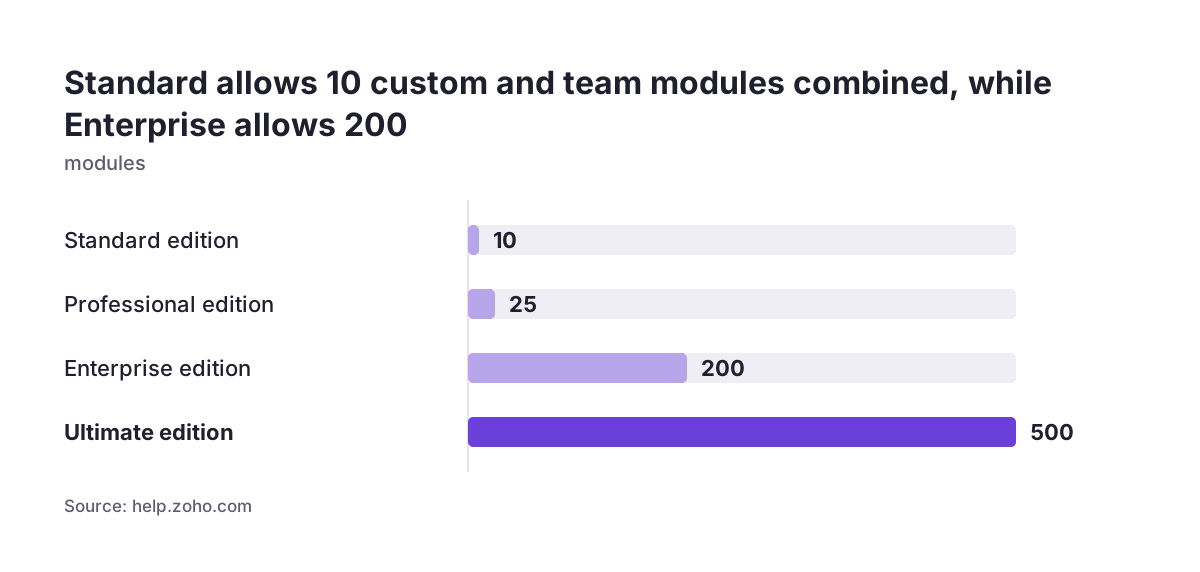
Your Zoho CRM edition sets how many custom modules you can build. Zoho publishes the limits below, counting custom modules and team modules together:
- Standard edition: 10 modules;
- Professional edition: 25 modules;
- Enterprise edition: 200 modules;
- Ultimate edition: 500 modules.
A firm on Standard with three team modules already has seven places left for everything else. That is enough for most small firms. It is not enough if every department wants its own list.
Field types also depend on the edition. Custom fields are not available in the Free edition of Zoho CRM. Formula fields are not available in the Standard edition. If your new process needs calculated values, check your edition before you design the module.
Downgrading has a specific effect on custom modules. If a lower edition does not support a custom module, Zoho hides that module's data from your account. The data appears again when you upgrade. You do not lose it, but your staff cannot use it in the meantime. Factor this in if you expect to change editions.
Creator apps sit outside these CRM module counts. That can matter to a firm that has used up its module allowance but does not want to move to a higher CRM edition.
Maintenance cost: what each option asks of you over time
A custom module costs least to maintain because it lives inside one system. Your CRM admin changes fields, layouts, workflow rules and reports in the same place as everything else. There is one set of permissions to review and one set of users to manage. No code is involved.
The ongoing risks of a custom module are few and specific:
- the edition's module limit, which caps how far you can grow;
- deletion, because data from a deleted custom module cannot be restored;
- downgrades, which hide unsupported custom module data until you upgrade again.
A Creator app asks for more over its lifetime. You maintain its forms, views, access rules and the connection to CRM, as well as CRM itself. Each change to a CRM field the app uses has to be checked on both sides. Someone on your team, or your partner, needs to know Creator well enough to test and release changes safely.
In return, a Creator app can grow without the CRM module ceiling. It can also serve people who have no reason to work in CRM. For the build and release side, our guide to building a Zoho Creator app and going live covers what to plan before launch.
A fair rule is to choose the option whose upkeep you can staff. A well-kept custom module beats a Creator app nobody on the team can change.
Decision table: custom module, team module or Creator app
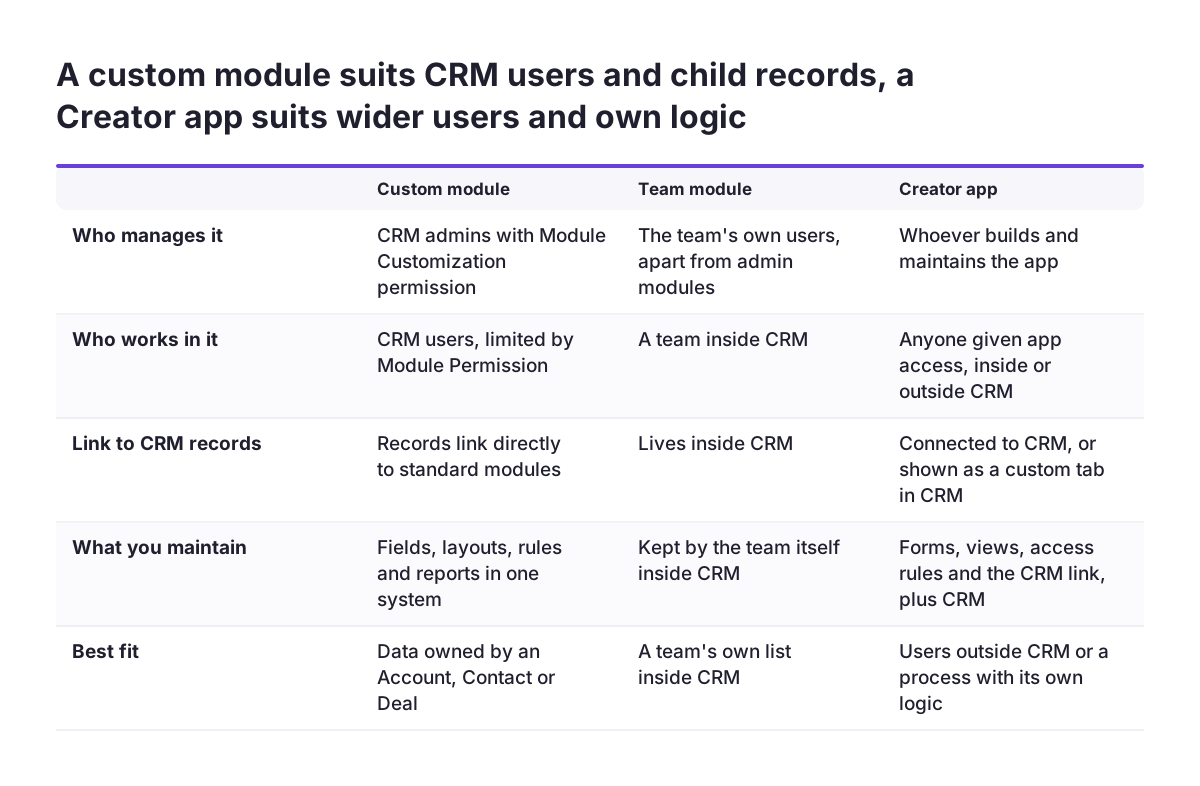
The table below compares the three ways to hold extra data against the questions in this guide. It uses Zoho's own descriptions of each option. Where a row has no clear winner, the answer depends on your users.
| Question | Custom module | Team module | Creator app |
|---|---|---|---|
| Who manages it? | CRM admins, with the Module Customization permission | The users themselves, separate from admin-managed modules | Whoever builds and maintains the Creator app |
| Who works in it? | CRM users, limited by Module Permission | A team inside CRM | Anyone given access to the app, inside or outside CRM |
| How does it relate to CRM records? | Records link directly to standard modules | Lives inside CRM | Connected to CRM, or shown as a custom tab inside it |
| Does it count toward CRM module limits? | Yes | Yes, combined with custom modules | No |
| Is code needed? | No, Zoho's built-in tools need no programming skills | No | Low-code build in Creator |
| What does upkeep look like? | One system, one admin | Owned by the team | A second system plus the CRM link |
Read the table from the top row down. If the first two rows point to CRM users and CRM admins, the custom module is almost always the right call.
Worked example: site surveys as a custom module, then as an app
Imagine an installer whose sales team books a site survey for each new account. The survey data belongs to the Account, and only sales and operations staff use it. That points to a custom module. The names below are illustrative, and the settings come from Zoho's documentation.
- Confirm your profile has the Module Customization permission. Admin profiles have it by default.
- Create a custom module called Site Surveys in the module builder. Add fields for survey date, surveyor and access notes, plus a lookup to Accounts.
- Set up the Quick create form so staff can add a missing Account from the survey lookup without leaving the page.
- Choose up to 5 fields for the business card, such as survey date, outcome and surveyor.
- Use Module Permission so only the Sales and Operations profiles see Site Surveys.
- Add a workflow rule for the follow-up step your team now does by hand, and a report on surveys per month.
Now picture the business a year on. Surveys are done by subcontractors who have no CRM logins. Each survey has many rooms and measurements. There is also a multi-step approval before a quote goes out. The data now has its own structure and its own users.
At that point a Creator app fits better. It can hold the forms and views the subcontractors need. Through Zoho CRM's Custom Apps feature, it can still appear as a tab inside CRM for the sales team. Before you migrate, test that Creator can reach your Site Surveys module, given the community report of a custom module not showing in Creator.
What this means for a UK company on Zoho CRM
For a UK firm, the edition you already pay for is usually the deciding constraint. A small firm on Standard has 10 modules, custom and team combined, and no formula fields. If a new process needs calculations or many modules, compare two costs. One is moving up an edition. The other is building the process in Creator instead.
Keeping personal data in fewer systems also makes governance simpler. A custom module holds customer data under the same CRM permissions you already review. A Creator app adds a second place where names, addresses and notes live. That second place needs its own access rules and its own review. Weigh that before splitting data out of CRM.
Check where new Zoho features are available before you plan around them. Zoho's announcement of Zoho Key Service, a CRM feature for using third-party language models without API keys, is one example. It lists the Professional, Enterprise and Ultimate editions in the US, IN, AU, JP and CA data centres. The UK is not in that list. If you plan AI automation on top of a new module, confirm the feature applies to your account first.
None of this changes the core test. It does mean a UK firm should read the edition and availability notes before committing to a design.
Next steps: test the decision before you build
A short written check will settle most cases between a custom module and a Creator app. Work through these steps with the person who owns the process:
- List everyone who will open the new records in a normal week, and mark who already has a CRM login.
- Write down which CRM record each new record belongs to: Account, Contact, Deal or none.
- Check your edition's module limit and whether you need custom or formula fields.
- List any process features you need, such as pipelines, and confirm they work in a custom module in your account.
- If Creator is in the running, build a test link to the exact CRM module before designing the app.
- Name the person who will maintain the result, and check they can work in the chosen tool.
If steps one and two point to CRM users and customer records, build a custom module and review it after a quarter of use. Remember that deleting a custom module is permanent. Settle the field list before you import real data.
If the check points the other way, or you want a second opinion on your design, our Zoho CRM implementation and consulting team can review the plan with you before any build starts.