


PECR and the soft opt-in: who a UK firm may email without consent
Here is the short answer on PECR and the soft opt-in: UK email marketing rules require consent before you email an individual, with two exceptions, one for existing customers and one, since February 2026, for charities. Under the customer exception, you may email someone who bought, or negotiated to buy, something from you. You must also have given them a free way to refuse, both at that moment and in every email since. Companies are different, because you may email a corporate body without consent.
PECR is the Privacy and Electronic Communications (EC Directive) Regulations 2003. The products and services soft opt-in is the exception in regulation 22 that lets you email existing customers about your similar products and services without their consent.
The same rule covers texts, picture and video messages, voicemails and social media direct messages, as well as email. The soft opt-in only protects you if you can prove its conditions for each contact. For most firms, that proof lives in the CRM.
This guide explains the rule, the 2026 change for charities, and how to record each contact's basis in Zoho CRM before sending from Zoho Campaigns. It is not legal advice. Where your case is unusual, a lawyer should look at it.
Regulation 22 covers individual subscribers, including sole traders
Regulation 22 of PECR governs unsolicited direct marketing by electronic mail to individual subscribers. A person must neither send nor instigate that marketing unless the recipient has previously told the sender they consent. The only other route is one of the exceptions in paragraphs (3) or (3A).
The ICO treats sole traders and some partnerships as individuals. An email to a plumber trading in their own name therefore falls under the consent rule, even though the plumber runs a business. By contrast, the ICO says you can email or text any corporate body. That means a company, a Scottish partnership, a limited liability partnership or a government body.
These three further rules from the ICO catch firms out:
- You must not disguise or conceal your identity. You must also give a valid contact address so people can opt out or unsubscribe.
- If you ask people to forward your message to friends, you are instigating that message and must still comply with PECR. The ICO advises against this kind of viral marketing.
- There is no email or text equivalent of the telephone preference service. The only suppression list is the one you keep yourself.
The type of recipient therefore decides the rule. Every contact record should say whether the recipient is a person or a corporate body.
The products and services soft opt-in has three conditions
The products and services soft opt-in, in regulation 22(3), lets you email an individual without consent only when all three conditions hold. If you miss one, you are back to needing consent.
- Where the details came from. You obtained the person's contact details in the course of a sale, or negotiations for the sale, of a product or service to that person.
- What you market. The marketing concerns your own similar products and services only.
- How they can refuse. You gave them a simple means of refusing. It must be free of charge apart from the cost of sending the refusal. You must offer it when you collect the details and in every message after.
The ICO spells out what the products and services soft opt-in does not cover. It does not apply to prospective customers or new contacts, for example contacts from bought-in lists. The ICO's brief guide also says it does not apply to non-commercial promotions such as charity fundraising or political campaigning. The charity position changed in 2026 under a separate charity soft opt-in, covered below.
Each condition is a fact about the past. If your CRM does not hold those facts, you cannot show that the soft opt-in applied. For an inherited list without that history, stop emailing those individuals. Do not email them to ask for consent, because that email is itself marketing. Collect consent through a channel you are allowed to use instead.
The charity soft opt-in since 5 February 2026, and an ICO page that lags behind
Since 5 February 2026, charities have their own soft opt-in. The Data (Use and Access) Act 2025 inserted paragraph (3A) into regulation 22 on that date. It also added a definition of charity in paragraph (5).
Under paragraph (3A), the sole purpose of the marketing must be to further one or more of the charity's charitable purposes. The charity must have obtained the contact details directly from the person when they expressed an interest in those purposes, or offered or provided support for them. It must also have given them a simple, free way to refuse marketing when it collected the details, and in every message since.
The ICO's own pages do not yet agree with each other. The brief email marketing page in the Guide to PECR carries a notice that it is under review because of the Data (Use and Access) Act. That page still says the soft opt-in does not apply to charity fundraising. The ICO's detailed guidance on direct marketing using electronic mail was updated on 28 April 2026. It describes the new charitable purposes soft opt-in and what happens if both soft opt-ins apply.
If you run a charity, work from the detailed guidance rather than the brief page. Have a lawyer confirm how the conditions fit your supporter journeys.
Who you may email without consent, and what to record: a decision table
The table below sets out whether you need consent for the recipients a UK firm usually meets, and what your records must show. It summarises regulation 22 and the ICO guidance. It does not replace either.
| Recipient | May you email without consent? | What your CRM should record |
|---|---|---|
| Individual or sole trader who bought from you or asked for a quote | Yes, under the soft opt-in, for your similar products and services only | Source (sale or negotiation), date, what they bought, opt-out offered at collection |
| Individual who signed up on your website | No, you need their consent | Consent date, form used, wording shown |
| Individual from a bought-in list, or a new prospect | No, the soft opt-in does not apply | Consent evidence, or a flag that says do not email |
| Company, LLP, Scottish partnership or government body | Yes, regulation 22 does not require consent | Subscriber type set to corporate, plus your do-not-email list |
| Supporter of your charity | Yes, under regulation 22(3A) since 5 February 2026, if its conditions are met | The charitable purpose, how they showed interest or gave support, the date, and proof that an opt-out was offered at collection |
| A customer's friend, reached through "forward to a friend" | No, you are still instigating the message | Nothing, because the ICO advises against this approach |
Two patterns cause most of the trouble. Some partnerships count as individuals, so record which kind of partnership each contact is. A company address can also belong to a named person, so put that case to your lawyer.
Recording the lawful basis for each contact in Zoho CRM
Zoho CRM does not know why you may email someone unless you record the reason. The fix is a small set of custom fields on the Contact and Lead records. Fill them in at the moment the details arrive, not months later.
These are the fields we suggest, with the reason for each:
- Subscriber type: a picklist with Individual, Sole trader or partnership, and Corporate body. Regulation 22 turns on this field.
- Marketing basis: a picklist with Consent, Soft opt-in (products and services), Soft opt-in (charity), Corporate and None.
- Contact source: a picklist with Sale, Quote or negotiation, Website form, Event and Imported list.
- Basis date and evidence: the date, plus a reference such as an order number, a quote number or the form name.
- Opt-out offered at collection: a checkbox, ticked only when the form, quote or order page carried a free way to refuse marketing.
If you have not added custom fields before, our guide on customising fields and layouts in your CRM covers the basics. Make Marketing basis mandatory on new records. Default it to None, so that silence never counts as permission.
At Svennis we add these fields before the first import, together with a filter that keeps any contact with a basis of None out of marketing lists. The gap we most often find at clients is an old list where nobody can say how the addresses arrived, and repairing that means chasing evidence one contact at a time.
Worked example: a sole trader's quote request becomes a lawful newsletter
This worked example follows one contact at an imagined UK firm, Zylker Ltd, which sells office furniture. The scenario is illustrative, and the steps apply the soft opt-in conditions described above.
- Jo Patel, a sole trader, asks Zylker for a quote through its website. The quote form says Zylker may send offers on similar products. It also gives a free way to say no to marketing emails. Jo does not opt out.
- The sales rep creates Jo as a contact in Zoho CRM. The rep sets Subscriber type to Sole trader or partnership and Contact source to Quote or negotiation. Marketing basis becomes Soft opt-in (products and services), the quote number goes in as evidence, and Opt-out offered is ticked.
- Jo joins the Zoho Campaigns list for Zylker's furniture newsletter. A mailing about Zylker's own chairs and desks fits "similar products and services".
- A mailing that promotes another firm's software would not fit. Zylker leaves Jo out of that send.
- Every newsletter carries a visible unsubscribe link. When Jo unsubscribes, Zylker records the refusal within the 48 hours Google recommends, and Jo stays out of future sends.
Zylker treats the quote request as negotiations for a sale. If your own case is less clear, ask a lawyer. Had Jo come from a bought-in list, Zylker would need Jo's consent first.
Setting up Zoho Campaigns: sender address, domain authentication and DMARC
Zoho Campaigns needs a verified sender address and an authenticated domain before your mail has a fair chance of reaching the inbox. Zoho strongly urges every account to authenticate its domain with SPF and DKIM. Only the organisation's admin can open the domain authentication settings.
DMARC is an authentication technique that uses SPF (Sender Policy Framework) and DKIM (DomainKeys Identified Mail) to validate emails. It lets you publish a policy telling receiving servers how to handle mail from your domain that fails those checks.
- Add a sender. Go to Settings, choose Manage Senders under Deliverability, then click Add Sender. You can enter up to five addresses at once. Use an address on your own domain, because Gmail warns that impersonating Gmail From headers might affect delivery.
- Verify the address. Click Verify your email address in the email that Zoho Campaigns sends. The address then appears under the Sender Address tab, and its domain appears under Domain Authentication.
- Copy the records. Go to Settings, then Domain Authentication under Deliverability. Click Setup on the row, then Copy next to each text record.
- Publish and verify. Add the SPF and DKIM TXT records at your DNS host, then verify the domain in Zoho Campaigns.
- Add DMARC. Publish your own DMARC record as a TXT record. A policy of p=none is enough to start. The record may take 24 hours to take effect.
A message passes DMARC when it passes either SPF with alignment or DKIM with alignment. SPF alignment needs the From address to match the return-path address. DKIM alignment needs the From address to match the record's d tag. If you run email alongside other channels, our page on Zoho Marketing Plus covers the wider suite.
Gmail's bulk sender rules: authentication, unsubscribe and spam rate
Gmail classes you as a bulk sender if you send close to 5,000 or more messages to personal Gmail accounts within 24 hours. It counts everything sent from the same primary domain, and bulk sender status is permanent. The rules do not apply to mail sent to Google Workspace accounts.
Under Google's email sender guidelines, every sender to Gmail needs SPF or DKIM. Unauthenticated messages might be marked as spam or rejected with a 5.7.26 error. Bulk senders must also meet these requirements:
- SPF and DKIM both set up, with at least one aligned to the From domain.
- A DMARC record, where a policy of none is acceptable.
- One-click unsubscribe through List-Unsubscribe headers under RFC 8058, plus a clearly visible unsubscribe link in the body of marketing messages.
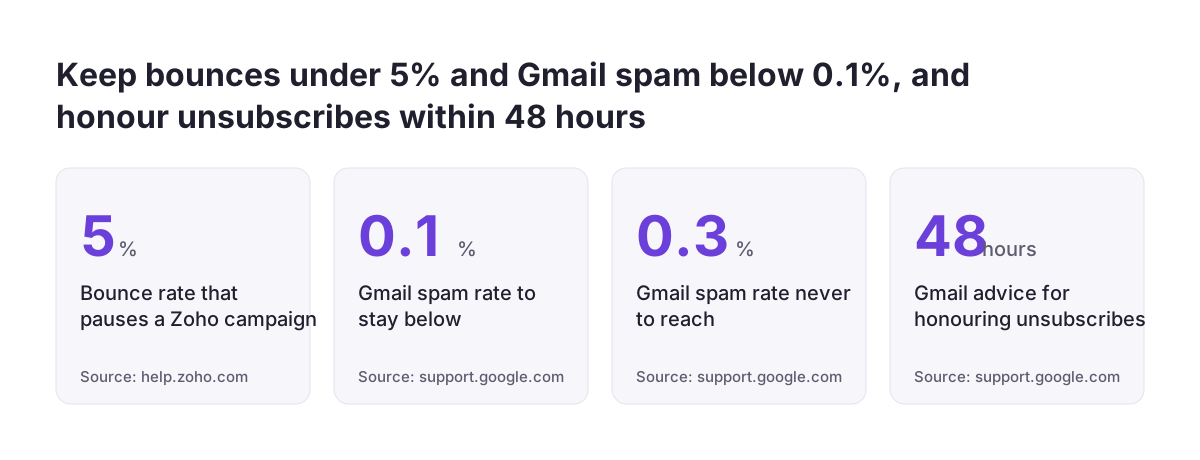
- A spam rate in Postmaster Tools below 0.3%, and Google advises keeping it below 0.1%.
Since November 2025, Gmail has been ramping up enforcement, including temporary and permanent rejections. The Zoho help pages cited in this guide do not confirm that Campaigns adds the one-click header. Send a test campaign to a personal Gmail address and check the message headers for List-Unsubscribe yourself.
Bounces, spam rate and unsubscribes: the numbers to check each month
A monthly check of bounces, spam rate and unsubscribe handling tells you whether your list and your sending practice are still healthy. The table below shows each threshold and what happens when you cross it.
| Measure | Threshold | What happens |
|---|---|---|
| Bounce rate per campaign | Above 5% | Zoho Campaigns pauses the campaign and resumes after 24 hours. A second breach cancels it permanently. |
| Hard bounces | Any | The address generally goes straight to the Bounced list. |
| Soft bounces | Around seven per address | Zoho retries within five days. After about seven soft bounces, it treats the address as a hard bounce. |
| Spam rate in Postmaster Tools | Below 0.1% advised, never 0.3% | Above 0.3%, Gmail makes you ineligible for mitigation until you stay below it for 7 consecutive days. |
| Unsubscribe requests | Within 48 hours | Google recommends this timeframe. |
Hard bounces matter most, because Zoho says a rising hard bounce rate damages your sender reputation and may lead to blacklisting. Zoho advises avoiding purchased lists, using double opt-in and authenticating your domain. Add one CRM check: no contact with a basis of None should sit in a marketing list. If you use email marketing automation, run that check whenever a journey adds contacts to a list.
What PECR means for a UK firm deciding who to email
For a UK firm, PECR splits the mailing list in two. Emails to companies, LLPs, Scottish partnerships and government bodies need no consent under regulation 22. Emails to individuals, sole traders and some partnerships need consent or a soft opt-in. Most B2B lists mix both groups, so the Subscriber type field does real work.
Keep one do-not-email list that covers every recipient, corporate or not. The ICO requires a valid contact address in every message so people can opt out. There is also no national email preference service to catch refusals for you.
Sync only contacts with a valid basis from Zoho CRM into Zoho Campaigns. That choice reduces risk, and it also affects cost. Zoho Campaigns pricing sets paid plans by contact tier, starting from 500 contacts. If a sync pushes you past the contacts you have bought, Zoho upgrades the account automatically and charges the difference on the next billing date.
A lawyer should look at your position in four situations:
- You run a charity and want to use regulation 22(3A).
- Your list holds partnerships whose status you cannot confirm.
- You inherited a list with no record of its source.
- You track opens, because the ICO says tracking pixels fall under PECR's separate rules on storage and access technologies, not the email marketing rules.
Next steps: audit the list, add the fields, then send
You can put the soft opt-in on a sound footing in a few working sessions. Work through these steps in order:
- Export your current marketing list and mark each contact as an individual or a corporate body.
- For each individual, find the sale, quote or form that brought them in. Where you cannot find one, stop mailing that contact until you have consent.
- Add the Subscriber type, Marketing basis, Contact source, evidence and opt-out fields in Zoho CRM. Make Marketing basis mandatory, with None as the default.
- Check every collection point, including quote forms, checkout pages and event sign-ups, for a free way to refuse marketing.
- Authenticate your domain in Zoho Campaigns and publish a DMARC record with p=none.
- Send a test to a personal Gmail address and inspect the headers and the unsubscribe link.
- Book a monthly review of bounces, spam rate, unsubscribes and contacts with a basis of None.
If you would rather have the fields, sync and domain set up for you, our Zoho partner services for UK firms cover that work.
Sources
- ICO: Electronic mail marketing (Guide to PECR)
- ICO: Guidance on direct marketing using electronic mail
- legislation.gov.uk: PECR 2003, regulation 22
- Zoho Campaigns: Pricing and plans
- Zoho Campaigns Help: Bounces
- Zoho Campaigns Help: DMARC
- Zoho Campaigns Help: Steps to authenticate your sender domain
- Gmail Help: Email sender guidelines FAQ
- Gmail Help: Email sender guidelines