


Weekly Companies House check with a Zoho CRM schedule: what it does and when to use it
A weekly Companies House check with a Zoho CRM schedule is a Deluge function that Zoho CRM runs every week without anyone pressing a button. It reads the company number on each customer account and asks Companies House for that company's current status. When a healthy company is dissolved, enters liquidation or administration, or faces a proposal to strike off, the account owner gets a high-priority task.
Deluge is Zoho's scripting language, and a function is a Deluge script that Zoho CRM runs for you. The Companies House Public Data API is the service that returns a UK company's public record, including its status, as data a script can read. With the check in place, the account owner hears about a change before it affects a deal or an invoice.
This guide is one of three UK posts on Zoho CRM automation with code. Each tool suits a different moment:
- A client script checks the format of VAT and company numbers while someone types, so malformed numbers never reach the record.
- A workflow function checks a company against Companies House when an account is saved, as described in checking Companies House from a Zoho CRM workflow.
- The schedule in this post rechecks the customers you already have, because their status can change at any time.
The code checks company status only. The Companies House company profile also carries SIC codes, accounts dates and confirmation statement dates, and this post leaves those alone.
Why a schedule catches Companies House changes that a workflow misses
A schedule catches Companies House changes because the change happens at Companies House, not in your CRM. A Zoho CRM workflow rule runs when something happens to a record, such as a save. When a customer goes into administration, nobody touches its account in Zoho CRM. No record event fires, so a workflow never looks.
Zoho defines schedules as "automated user-defined actions, which can be performed through Functions either at a particular time or on a recurring basis". Every schedule must be linked to a function. That makes a schedule the right tool for anything that changes outside the CRM on its own timetable.
The three tools in this series compare as follows.
| Tool | When it runs | What it catches | Companies House calls |
|---|---|---|---|
| Client script | While a user fills in the account form | A malformed VAT or company number | None |
| Workflow function | When an account record is saved | A wrong or unknown company at entry | One per saved record |
| Schedule (this post) | Weekly, or daily for larger customer lists | A status change on an existing customer | Up to 300 per run |
The workflow and the schedule are built to run side by side. They write to the same account fields, and they share one Companies House rate limit. That shared limit is why the schedule deliberately leaves half of it unused.
Zoho CRM and Companies House limits that set the size of each run
Published limits on both sides decide how much one run of the schedule can do. Companies House allows 600 requests in any five-minute period, according to its rate limiting guide for the Companies House API. Go over it and every further request in that window returns HTTP status 429, Too Many Requests. At the end of the period the limit resets to 600.
| Limit | Value | Effect on this function |
|---|---|---|
| Companies House requests | 600 per five minutes, then 429 | Each run stops at 300 calls |
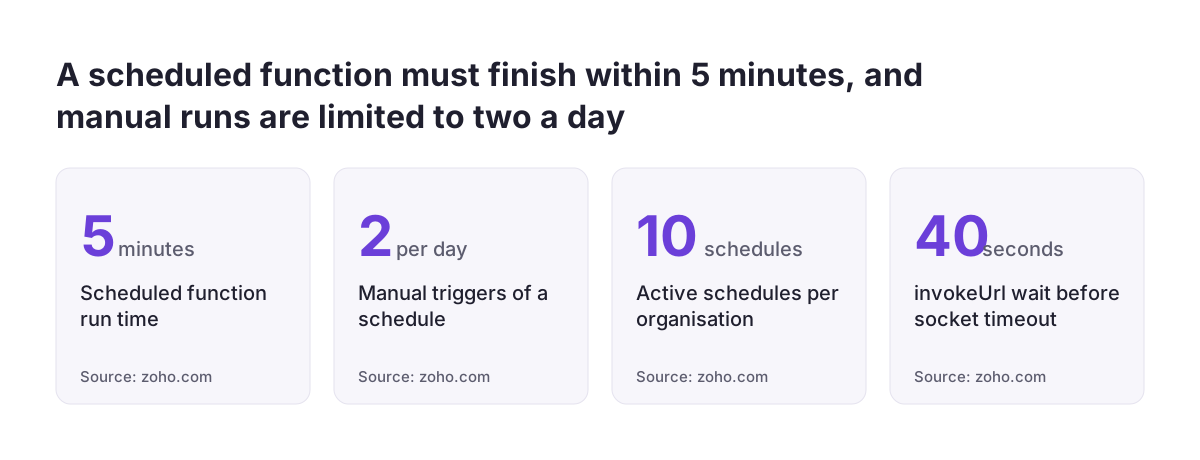
| Schedule function run time | 15 minutes or 5 minutes, depending on the Zoho page | Keep each run short |
| Lines of execution | 200,000 per invocation | The loop reads at most ten pages |
| Active schedules per organisation | 10 | The check uses one slot |
| Manual Run Now | Twice per day | Test in the editor instead |
| invokeUrl reply time | 40 seconds, then a socket timeout | A slow reply still uses time |
Zoho's own pages disagree on run time. The Functions limits page gives a schedule function 15 minutes before it is forcefully terminated. The Zoho CRM help page on custom schedules says a scheduled function "should run within span of 5 mins". Design for the shorter figure, which is one more reason to cap the calls.
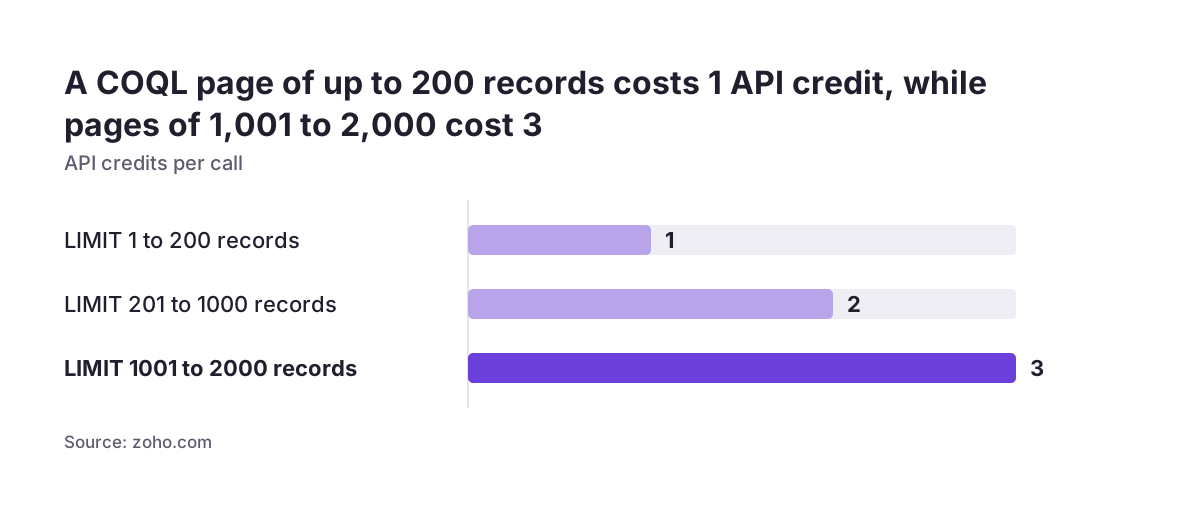
The two COQL pages also differ. The COQL overview allows up to 2,000 records per call, while the Get Records page says one call fetches at most 200 records and 50 fields. The code asks for 200 at a time, which satisfies both and costs one API credit per page.
Companies House also states that it may ban without notice applications that regularly exceed or try to bypass its limits. If you need more, it invites you to contact it for a higher limit.
Three design choices: a 300-call cap, a last-checked date and one task per change
A cap of 300 Companies House calls per run
The function stops after 300 Companies House requests, half of the 600 allowed in five minutes. The other half stays free for the workflow function, which may be checking a new account at the same moment. Each invokeUrl execution counts as a separate call, so a request inside a loop that runs 300 times makes 300 calls.
A last-checked date that moves only for accounts actually read
Each account carries a date field that records its last check. The query picks only accounts whose last check is empty or six or more days old. If Companies House answers 429, the run stops at once, and the unread accounts keep their old date. The next run picks them up.
A task only when a healthy company turns at risk
The function compares the status it stored last time with the status Companies House returns now. It creates a task only when the old status was healthy and the new one is not. A company that has been in liquidation for a month does not produce a fresh task every week.
Daily runs for larger customer lists
With more than about 300 customer accounts, one weekly run cannot reach them all. Set the schedule to run daily instead. Because the six-day filter skips anything checked recently, each account is still read about once a week.
What you need first: edition, permissions, fields and two connections
You need a Zoho CRM edition with full access to functions. Zoho lists Enterprise, CRM Plus, Ultimate and Zoho One; on Standard and Professional, functions are only available through Extensions. Creating the function needs the Manage Extensibility permission, under Developer Permissions in profile settings. Configuring the schedule needs the Manage Workflow permission.
The code reads and writes these fields on the Accounts module. The API names are examples: create the fields if they do not exist, check the exact API names in your own org and change the code to match.
Company_Number: a text field holding the Companies House number.Company_Status: a text field for the status Companies House returns.Company_Status_Detail: the extra text field for the status detail, such as a proposal to strike off.CH_Checked_On: a date field for the last check.Account_Type: the account type picklist; the code only checks accounts whose value is Customer.
If you followed the workflow post, some of these fields may already exist. Adding fields to a module is covered in how to customise your CRM.
The function also uses two connections, and their names must match the code exactly:
companies_house: Basic authentication, with your Companies House API key as the username.crm_coql: Zoho OAuth to Zoho CRM, with the scopesZohoCRM.coql.READandZohoCRM.modules.accounts.READ.
Build and test everything in a sandbox first, not in your live org.
Function code, part one: settings and paging through customer accounts with COQL
The first part of the function sets the run's limits and fetches customer accounts that are due a check. Create a function in the Schedule category, open it in the Deluge Script Editor and paste this block first. It stops part-way through the page loop; parts two and three continue directly below it.
void schedule.ch_weekly_status_check()
{
	MAX_CH_CALLS = 300;	// half of the 600 per 5 minutes; the rest stays free for the workflow
	STALE_DAYS = 6;	// an account is checked again once its last check is 6 or more days old
	CRM_API = "https://www.zohoapis.eu";	// .com for a US data centre org
	todayText = zoho.currentdate.toString("yyyy-MM-dd");
	cutoffText = zoho.currentdate.subDay(STALE_DAYS).toString("yyyy-MM-dd");
	dueText = zoho.currentdate.addDay(3).toString("yyyy-MM-dd");
	chCalls = 0;
	flagged = 0;
	stop = false;
	lastId = "0";
	pageSlots = {1,2,3,4,5,6,7,8,9,10};
	for each slot in pageSlots
	{
		if(stop)
		{
			break;
		}
		q = "select id, Account_Name, Company_Number, Company_Status, Company_Status_Detail, Owner";
		q = q + " from Accounts where ((Company_Number is not null and Account_Type = 'Customer')";
		q = q + " and ((CH_Checked_On is null or CH_Checked_On < '" + cutoffText + "')";
		q = q + " and id > " + lastId + ")) order by id asc limit 0, 200";
		qm = Map();
		qm.put("select_query",q);
		cr = invokeurl
		[
			url :CRM_API + "/crm/v8/coql"
			type :POST
			parameters:qm.toString()
			connection:"crm_coql"
			detailed:true
		];
		if(cr.get("responseCode").toString().toLong() != 200)
		{
			break;
		}
		page = cr.get("responseText").toString().toMap();
		rows = page.get("data");
		if(isNull(rows))
		{
			break;
		}
COQL, short for CRM Object Query Language, lets a script fetch Zoho CRM records with SQL-like queries that use module and field API names. The COQL endpoint is {api-domain}/crm/{version}/coql. It takes a POST even though you are reading, because you post the query. The invokeUrl task is Deluge's HTTP client. With detailed:true it returns the response code, headers and content, so the script can test the code before reading the data.
The query pages by record id rather than by offset. In COQL, limit 0, 200 means offset 0 and 200 records. Each checked account drops out of the filter as its date changes, which would shift positions under an offset. Asking for ids above the last one read avoids that.
These are the lines you are most likely to change:
CRM_API: the EU data centre's API domain. The comment notes.comfor a US org; other data centres use their own domain.MAX_CH_CALLSandSTALE_DAYS: the call cap and the recheck interval.dueText: tasks fall due three days after the run.- The field names and the
'Customer'value in the query.
Function code, part two: calling Companies House for each account
The second part loops through the page of accounts and asks Companies House about each one. Paste it directly below part one, inside the same page loop.
		for each row in rows
		{
			if(chCalls >= MAX_CH_CALLS)
			{
				stop = true;
				break;
			}
			lastId = row.get("id").toString();
			num = row.get("Company_Number").toString().toUpperCase().replaceAll("[^A-Z0-9]","");
			if(num.matches("[0-9]{1,7}"))
			{
				num = ("0000000" + num).right(8);
			}
			oldStatus = "";
			if(!isNull(row.get("Company_Status")))
			{
				oldStatus = row.get("Company_Status").toString();
			}
			oldDetail = "";
			if(!isNull(row.get("Company_Status_Detail")))
			{
				oldDetail = row.get("Company_Status_Detail").toString();
			}
			newStatus = "";
			newDetail = "";
			chCalls = chCalls + 1;
			resp = invokeurl
			[
				url :"https://api.company-information.service.gov.uk/company/" + num
				type :GET
				connection:"companies_house"
				detailed:true
			];
			code = resp.get("responseCode").toString().toLong();
			if(code == 429)
			{
				// window used up: stop here, the rest are picked up by the next run
				stop = true;
				break;
			}
			if(code == 404)
			{
				newStatus = "not-found";
			}
			else if(code == 200)
			{
				p = resp.get("responseText").toString().toMap();
				if(!isNull(p.get("company_status")))
				{
					newStatus = p.get("company_status");
				}
				if(!isNull(p.get("company_status_detail")))
				{
					newDetail = p.get("company_status_detail");
				}
			}
			else
			{
				info "CH HTTP " + code + " for " + num;
				continue;
			}
Before each call, the function checks the 300-call cap and records the account's id, so the next page starts after it. It then tidies the company number. It removes spaces and punctuation, converts letters to capitals and pads a number of one to seven digits with leading zeros to eight characters. A number typed as 1234567 is sent as 01234567.
The request goes to the Companies House company profile for that number. The response code decides what happens next:
- 200: the function reads
company_statusand, if present,company_status_detail. - 404: Companies House found no company under that number, and the status becomes
not-found. - 429: the rate window is used up, so the run stops and the remaining accounts wait for the next run.
- Any other code: the function logs the code and number with
info, skips the account and leaves its last-checked date unchanged.
Each invokeUrl call waits up to 40 seconds for a reply before Deluge throws a socket timeout error. Every call also counts towards the organisation's daily Invoke URL quota of 5,000,000 requests, which applies across all functions together. You rarely need to change anything in this block.
Function code, part three: updating the account and creating one task
The third part writes the result back to the account and creates a task when a healthy company becomes at risk. Paste it directly below part two; it closes the loops and the function.
			upd = Map();
			if(newStatus != oldStatus)
			{
				upd.put("Company_Status",newStatus);
			}
			if(newDetail != oldDetail)
			{
				upd.put("Company_Status_Detail",newDetail);
			}
			upd.put("CH_Checked_On",todayText);
			zoho.crm.v8.updateRecord("Accounts",lastId.toLong(),upd,{"trigger":List()});
			// A task only when a healthy company becomes at risk, so no weekly duplicates
			strike = "active-proposal-to-strike-off";
			newRisk = false;
			if(newStatus != "active" || newDetail == strike)
			{
				newRisk = true;
			}
			oldRisk = false;
			if(oldStatus != "" && (oldStatus != "active" || oldDetail == strike))
			{
				oldRisk = true;
			}
			if(newRisk && !oldRisk)
			{
				flagged = flagged + 1;
				statusText = newStatus;
				if(newDetail != "")
				{
					statusText = newStatus + " (" + newDetail + ")";
				}
				task = Map();
				subject = "Companies House: " + row.get("Account_Name") + " is " + statusText;
				task.put("Subject",subject);
				task.put("Due_Date",dueText);
				task.put("Priority","High");
				task.put("Owner",{"id":row.get("Owner").get("id")});
				task.put("What_Id",{"id":lastId});
				task.put("$se_module","Accounts");
				zoho.crm.v8.createRecord("Tasks",task,{"trigger":List()});
			}
		}
		if(page.get("info").get("more_records") != true)
		{
			break;
		}
	}
	info "CH weekly: calls " + chCalls + ", flagged " + flagged + ", stopped early " + stop;
}
The update map only includes status fields that changed, but it always sets CH_Checked_On to today, so the account leaves the queue for six days. The update passes an empty trigger list as its last argument. Its purpose is to keep the write from setting off other automation, and you should confirm that behaviour in your sandbox.
The risk test treats any status other than active as at risk. An active company with the detail active-proposal-to-strike-off also counts as at risk. An empty old status counts as not at risk, which is why the first run needs care.
The task goes to the account owner, falls due in three days and has High priority. Its subject reads "Companies House: [account name] is [status]", with the detail in brackets when there is one. What_Id, with $se_module set to Accounts, links the task to the account; Zoho documents What_Id support for Tasks, Calls and Events only. To change the priority or wording, edit the Priority and subject lines. The final info line logs the calls made, the accounts flagged and whether the run stopped early.
Worked example: a first run with tasks switched off, then the weekly schedule
Run the function by hand with task creation switched off before you schedule it. On the first run every stored status is empty. Every company already dissolved or in liquidation would therefore count as newly at risk and create a task, even when the change is years old.
At Svennis we always make this first pass with tasks off and read the flagged count in the log before any owner receives a task. It turns a burst of old news into one short list that someone reviews once.
Follow these steps in your sandbox:
- Put
//at the start of thezoho.crm.v8.createRecordline and save the function. - Run the function from the editor and read the log line, which shows calls, flagged and stopped early.
- If stopped early is true, more accounts are waiting. Run again after five minutes, once the Companies House window has reset.
- When stopped early is false, every customer has a stored status. Review the accounts already at risk, then remove the
//and save. - Go to Setup > Automation > Schedules and click Create your First Schedule.
- Give the schedule a unique name and set the Frequency field to Weekly, or Daily for more than about 300 customers.
- Pick a start date no more than one year ahead and choose the function.
Once the schedule exists, a manual Run Now is allowed only twice a day, so do further hand-testing in the editor. Failed runs appear under the Failure tab on the Schedules page for as long as they remain in the CRM Audit logs. Each Deluge run uses one function credit from your organisation's daily allowance.
What a changed company status means for a UK business
A changed status at Companies House is a signal to act on an account, not an automatic verdict. The company profile records a jurisdiction such as england-wales, scotland or northern-ireland, so one check serves customers registered anywhere in the UK.
The code flags every status other than active. Companies House lists values including dissolved, liquidation, receivership, administration, voluntary-arrangement, insolvency-proceedings, converted-closed and removed. A number that returns nothing is stored as not-found. That may be a mistyped number in the CRM rather than a failed business, so the owner should check which.
For a UK firm that sells on account, the task is the prompt to check before the next quote, order or invoice. Agree in advance who acts on it. The account owner might confirm the position, while finance decides on credit and open invoices. Write that rule down beside the schedule so no task sits unread.
Some company records are not held in full at Companies House. The profile returns partial_data_available when Companies House is not the primary source of data for the company, so treat those accounts with extra care. The API tells you the status. It does not tell you what that status means for your contract, which is a question for your own advisers.
Next steps: from sandbox test to a live weekly check
Start small and in a sandbox. This order takes you from nothing to a live weekly check:
- Confirm your edition supports functions and that you hold the Manage Extensibility and Manage Workflow permissions.
- Create or check the five account fields and note their API names.
- Create the two connections with the exact names used in the code.
- Paste the three parts, set
CRM_APIfor your data centre and run with task creation switched off. - Switch tasks on, create the schedule and check the Failure tab after the first scheduled run.
If you have not yet added a check at data entry, set up the workflow function as well, so new accounts start with a verified number. For the tools around functions and automation, intermediate Zoho CRM features beyond the basics gives the wider picture. If you would rather have the build, fields and connections set up for you, see our Zoho CRM implementation and consulting page.