


Zoho CRM API limits and credits: how they are counted
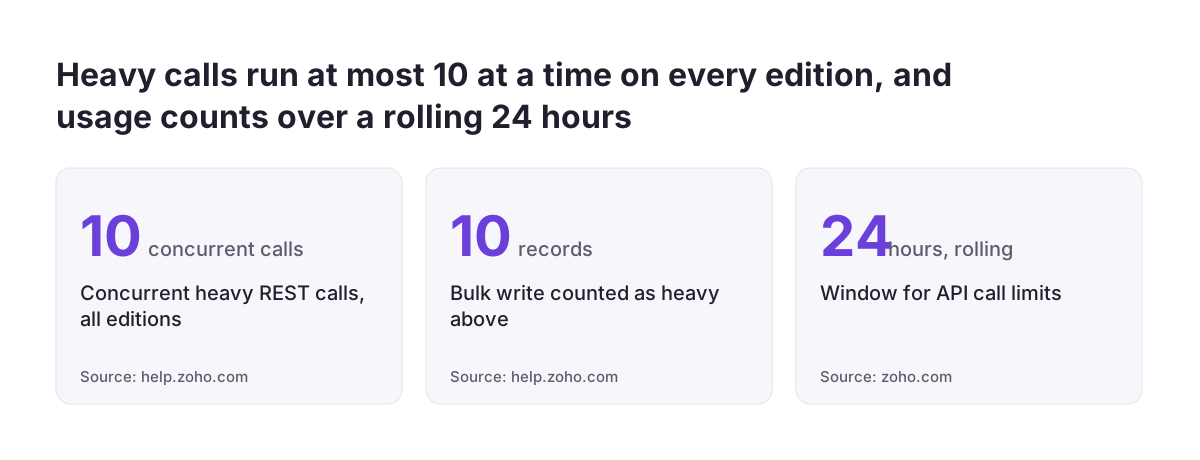
A Zoho CRM API credit is the unit Zoho uses to count the work your integrations ask of the CRM. Your edition sets the Zoho CRM API limits and credits you can use. Every REST and GraphQL call consumes credits. The number depends on how intensive the call is. Usage is measured over a rolling 24 hours, and separate concurrency limits cap how many calls can run at once.
Zoho's own developer team describes the rule plainly in its comparison of Zoho CRM REST and GraphQL APIs. Both kinds of call "are associated with credits", and the credits consumed depend on "the intensity of the API call". A simple read costs less than a heavy query or a bulk write.
Zoho publishes the allowance for each edition in its API limits documentation. Check the figure for your own edition there. Second-hand figures in forums are often wrong or partial. One Professional Edition user reported hitting a limit of 250 requests per organisation per day for certain API methods.
Another user on a 10-user Enterprise account believed the limit was 250 requests per user. That user could not tell whether it applied per type of request or across all requests. The confusion is common, which is why this guide works from how credits are consumed rather than from a single number.
If the idea of systems talking to each other through an API is new to you, start with our explainer on API integration.
The 24-hour rolling window has no midnight reset
Zoho CRM counts API calls over a rolling 24-hour window in the current API versions. The Zoho CRM API version comparison states that version 2.0 limits are "based on 24 hour rolling window". The old version 1.0 counted calls against the PST timezone.
A rolling window changes how you plan jobs. With a calendar-day limit, credits come back at a fixed moment each night. With a rolling window, a call made at 02:00 on Tuesday still counts against you until 02:00 on Wednesday. No reset is coming. A heavy job that runs at night therefore reduces what your daytime users and integrations can do the following morning.
Three practical consequences follow for anyone scheduling integrations:
- Spreading a large job across the day does not create extra credits. It only avoids a single spike.
- A runaway loop at any hour drains the budget for the next 24 hours, not just until midnight.
- An integration written against version 1.0 assumed a PST reset. Its schedule may no longer make sense under the rolling window.
The sensible design is a steady, predictable consumption pattern. Size each scheduled job, know when it runs, and leave headroom for the calls your staff trigger during the working day through widgets, buttons and extensions.
Concurrency and sub-concurrency limits apply even when credits remain
Concurrency is the limit on how many Zoho CRM API calls can be active at one time. It varies across editions of Zoho CRM. Concurrency is separate from the daily credit allowance. An integration with plenty of credits left can still be refused because it is running too many calls in parallel.
Zoho adds a tighter limit, called sub-concurrency, for the most resource-intensive REST APIs. According to Zoho's Kaizen #173 post, the sub-concurrency limit is 10 across editions. The calls it covers include:
- Convert Lead
- Send Mail
- Query API
- Composite API
- Insert, Update or Upsert records, when the record count is greater than 10
Bulk writes are where teams meet sub-concurrency most often. A sync tool that splits a large update into many batches and fires them all at once can exceed 10 active heavy calls in seconds. The same happens when several integrations write in bulk at the same moment.
The fix is a queue. Send heavy calls through a single worker, or a small fixed pool, so the number in flight never approaches the limit. Retry refused calls after a pause rather than immediately. An immediate retry adds to the pile-up that caused the refusal.
Where integrations run out of credits: polling, paging and per-record calls
Most Zoho CRM integrations that run out of credits do so through a handful of predictable patterns. The volume of data is rarely the problem on its own. The shape of the calls is.
Polling for changes the CRM does not flag
Polling means asking the CRM again and again whether anything has changed. It is expensive when the change leaves no trace on the record. A Zoho community thread on API usage gives a clear case. Adding an attachment to a Lead does not change the Lead's "Modified" or "Last Access" times, whereas adding a Note does. Detecting new attachments therefore means querying every record, every time.
Paging through large lists
Version 2.0 GET calls return 200 records per page by default. The response carries an info object with a more_records field. That field tells you whether another call is needed for the next page. A full read of a large module costs one call per page, on every run.
One call per record
Writing one record per call multiplies usage when a batch would do the same job. Assembling a screen from several REST endpoints has the same effect. Each widget load can become four or five calls.
At Svennis, when a client's integrations start hitting the limit, we first list every connected application and its schedule before changing any code. The heaviest consumer is often a polling job that nobody remembers setting up.
Worked example: estimating calls for a contact read and a services update
Estimating Zoho CRM API usage starts with counting calls, job by job. Credits come second. Take a field-service firm with two nightly jobs. The first reads 6,000 contacts into a scheduling tool.
The second job pushes updated details back to the Services module. The contact total is an illustrative figure. The limits are Zoho's.
The read job uses GET calls at the default of 200 records per page. 6,000 contacts divided by 200 gives 30 calls per run. The job stops when more_records returns false.
The write job uses the Update Services API. That API sends PUT /Services__s with the OAuth scope ZohoCRM.modules.services.UPDATE. It accepts up to 100 services per call, and an organisation can have at most 500 active services. Updating all 500 one at a time costs 500 calls. Batching costs 5.
| Job | Approach | Calls per run |
|---|---|---|
| Read 6,000 contacts | GET, 200 per page | 30 |
| Update 500 services | One service per call | 500 |
| Update 500 services | 100 services per call | 5 |
The batched design needs 35 calls a night instead of 530. Each batch of 100 is an update of more than 10 records, so it falls under sub-concurrency. Run the five batches one after another rather than in parallel. Finally, convert calls to credits using Zoho's published credit table. Heavier calls weigh more than simple ones.
GraphQL or REST for read-heavy widgets and extensions
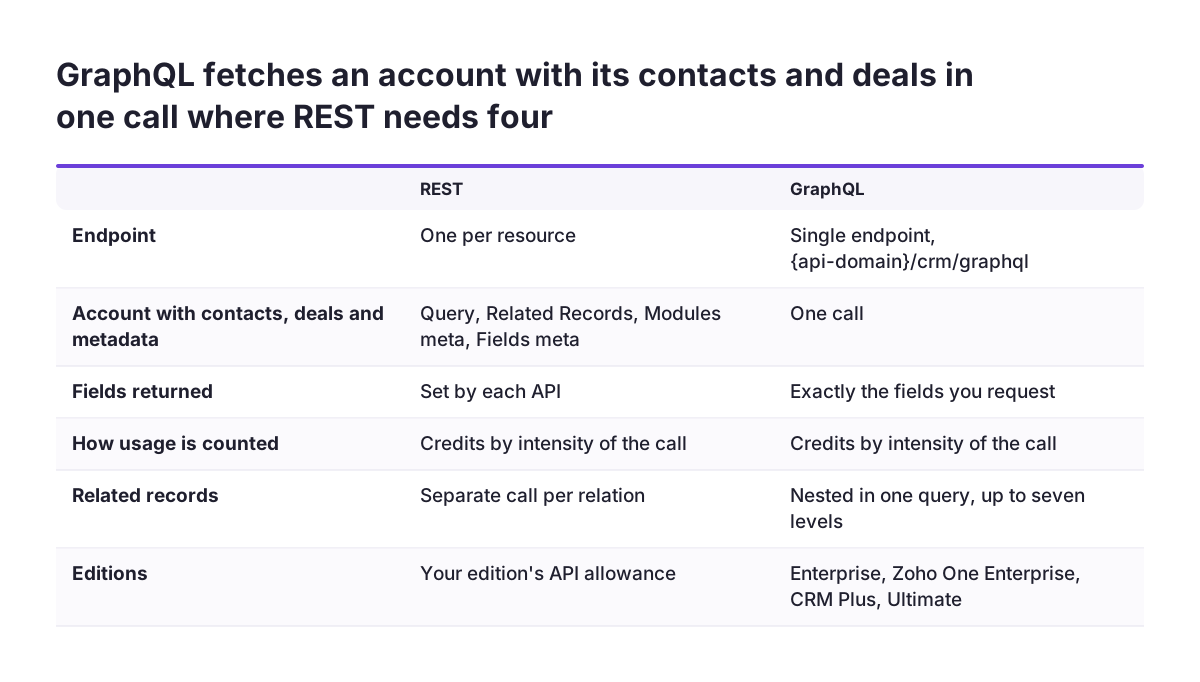
Zoho CRM offers two API architectures, REST and GraphQL. For read-heavy work, the choice affects how many calls you make. GraphQL runs through a single endpoint, {api-domain}/crm/graphql. It lets you ask for exactly the fields you need, across related records, in one request.
Two terms explain the difference. Over-fetching is when the client receives much more data than it needs. Under-fetching is when the client has to send several requests to get all the data it needs. Zoho's example is an account shown with its contacts, deals and field metadata.
In REST, that account view needs the Query, Related Records, Modules meta and Fields meta APIs. In GraphQL it is one call.
GraphQL has its own conditions, all from Zoho's Kaizen #173 post:
- It is supported only for Enterprise, Zoho One Enterprise, Zoho CRM Plus and Ultimate edition orgs. It is not available on trials of those editions.
- It supports queries only, so writes still go through REST.
- Query depth, the nesting level of a requested field, is limited to seven.
- GraphQL calls also consume credits. Query complexity rises with the number of fields and the depth.
- Responses mostly return status 200, with a few errors returning 400. Your error handling must read the response body.
REST remains available on every Zoho CRM edition, including trials. For a widget on a busy record page in an eligible edition, a single lean GraphQL query is usually the better design.
Design checklist for syncs, widgets and extensions within the limits
Each type of Zoho CRM integration consumes credits and concurrency in its own way. The table below sets out the main patterns, what uses up the budget in each, and the design choice that keeps it under control.
| Pattern | What uses the budget | Design choice |
|---|---|---|
| Scheduled sync | One call per page on every run | Read only changed records where the data allows it; page at 200 and stop on more_records false |
| Change detection | Querying every record when changes leave no timestamp | Avoid fields that do not update "Modified"; detect the change at the source instead |
| Bulk write | Many single-record calls; sub-concurrency above 10 records | Batch to the API's maximum and send batches through a queue |
| Widget on a record page | Several calls on every page load | One GraphQL query where the edition supports it; cache metadata |
| Extension used by many staff | Calls multiplied by users and clicks | Fetch only on demand, not on every open |
| Write that fires automation | Workflows, approvals and blueprints set off by the write | Set the trigger key deliberately in insert, update and upsert calls |
Do not count on capping each connected app from the console. In a Zoho community thread, a user asked whether request limits could be set per Server-based Application client in api-console.zoho.com, because their licence had limited credits. Build a budget into each integration instead. A sync can count its own calls and stop at a ceiling you choose. Our intermediate Zoho CRM guide covers the configuration side of these choices.
Monitoring API usage: who can see it and what the warning email says
Zoho CRM API usage data is the number of API calls made today and the daily limits. According to a user in the Zoho community, it is visible only to the Zoho root administrator account. Non-admin users can make API calls but cannot see usage data anywhere. The same user asked Zoho to expose usage through the API itself, so integrations could watch and limit their own consumption.
The practical result is that your integrations cannot rely on reading the remaining allowance from Zoho. Each integration should keep its own log of calls made, by job and by hour. Your administrator should check the usage figures in the CRM regularly. Comparing the two quickly shows which job is growing.
Prepare your staff for the warning email as well. A user on the Zoho community thread on the API limit reported that the limit-exceeded email went to all users in their organisation. It also stated that "data will be lost", which the user considered inaccurate and alarming. A short internal note tells people what the email means and who deals with it. That avoids a morning of worried messages to the person who looks after the CRM.
Treat the warning as a signal to find the job that spiked, not as an emergency. Under the rolling window, credits return as the calls that caused the spike age past 24 hours.
What the API limits mean for a UK company running Zoho CRM
A UK company feels the Zoho CRM rolling window in a specific way. Usage never resets at UK midnight or at any fixed hour. Overnight jobs, the working day and evening activity from remote staff all draw on the same 24-hour budget. If you inherited an older integration written for version 1.0, its schedule was built around a PST reset. Check whether that assumption still holds.
Edition choice matters more than many UK firms expect when they first sign up. Concurrency varies by edition. GraphQL, which can collapse several reads into one call, is only available on Enterprise, Zoho One Enterprise, CRM Plus and Ultimate. A firm on a lower edition with a busy widget may be paying for extra calls through design rather than licence.
A typical UK small or mid-sized business connects Zoho CRM to an accounting package, a website form, an email tool and perhaps a scheduling app. Each connection draws on the same organisation-wide budget. Upgrading the edition is one answer. Redesigning the heaviest integration is often the cheaper one. Do the call count from the worked example first, then decide.
If you are still working out which edition and modules suit your firm, our Zoho CRM implementation page sets out how we approach the build for UK teams.
Next steps: audit your integrations before you change edition
An audit of your Zoho CRM integrations tells you whether you need more credits or better-designed calls. It usually takes a few focused hours. Work through these steps in order:
- List every application connected to Zoho CRM, who owns it and when it runs.
- For each scheduled job, count calls per run using page size and batch size, as in the worked example.
- Mark any job that polls every record to detect a change.
- Mark any bulk write above 10 records that runs in parallel with others.
- Check the usage figures as the administrator, and compare them with your estimate.
- Fix the largest gap first, then decide whether an edition change is still needed.
Write the result down as a one-page budget: each integration, its expected daily calls and its ceiling. Revisit it whenever someone connects a new app or adds a widget.
If the audit shows your setup has outgrown its original design, read our guide to Zoho CRM help when your setup no longer fits your sales process. It explains when to reconfigure, when to rebuild an integration and when to extend the CRM.
Sources
- Kaizen #173: A Comparison of Zoho CRM REST APIs and GraphQL APIs
- API Versions - A Comparison, Zoho CRM
- Update Services API, Zoho CRM API V8
- API limit, Zoho Community
- Feature Request: API call for API Usage and Quotas, Zoho Community
- API Keys and API limits for accounts with multiple users, Zoho Community
- Can I set API request limits for each client application?, Zoho Community