


Direct Debit and card payments in Zoho Billing: GoCardless for mandates, Stripe for cards
To set up Direct Debit and card payments in Zoho Billing, connect GoCardless for Direct Debit and Stripe for recurring card charges. Then set failed-payment rules that match Direct Debit timing. GoCardless is the only gateway in Zoho's UK help centre built for Direct Debit. Stripe handles cards.
A payment gateway is the outside service that holds your customer's card or bank details and moves the money. Zoho Billing connects to the gateway and records the result against the invoice. You choose gateways per business need, not per customer, and you can run more than one.
This guide is part 2 of a three-part series for UK subscription and recurring-revenue businesses: software, memberships, retainers and maintenance contracts. Part 1, setting up Zoho Billing for a UK subscription business, covers the initial build. Part 3 will cover Zoho Billing with Zoho CRM and Zoho Books.
If you want a summary of what the product does before the hands-on detail, see our Zoho Billing product page. The rest of this post covers gateway choice, mandates, card authentication, retries, refunds and the checks to run before your first live collection.
Zoho Billing supports six payment gateways in the UK and adds no fee of its own
Zoho's UK help centre lists six supported gateways: Square, Braintree, PayPal, Stripe, Verifone and GoCardless. If another Zoho page shows a different set, trust the Zoho Billing online payments help page. It is the product's own documentation.
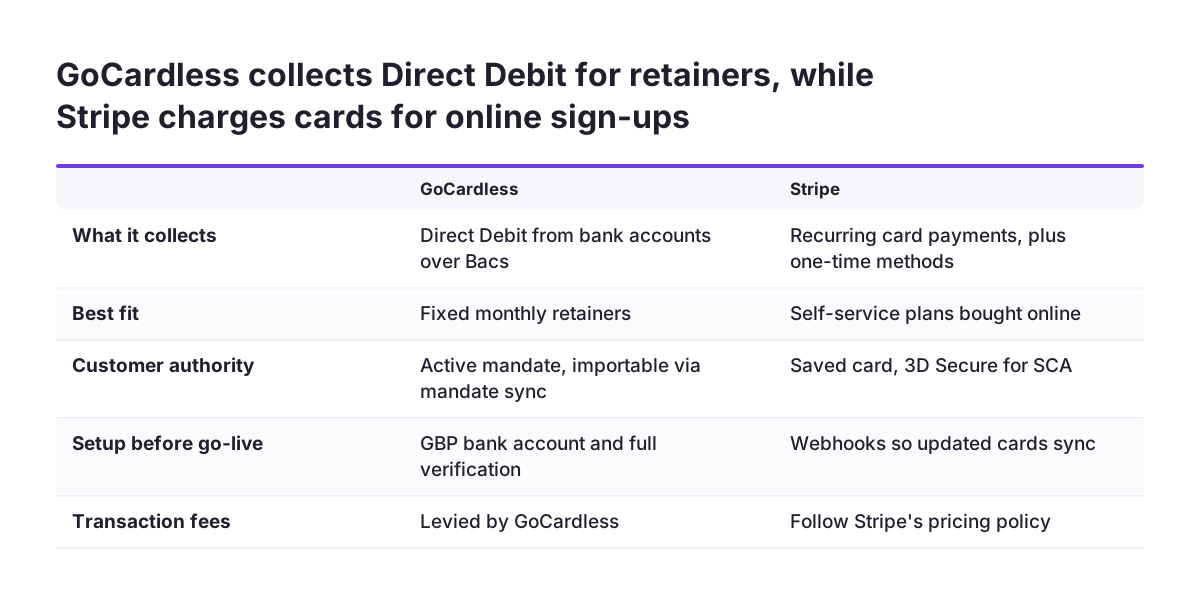
Zoho does not charge a fee for receiving online payments. The gateway may apply its own charges. For Stripe, transaction charges follow Stripe's pricing policy. For GoCardless, GoCardless levies the transaction fees. Your cost comparison is therefore between gateways, not between Zoho plans.
You set up a gateway in Zoho Billing under Settings, then Payments Gateways under Online Payments. Once a gateway is connected, you can include a payment method in your invoices and subscriptions.
Two data points matter for your privacy notice and security review:
- When you connect a gateway, your merchant account information is shared with that gateway.
- Zoho Billing stores only the last four digits of a customer's card details. The full card sits with the gateway.
For most UK subscription businesses the practical shortlist is two gateways. GoCardless covers Direct Debit. Stripe covers recurring card payments. The next sections explain why those two, and how to configure each.
Direct Debit in Zoho Billing runs through GoCardless, because Stripe only recurs on cards
GoCardless is the gateway to use for Direct Debit in Zoho Billing. Zoho describes it as a gateway that lets customers make direct debit payments for invoices and recurring invoices. In the UK, direct debits run over the Bacs network.
Stripe does not fill that gap. Zoho's Stripe help page says cards and ACH are the only Stripe payment methods that support recurring payments. ACH is the US bank scheme, so it does not help a UK business. Every other Stripe method collects one-time payments only.
The GoCardless integration has three requirements a UK business should confirm before building anything:
- Your GoCardless account must be connected to a GBP bank account (the integration also supports AUD, CAD, EUR and NZD).
- Payouts only start once your GoCardless account is fully verified.
- Payments received through GoCardless are reconciled automatically in Zoho Billing, so no manual entry is needed.
Zoho adds one caution on its Direct Debit help page. It advises enabling direct debit only for customers you know and trust. The reason is that a collection can be initiated even when the customer has insufficient funds. That is a strong argument for Direct Debit on established accounts rather than on brand-new sign-ups.
GoCardless mandates: new authorisations and importing existing ones
A mandate is the customer's standing authority for you to collect from their bank account. Without an active mandate, GoCardless cannot collect. If you already use GoCardless outside Zoho, you do not need to ask customers to sign up again.
Importing existing mandates with mandate sync
Mandate sync is the Zoho Billing feature that fetches customers' mandate details from a connected GoCardless account. It matches on email, and it has three rules:
- The customer's primary email address in Zoho Billing must match their email in GoCardless.
- Only active mandates are fetched.
- Mandates cannot be fetched for different customers who share the same primary email address in Zoho Billing.
The third rule catches firms where one finance contact pays for several client accounts. Give each customer record a distinct primary email before you sync.
New mandates and the mandate description
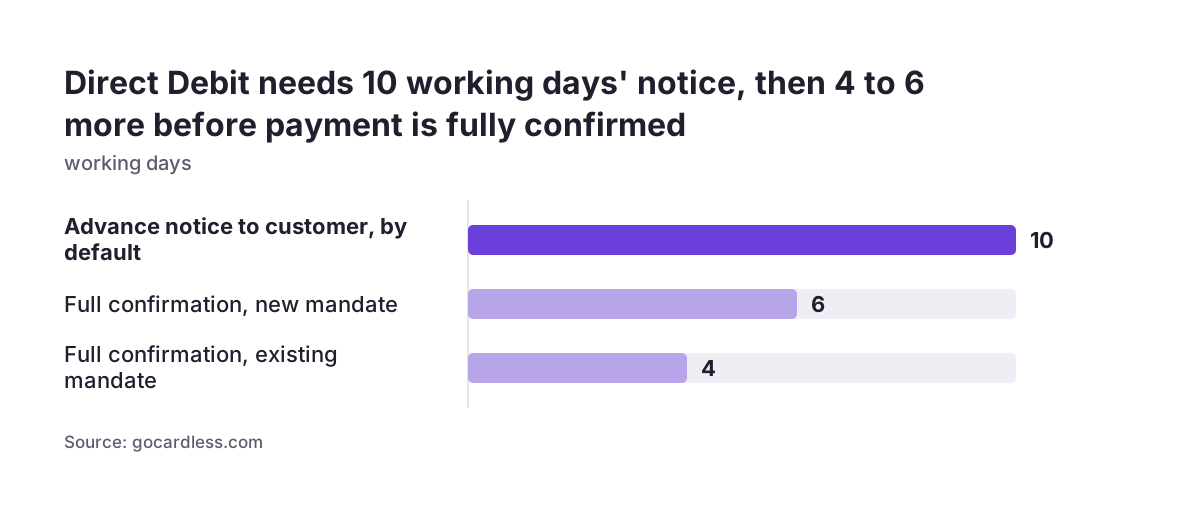
When a mandate must be created first, GoCardless collects the payment 4 working days after submission and treats it as fully confirmed after 6. The scheme does not allow a payment request before the mandate is approved. Zoho's GoCardless settings include a mandate description. If you leave it empty, your organisation's name appears on the payment page.
Mandates also expire through disuse. Under the Dormancy Period Rule, a Direct Debit Instruction is removed from the bank's system after a long gap with no collections, typically 13 months. The customer must then re-authorise.
Direct Debit timing: advance notice, collection days and confirmation
Direct Debit is slower than a card, and your billing calendar must allow for it. The Bacs three-day cycle is the cycle behind every Direct Debit. A request is submitted on day 0, processed on day 1 and acted on on day 2.
The GoCardless guide to Direct Debit timings sets out the figures:
- Advance notice to the customer is 10 working days by default. It can be reduced through agreements with your customer and your bank.
- On an existing mandate, payment is collected 2 working days after submission.
- The payment is 99% confirmed after 3 working days and fully confirmed after 4.
- If the collection date falls on a weekend or public holiday, the payment is taken on the next working day.
Failed payments are the trap. GoCardless says even failed payments are credited to your account on day 2, then reversed when the failure notice arrives. In around 1% of cases, that notice reaches your bank 4 working days after submission. A payment that looks paid on day 2 is not safe to treat as final.
Zoho's pages disagree on timing. An older Zoho help page on direct debit says authorisation and fund transfer can take 3 to 15 days, depending on the gateway. The cautious reading is to plan on GoCardless's published timings. Do not treat a collection as settled until the confirmation window has passed.
Card payments through Stripe, and what Strong Customer Authentication changes
Stripe is the gateway for recurring card payments in Zoho Billing. The integration is available on the Standard, Premium and Enterprise plans. It supports Visa, MasterCard, American Express, JCB, Discover and Diners Club. Credit cards are accepted by default, and any other method must be enabled manually.
Three Stripe settings affect day-to-day operations:
- Updated or expired card details sync from Stripe automatically only if you configure webhooks in your Stripe account.
- Stripe is enabled across all your Zoho Finance apps, so disabling it in one app disables it in the others.
- Deleting the integration does not delete the cards stored in Stripe.
Strong Customer Authentication
Strong Customer Authentication (SCA) is a European rule under PSD2 that changes how customers authenticate online payments. Stripe says it has been in effect since 14 September 2019. Card payments meet SCA through 3D Secure, and banks might decline payments that skip it.
Renewals are handled as merchant-initiated transactions. A merchant-initiated transaction is a later payment on a saved card, charged while the customer is not present. Stripe says these need an agreement, also called a mandate, with the customer. Cards from UK customers saved before 14 September 2021 can rely on previous authorisation agreements, if the bank accepts them.
Banks can still ask a customer to authenticate a low-risk payment. Zoho's Stripe help page does not describe how a renewal that needs re-authentication is handled. Test that case before go-live rather than assume it.
Worked example: a monthly retainer on Direct Debit and a self-service plan on card
Take a UK IT maintenance firm with two revenue streams. Fixed monthly retainers go on Direct Debit. A small self-service support plan, bought online, goes on card. The firm already collects some retainers through GoCardless.
The retainer on Direct Debit
- In Zoho Billing, open Settings, then Payments Gateways under Online Payments, and connect GoCardless with the firm's GBP bank account.
- Complete GoCardless verification, because payouts wait for it.
- Clean customer records so each has a unique primary email matching GoCardless, then run mandate sync.
- Write a mandate description, or accept that the organisation's name appears on the payment page.
- Set GoCardless as the payment method on each retainer subscription.
On an existing mandate, a collection submitted on a Monday is collected on Wednesday. With no bank holiday in the week, it is fully confirmed by Friday.
The self-service plan on card
The firm connects Stripe, keeps credit cards as the default method and configures webhooks for card updates. An older Zoho help page says direct debit is not offered on public hosted payment pages. The cautious reading is that online sign-ups pay by card, and Direct Debit is offered once the customer is established.
One setting links both streams. When several gateways are selected on an invoice, the last configured one is used by default. The gateway you pick for an invoice also becomes the default for the next invoice. Check each subscription carries the right one.
Failed payments in Zoho Billing: dunning retries, limits and final actions
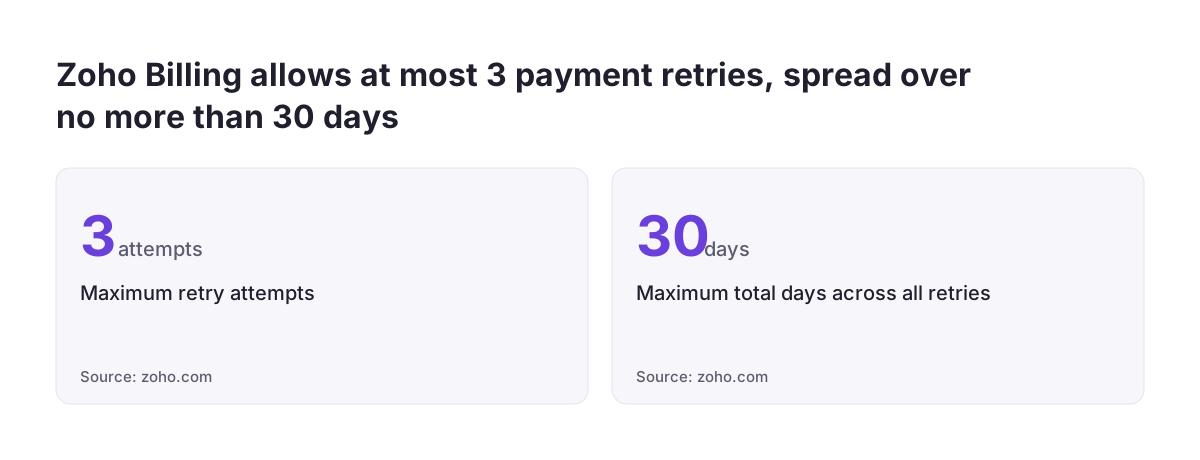
Dunning management is Zoho Billing's automated recovery process, set in motion when a subscription's renewal payment fails. The Zoho Billing dunning help page sets hard limits. You get a maximum of 3 retry attempts. The total days across all retries cannot exceed 30.
You configure dunning separately for subscriptions with and without autocharge. You can also set separate dunning preferences for Direct Debit subscriptions, because Direct Debit takes longer to process. During dunning, the subscription shows as Past Due and the customer can still pay the overdue invoice.
After the final retry fails, you choose what happens next:
- Mark the subscription as Unpaid.
- Cancel the subscription, with the option to void the invoice.
- Cancel the subscription and reverse the invoice, which marks it Paid and creates a closed credit note for the same amount.
Pausing and resuming dunning is available in the Enterprise edition and certain plans. Retries scheduled during a pause are skipped. If all retries were missed, one final attempt is made after resuming. The resume date must fall before the next billing date. A subscription cancelled by dunning can later be reactivated in-term, without changing the billing cycle or raising a new invoice.
Match the Direct Debit retry schedule to Bacs timing. Space each retry beyond the 4-working-day confirmation window, so a late failure notice never collides with the next attempt. Zoho's page does not say how retry dates interact with advance notice, so confirm that with GoCardless.
Refunds and credit notes in Zoho Billing when money is owed back
A credit note is the document a seller gives a customer to record money the seller owes them. In Zoho Billing, credits represent that money. The debt remains until you refund it or subtract it from the next invoice you send.
You can create and close credit notes from various modules in Zoho Billing. You can list them with filter views and custom views. The Credit Note Details report gives a consolidated view of every credit note in the system, which helps at month end.
Credit notes also appear automatically in one dunning case. If you choose to cancel a subscription and reverse the invoice, Zoho marks the invoice Paid and creates a matching credit note in Closed status. Your finance team should recognise these, so they are not mistaken for goodwill credits.
Direct Debit refunds can also come from outside Zoho. Under the Direct Debit Guarantee, a payer is entitled to a full and immediate refund from their own bank if you or the bank make an error. That refund does not start in Zoho Billing. If a payer receives a refund they are not entitled to, they must pay it back when you ask.
Go-live checks so Zoho Billing payments reconcile cleanly into Zoho Books
Most payment problems come from settings nobody checked, not from the gateways themselves. Before switching on live collection, work through the checks below. Each one maps to a documented rule in Zoho, GoCardless or Stripe.
| Check | Where | What goes wrong if you skip it |
|---|---|---|
| GoCardless fully verified, GBP bank account connected | GoCardless account | Payments collect but no payout arrives |
| Unique primary email per customer, matching GoCardless | Zoho Billing customers | Mandate sync skips customers |
| Mandate description written | GoCardless settings in Zoho Billing | Payers see a name they may not recognise |
| Stripe webhooks configured | Stripe account | Expired cards fail at renewal |
| Correct default gateway on each subscription | Subscriptions and invoices | Renewals try the wrong gateway |
| Separate Direct Debit dunning settings | Dunning management | Retries land before a failure is confirmed |
| One test card renewal needing authentication | Stripe and Zoho Billing | Unknown handling of SCA at renewal |
At Svennis we run one real Direct Debit and one real card renewal through the finished setup before go-live. We then check each payment lands against the right invoice in Zoho Books. Only after both match do we switch dunning on.
What Direct Debit and card rules mean for a UK subscription business
UK subscription businesses work under the Bacs scheme and the Direct Debit Guarantee, and both shape how you bill. The Direct Debit Guarantee applies to every Direct Debit. It is offered by all banks and building societies that accept Direct Debit instructions. Every organisation collecting by Direct Debit is vetted by the banks first.
The Guarantee affects price changes. If the amount, date or frequency of a Direct Debit changes, you must notify the payer in advance. That is normally 10 working days before the debit, or as otherwise agreed. Build that notice into any annual price review for retainers.
Customers can cancel at any time. A payer can cancel a Direct Debit by contacting their bank, and written confirmation may be required. The Guarantee does not affect your contract with the customer, so a cancelled mandate does not cancel what they owe.
Seasonal memberships and paused contracts face the dormancy risk. After a long gap with no collections, typically 13 months, the mandate is removed and must be re-authorised.
For card payments, Stripe says cards from UK customers saved before 14 September 2021 can rely on previous authorisation. Newer cards were saved under SCA. Either way, a bank can still ask for authentication at renewal.
Next steps: connect one gateway, test one renewal, then switch on dunning
A clean payment setup follows a short, fixed order. Doing it in this order means a mistake shows up in a test, not in a customer's bank account.
- Decide which customers go on Direct Debit and which on card. Fixed retainers suit Direct Debit. Self-service sign-ups suit card.
- Connect GoCardless with a GBP bank account and complete verification.
- Clean customer emails, then run mandate sync for existing GoCardless customers.
- Connect Stripe and configure webhooks.
- Set separate dunning rules for Direct Debit, spaced around Bacs confirmation.
- Run one live collection on each gateway and match both in your books.
If you have not built the plans and subscriptions yet, start with part 1 of this series. Part 3, on Zoho Billing with Zoho CRM and Zoho Books, follows.
If you want someone to review your gateway and dunning settings before your first live run, our Zoho partner services for UK businesses set out how we work.
Sources
- Zoho Billing help: Online Payments
- Zoho Billing help: GoCardless (UK)
- Zoho Billing help: GoCardless settings
- Zoho Billing help: Stripe
- Zoho Billing help: Dunning Management
- Zoho Billing help: Credit Notes
- Zoho Subscriptions help: Direct Debit Payments
- GoCardless: Direct Debit timings
- Direct Debit: Direct Debit Guarantee
- Stripe: Strong Customer Authentication readiness