


Payment reminders and credit control in Zoho Books: the short answer
Payment reminders and credit control in Zoho Books work best as one routine. You agree terms and a credit limit for each customer, schedule reminders before, on and after the due date, and escalate in fixed steps. Then you review overdue balances every week. Automation sends the messages. A person decides when to stop supplying.
Most late payment comes from a gap in that routine, not from bad customers. Common gaps are a limit that was never set, a reminder that goes out too late, and a follow-up that depends on someone remembering it. This guide closes each gap in turn. It also includes a schedule you can copy and adapt.
A note on sources. Several Zoho help articles cited here describe these features in Zoho Billing, Zoho's billing app. Zoho Books has its own settings screens. Before you copy a setting, open the matching screen in your Zoho Books organisation and confirm that it exists under the same name. If it does not, the principle still holds and only the click path changes.
Credit control defined: terms, limits, reminders and follow-up
Credit control is the routine a business uses to decide who may buy on credit, how much, on what terms, and what happens when payment is late. It has four parts. Each part maps to something you configure or schedule in your accounting software.
- Payment terms: how many days the customer has to pay, set per customer.
- Credit limit: the most a customer may owe you at any one time.
- Payment reminders: automated emails tied to an invoice's due date.
- Follow-up: the human steps that start when reminders stop working.
Zoho's own help article on common mistakes in credit-based billing lists six errors. The first is extending credit without defined limits. Another is relying on memory for follow-up. The last is missing out on available credits, meaning credit balances a customer already holds that nobody applies to new invoices.
Those three mistakes are a useful test of any setup. If a customer has no limit, no scheduled reminders and no named owner for follow-up, that customer sits outside your credit control. Fix that before you tune reminder wording or timings.
Payment terms and credit limits, set per customer before the first invoice
Payment terms and credit limits belong on the customer record, set before you raise the first invoice. Zoho documents that you can configure different payment terms per customer in Zoho Billing. Those terms can include limits, due dates and payment conditions based on the customer's history. A long-standing customer who always pays can have longer terms than a new account.
A credit limit only helps if the system watches it. In Zoho Billing, you can assign a personalised credit limit per customer. The system tracks the outstanding balance in real time and flags when the limit is nearing or exceeded.
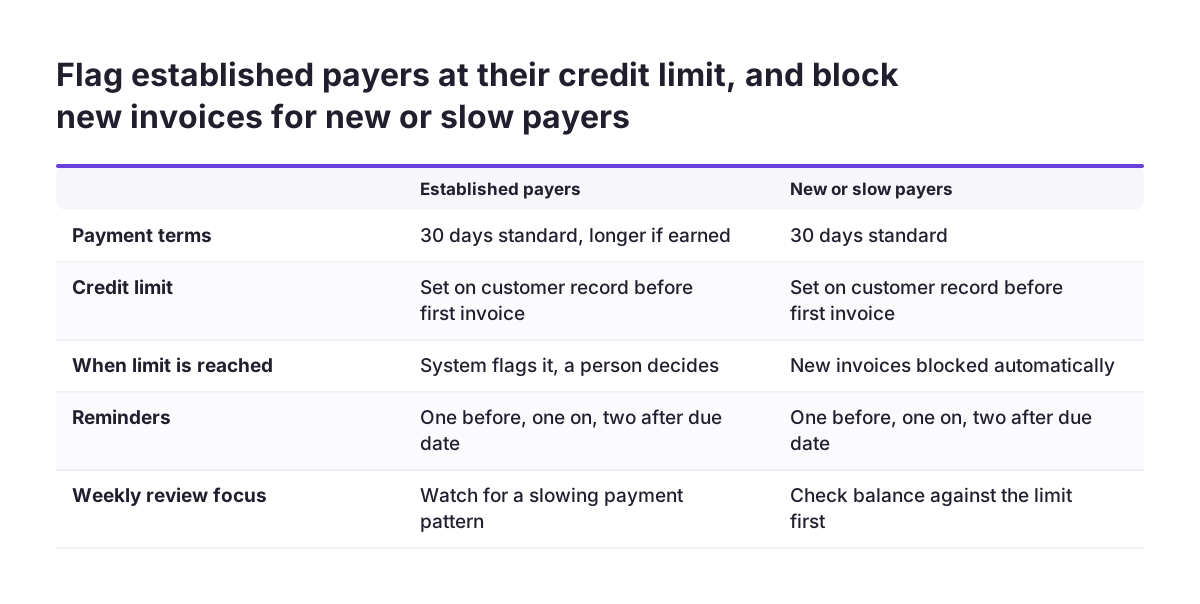
You then decide what a breach does. Zoho Billing can automatically block or restrict new invoice creation once a customer exceeds the threshold. That is a firm choice. It protects cash. It can also stop a sales colleague from invoicing a good customer who simply paid late this month.
Flag or block: how to choose
Use a flag for established customers, so a person reviews the account before anything stops. Use a block for new accounts and for customers already in escalation. Write the rule down. Your sales team then knows in advance why an invoice might not go out.
A reminder schedule before, on and after the due date
A reminder schedule is a set of automated messages, each tied to a fixed number of days before, on or after an invoice's due date. Zoho documents that Zoho Billing can send several reminders based on the due date, before, on or after it. The table below is an example schedule for 30-day terms. The day counts are suggestions to adapt, not Zoho defaults.
| Stage | Example timing | Tone | Sent by |
|---|---|---|---|
| Courtesy notice | 5 days before due | Friendly, invoice attached, how to pay | Automatic |
| Due today | On the due date | Neutral, one line and a payment option | Automatic |
| First overdue | 3 days after due | Polite, asks if anything is wrong | Automatic |
| Second overdue | 14 days after due | Firm, names the amount and the date | Automatic |
| Phone call | 21 days after due | Direct, agrees a payment date | Credit controller |
| Account review | 30 days after due | Formal, credit limit or supply decision | Finance manager |
The first three stages carry most of the weight. Customers who simply forgot will pay at the courtesy notice or the first overdue reminder. That leaves the later, human stages for the small number of accounts that need a conversation.
Worked example: setting up reminders and escalation for 30-day terms
This worked example follows a business that invoices trade customers on 30-day terms and wants fewer accounts past 30 days overdue. It uses the settings Zoho describes: per-customer terms, credit limits, scheduled reminders and Ageing Reports. Each setting is turned into a sequence you can follow in order.
- Sort customers into two groups: established payers and new or slow payers.
- Set payment terms on each customer record, keeping 30 days as the standard.
- Give every customer a credit limit. Set the system to flag established payers and to block new invoices for slow payers.
- Create the reminder schedule from the table above: one before, one on and two after the due date.
- Name one credit controller who owns the phone call stage, and one manager who owns the account review.
- Send each reminder template to an internal email address first and read it as a customer would.
- Switch the schedule on for new invoices only, so customers do not receive a burst of reminders for old balances.
- Book a weekly 30-minute review using the ageing report.
Step 7 matters more than it looks. Switching reminders on across an existing ledger can send several overdue notices to the same customer on the same morning. Clear old balances by phone first, then let the schedule handle new invoices.
Reminder wording that keeps good customers on side
Reminder wording upsets customers more often than reminder timing does. A courtesy notice that reads like a demand tells a reliable customer you do not trust them. Keep the early messages short and helpful: invoice number, amount, due date and a way to pay. Save firmness for the second overdue reminder.
Three rules help with every template:
- Lead with the invoice number and amount in the first line.
- Offer the easiest payment option in the same message.
- Give a named person to reply to, not a no-reply address.
At Svennis we test every reminder template against a real customer record before go-live and ask the credit controller to read it aloud. We do this because the wording a finance team writes for itself often sounds sharper to a customer than anyone intended.
Customers in a dispute need different handling. If a customer has queried an invoice, pause reminders on that invoice until the query is resolved. An automated chaser on a disputed invoice is the fastest way to turn a small query into a lost account.
Short payments, partial payments and credit notes
Short payments and partial payments need a clear process, or they stay on the ageing report for months. Zoho documents that Zoho Billing lets you record and reconcile partial payments under each invoice and customer account. Record the part payment as soon as it arrives. The reminder then shows the true balance and not the original amount.
Small short payments are a separate problem. A Zoho Books user reported in a Zoho community thread that customers in their region round down the cents. The only way they found to close the difference in Zoho Books was to issue a credit note. Decide in advance how small a shortfall you will write off this way, and who approves it.
A credit note is a document the seller issues to acknowledge returns, discounts or overcharges. It tells the buyer they owe less. According to a guide to Zoho debit and credit notes, you create one from Sales → Credit Notes, or from an invoice via More → Create Credit Note. A debit note corrects under-billing. You create one from Sales → Invoices → + New → New Debit Note.
Credits a customer already holds should not sit unused. For offline payments, Zoho Billing shows available credits so you can apply them before sending the invoice. For invoices paid online, it redeems them automatically.
Making payment easy: customer portal, payment links and offline payments
Making payment easy shortens the reminder cycle, because each reminder can end in a payment instead of a reply. Zoho describes the Customer Portal in Zoho Billing as a secure, self-service space where customers manage their billing activity themselves. Customers can view all their invoices in one place, download or print them, and check whether each one is paid, due or overdue.
The portal also handles common credit control tasks without a call:
- Customers can pay several outstanding invoices at once with a bulk payment.
- Customers can update contact details, billing address and saved card information.
- You can protect access with Multi-Factor Authentication, an extra verification step such as a one-time password.
A payment link lets a customer pay without an invoice being generated first. Zoho documents in its article on payment collection that you can send one by WhatsApp, SMS or email. Once the customer pays, Zoho Billing updates the record automatically. If you plan to use WhatsApp, note that Meta changes how WhatsApp Business messages are charged from 1 October 2026, moving to per-message pricing.
Offline payments still count. Cash, cheque and direct bank transfer can be recorded with notes or reference details, so a bank transfer never triggers a reminder by mistake.
Ageing reports and the weekly credit control review
An ageing report sorts unpaid invoices by how long they have been overdue. It is the main working document for a weekly credit control review. Zoho says Ageing Reports in Zoho Billing give visibility into the payment patterns of individual customers. Its payment reports show paid invoices with the payment mode, and unpaid invoices with their due or overdue days.
A weekly review takes about half an hour once the reminders run themselves. Work through it in the same order each week:
- Read the oldest overdue balances first and confirm each has a named next step.
- Check customers near or over their credit limit, and decide flag or block.
- Look for customers whose payment pattern is getting slower, even if not yet overdue.
- Clear short payments and unused credits so the report reflects real debt.
The third step is where credit control pays off. A customer who moves from paying on day 30 to day 45 is telling you something early. Shorter terms or a lower limit at that point cost less than chasing a large balance later. If you need trend charts across many customers, Zoho Analytics can sit alongside your finance data for that wider view.
What this means for a UK business
For a UK business, the setup above works as described. A few local points need checking before go-live.
The first point is payment methods. The Zoho article on payment collection gives UPI, cards, net banking and ACH as examples of online payment modes. Confirm which methods your UK organisation can actually offer before you promise them in a reminder. A reminder that links to a payment option the customer cannot use generates a reply, not a payment.
The second point is credit notes and VAT. The guide to Zoho credit and debit notes cited above was written for India's GST, where the notes tie back to the original invoice. Ask your accountant how your credit notes should be treated for UK VAT before you use them to write off short payments.
The third point is late fees. For trade customers, the Late Payment of Commercial Debts (Interest) Act 1998 already applies. It gives you a right to statutory interest and a fixed recovery sum on overdue invoices, even if your terms say nothing about it. Decide whether you will claim it, and check the reminder wording with your adviser before any reminder mentions it.
The last point is practical. Zoho Books stopped supporting Firefox, Chrome and Edge versions older than 100 from 15 May 2024. If your credit controller works on an older office machine, update the browser before you build templates on it.
Next steps: build your reminder schedule this week
The next step is to put the schedule on paper before you touch any settings. Agree the stages, the tone and the owners with whoever will make the phone calls. Then configure the system to match.
- List your customers in two groups, established and new or slow, and set terms and a credit limit for each.
- Open your Zoho Books organisation and confirm where reminders, limits and ageing reports sit on your plan.
- Write the four automated templates and test them on an internal address.
- Clear old overdue balances by phone, then switch reminders on for new invoices.
- Hold the first weekly review using the ageing report.
For an overview of what the product covers in the UK, see the Zoho Books overview for UK businesses. If you want help configuring or reviewing the routine after go-live, read what Zoho Books partner services include beyond the initial setup.
Sources
- Zoho Community: Collections Management, Payment Collection is All About Convenience
- Zoho Community: Credit Management, Tackling Common Mistakes in Credit Based Billing
- Zoho Community: Customer payment discount at time of collection
- Zoho Community: Customer Management, Giving Customers Control and Privilege
- Jose P Manuel on LinkedIn: Zoho Debit vs Credit Notes